Idea

Tagging and filtering stickies: show/hide functionality in Lucid

Related products:Lucidspark
  • December 15, 2025
  • 5 replies
  • 25 views

Forum|alt.badge.img+1

Hi! I want to add lots of different sticky notes in Lucidspark and then tag them. Once they’re tagged, will I be able to show and hide the notes based on their tags?

December 17, 2025

Hi ​@Hans Petter, welcome to the Lucid Community and thanks for your post!

To clarify - would you like to hide the text inside of sticky notes based on their tags? Unfortunately, hiding the text written on sticky notes based on tags isn’t currently supported in Lucid, but we’re very interested in your feedback and committed to continually improving our products.

If you’re willing to share, we’d love to hear more details about your use case or what you’d like to see in this experience within this thread.

I’ve also converted this post to an idea so that it’s visible to others within the Product Feedback section of the community - from here, they can upvote it and add details of their own.
 

A possible workaround is to sort sticky notes in Lucidspark by their tags, then hide content in containers.  


To try it out you can follow these steps:

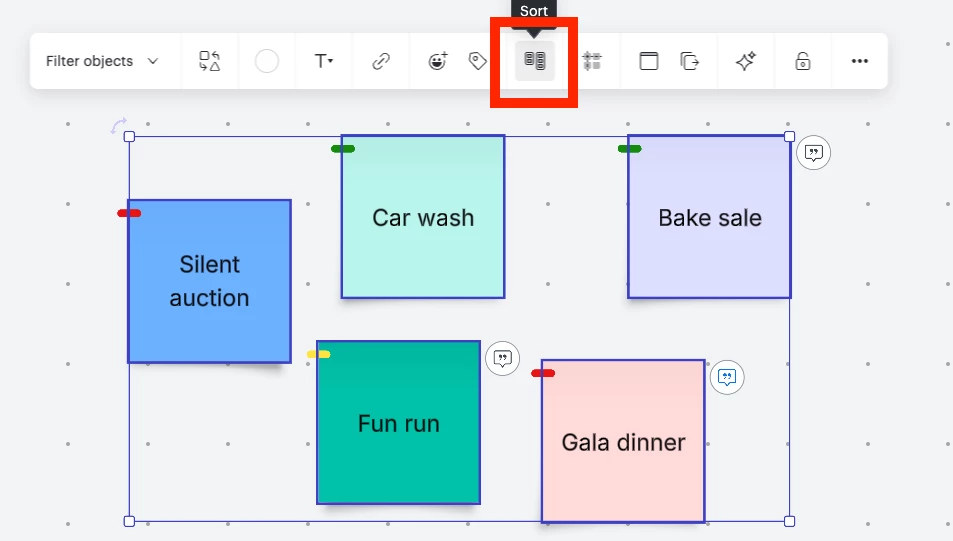
(1) After you’ve finished your sticky notes and tags, drag your cursor across the canvas to select all the relevant sticky notes and click Sort.

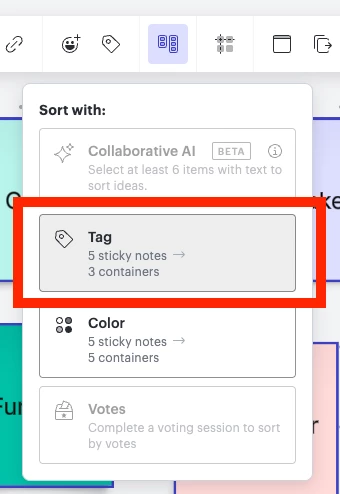
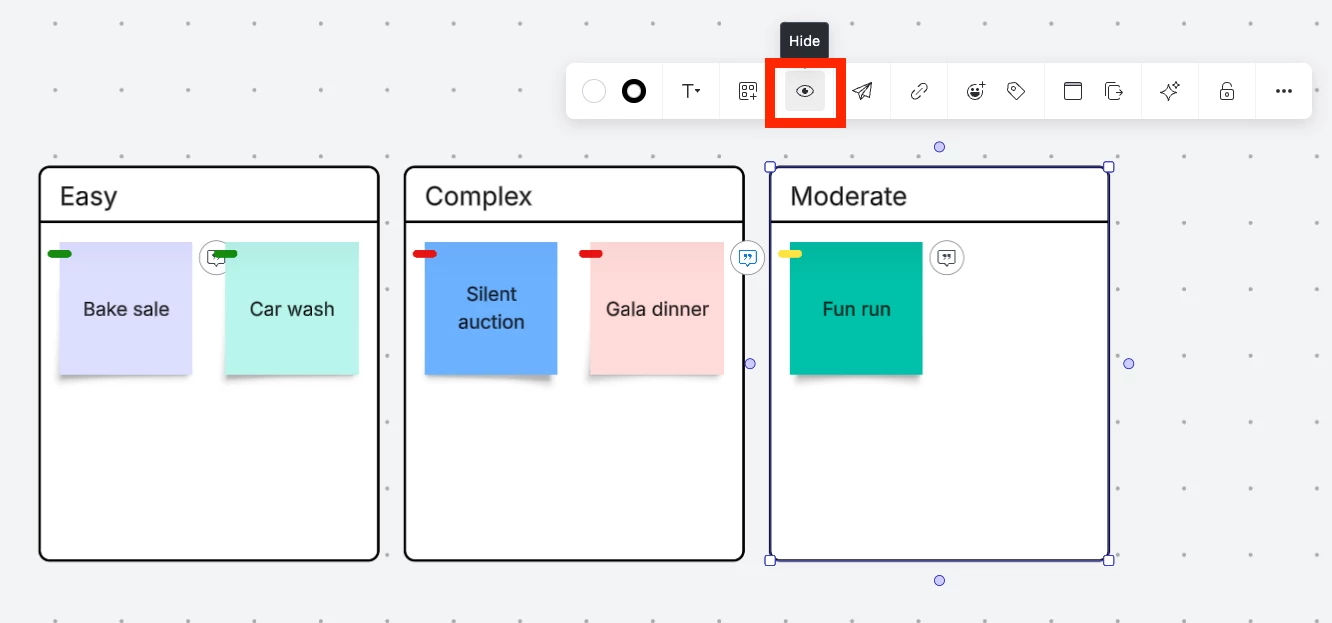
(2) In the drop-down that appears, select to sort by Tag. Doing so will automatically group all sticky notes with the same tag into containers labeled with the tag title. 


(3) Once the sticky notes are in the relevant containers, you can then hide content within each container. 

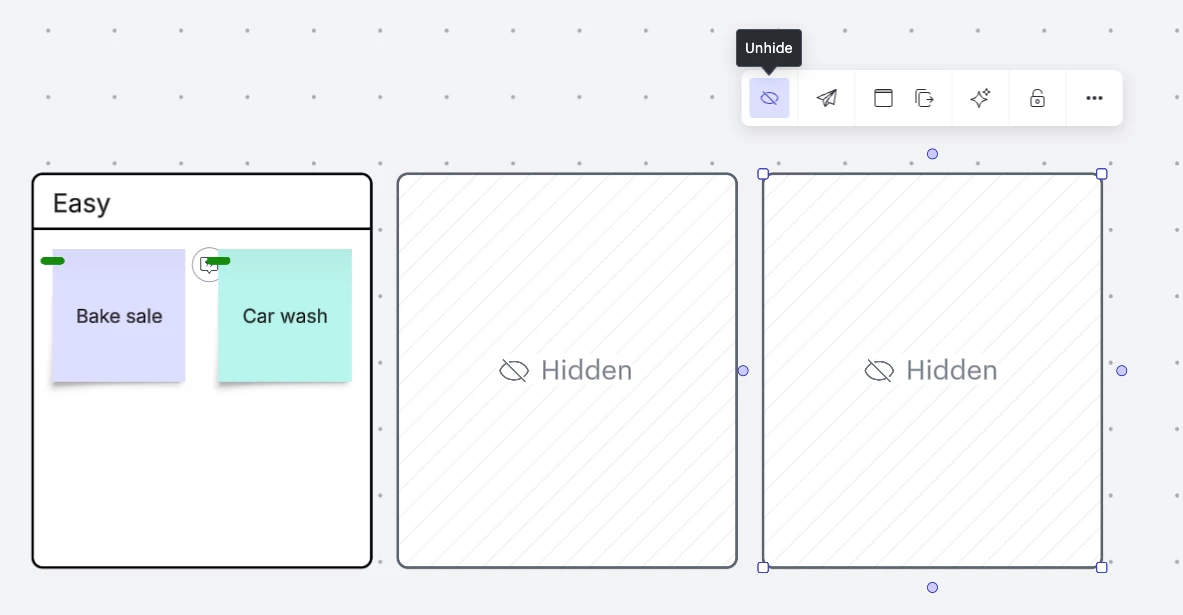
(4) Hiding content in containers allows you to only display the sticky notes with a specific tag. 


While this may not be exactly what you’re looking for, I hope this helps!

Let me know if I’m misunderstanding your request and I’d be happy to help further.


Finally, for more information on how Lucid manages feedback via this community, take a look at this post:


Comments

Ambar D
Forum|alt.badge.img+10
  • Lucid community team
  • December 17, 2025

Hi ​@Hans Petter, welcome to the Lucid Community and thanks for your post!

To clarify - would you like to hide the text inside of sticky notes based on their tags? Unfortunately, hiding the text written on sticky notes based on tags isn’t currently supported in Lucid, but we’re very interested in your feedback and committed to continually improving our products.

If you’re willing to share, we’d love to hear more details about your use case or what you’d like to see in this experience within this thread.

I’ve also converted this post to an idea so that it’s visible to others within the Product Feedback section of the community - from here, they can upvote it and add details of their own.
 

A possible workaround is to sort sticky notes in Lucidspark by their tags, then hide content in containers.  


To try it out you can follow these steps:

(1) After you’ve finished your sticky notes and tags, drag your cursor across the canvas to select all the relevant sticky notes and click Sort.

(2) In the drop-down that appears, select to sort by Tag. Doing so will automatically group all sticky notes with the same tag into containers labeled with the tag title. 


(3) Once the sticky notes are in the relevant containers, you can then hide content within each container. 

(4) Hiding content in containers allows you to only display the sticky notes with a specific tag. 


While this may not be exactly what you’re looking for, I hope this helps!

Let me know if I’m misunderstanding your request and I’d be happy to help further.


Finally, for more information on how Lucid manages feedback via this community, take a look at this post:


Forum|alt.badge.img
  • December 19, 2025

No, what the person probably wants is just to hide the sticky notes, not the text inside them, just the full sticky note.


Case:

  • Huge story map with sticky notes
  • 10 teams that are involved
  • Create tag per team
  • Give stickies tags based on what teams should do work for that sticky (Business req)

=> Result: If i want to see what team X has to do, I just filter on tag of team X and all stickies that do not have tag of team X are hidden. So i have a view of only the impacted stickies of team X


The above solution of sorting would have been okay-ish, but it does a cut and paste, not a copy and past. So if you sort, all your original tickets are gone. 


Forum|alt.badge.img+1
  • Author
  • December 19, 2025

Yes, this is a much more accurate description of my requirements – thank you, JDD.


Forum|alt.badge.img+1
  • Author
  • December 19, 2025

Yes, this is a much more accurate description of my requirements – thank you, JDD.

No, what the person probably wants is just to hide the sticky notes, not the text inside them, just the full sticky note.


Case:

  • Huge story map with sticky notes
  • 10 teams that are involved
  • Create tag per team
  • Give stickies tags based on what teams should do work for that sticky (Business req)

=> Result: If i want to see what team X has to do, I just filter on tag of team X and all stickies that do not have tag of team X are hidden. So i have a view of only the impacted stickies of team X


The above solution of sorting would have been okay-ish, but it does a cut and paste, not a copy and past. So if you sort, all your original tickets are gone. 

Yes, this is a much more accurate description of my requirements – thank you, JDD.


Ambar D
Forum|alt.badge.img+10
  • Lucid community team
  • December 19, 2025

@JJD Thanks for jumping in the thread and adding additional context and your detailed use case example!

I could certainly see how that would be helpful to a workflow like the one you mentioned. 

@Hans Petter, thanks for confirming!

Our product teams review feedback within this space as they continue to research product enhancements and new features. Comments like yours here are perfect to let our teams know what you’d like to see! 

Thank you both for taking the time to leave this detailed feedback.