Idea

Support for anek devnagari font

  • March 6, 2024
  • 6 replies
  • 123 views

Forum|alt.badge.img+1

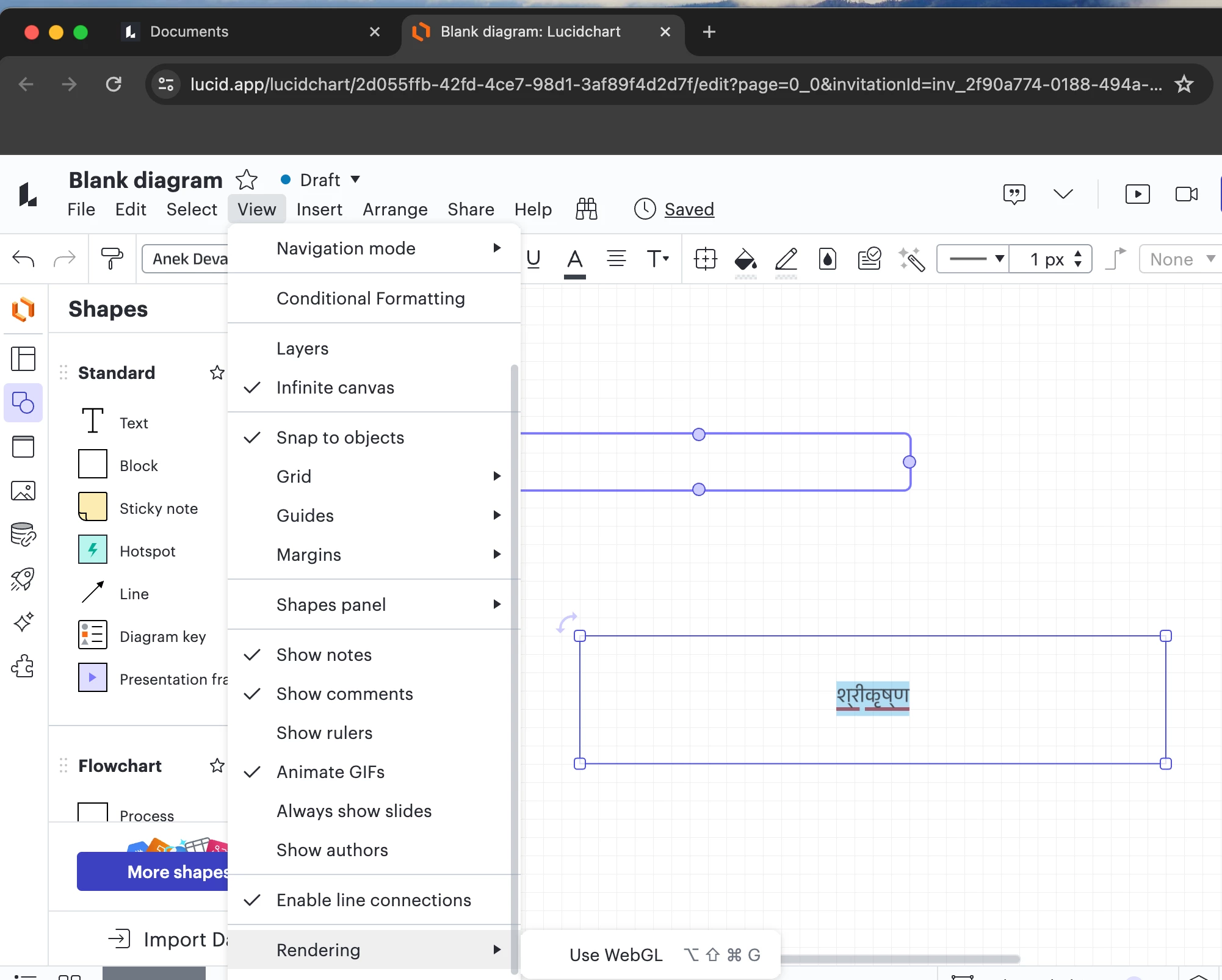
When I use Anek Devanagari font and want to use it, the font itself renders and shows the text श्रीकृष्ण correctly, but when rendered on the lucid app text box, it appears broken as श् री कृ ष् ण which is quite annoying. I am trying to create some calligraphy with the name Lord Shri Krishna but unable to because of this bug.

March 7, 2024

Languages that use Devnagari script have a concept of composite letters. Instead of having a fixed alphabet such as a-z, they have letters that create a letter written in a different form when they are combined in a specific order. For example, let’s take the word Shri Krishna. Further, let’s only focus on the first phoneme Shri or written in Devanagari श्री. As the English form shows you, the phoneme is formed using three distinct sounds - S H R followed by the vowel I. Devanagari has स for S, ह for H, but श for SH combined. र for R but SHR all three combined has yet another form श्र. The Lucid support goes from S and H combined to SH (श) but does not extend to S+H+R (श्र). This may seem academic to someone who does not know the language but it is a profound limitation that must be fixed. 
 

S + H can also make another letter ष. And N can make न or ण depending upon pronunciation and where you tongue rests while speaking the letter. What is a single phonetic sound in English are treated as different sounds and hence letters in Indian languages. So, English spelling is an approximation only. 
 

When ष and ण combine, Devanagari will show it as ष्ण. This is also a single phoneme. 
 

Lord ShriKrishna is a profoundly complex character and his own name is complex too. The way it is written is a living testament to that complexity that people spend a life time trying to understand and emulate. 
 

All we ask from Lucid is to treat the language with respect and render the words correctly. 


श्रीकृष्ण not श् री कृ ष् ण.


Thanks. 
 

🙏 

Comments

Kelsey Gaag
Forum|alt.badge.img+16
  • Lucidite
  • March 6, 2024

Hi @Triplus

Thank you for posting in the Lucid Community! Could you try the following steps to see if they resolve the issue? 

  • Open the document in an incognito window 
  • Connect to a new network 
  • Disable your VPN (if applicable) 
  • Turn off WebGL by going to View > Rendering > Uncheck Use WebGL
  • Select a new font
  • Re-upload the font file 
     

If none of these steps work can you send the following? 

  • A screenshot of the issue.
  • A screenshot of the associated Javascript Console output after reproducing the issue. You can open your Javascript Console by pressing Ctrl+Shift+J (if your computer is a Windows/Linux) OR Cmd+Opt+J (if your computer is a Mac).

Forum|alt.badge.img+1
  • Author
  • March 7, 2024

 Followed the process exactly but have the same issue. Evidence above.


Kelsey Gaag
Forum|alt.badge.img+16
  • Lucidite
  • March 7, 2024

Hi @Triplus

Thank you for the reply and trying those steps! I tested the issue further on my side and found that the text श्री कृष्ण was broken with other fonts as well. It looks like at this time Lucid doesn’t support Hindi but we’re very interested in your feedback and committed to continually improving our products. If you’re willing to share, we’d love to hear more details about your use case or what you’d like to see in this experience within this thread.

I’ve also converted this post to an idea so that it’s visible to others within the Product Feedback section of the community - from here, they can upvote it and add details of their own.

Finally, for more information on how Lucid manages feedback via this community, take a look at this post:

https://community.lucid.co/welcome-to-the-lucid-community-15/feedback-and-feature-requests-5439


Forum|alt.badge.img+1
  • Author
  • March 7, 2024

Languages that use Devnagari script have a concept of composite letters. Instead of having a fixed alphabet such as a-z, they have letters that create a letter written in a different form when they are combined in a specific order. For example, let’s take the word Shri Krishna. Further, let’s only focus on the first phoneme Shri or written in Devanagari श्री. As the English form shows you, the phoneme is formed using three distinct sounds - S H R followed by the vowel I. Devanagari has स for S, ह for H, but श for SH combined. र for R but SHR all three combined has yet another form श्र. The Lucid support goes from S and H combined to SH (श) but does not extend to S+H+R (श्र). This may seem academic to someone who does not know the language but it is a profound limitation that must be fixed. 
 

S + H can also make another letter ष. And N can make न or ण depending upon pronunciation and where you tongue rests while speaking the letter. What is a single phonetic sound in English are treated as different sounds and hence letters in Indian languages. So, English spelling is an approximation only. 
 

When ष and ण combine, Devanagari will show it as ष्ण. This is also a single phoneme. 
 

Lord ShriKrishna is a profoundly complex character and his own name is complex too. The way it is written is a living testament to that complexity that people spend a life time trying to understand and emulate. 
 

All we ask from Lucid is to treat the language with respect and render the words correctly. 


श्रीकृष्ण not श् री कृ ष् ण.


Thanks. 
 

🙏 


Kelsey Gaag
Forum|alt.badge.img+16
  • Lucidite
  • March 7, 2024

Hi @Triplus

Thank you for the reply and the clarification! I will be sure to add this to your feature request. Thank you for making us aware of this issue and it’s importance to the language. I apologize that this is currently happening and want you to know that at Lucid we are always working to make our products better and inclusive. Please let me know if you have any other concerns and thank you again for voicing this issue. 


Forum|alt.badge.img+1
  • Author
  • March 8, 2024

I’ll use alternative software for now. Check in again in a few months to see whether it works!