Idea

Support dictation/voice-to-text

Related products:LucidchartLucidspark
  • July 31, 2024
  • 11 replies
  • 268 views

Forum|alt.badge.img+1

I'm using Lucidchart in Chrome on a Mac. Dictation/voice text input doesn't work for me. I can use voice-to-text across Chrome and in other browser-based mind mapping/task management/ diagramming applications. Is there a way to do it Lucidchart?


Thanks,

James

August 1, 2024

Hi @Jedie 

Thanks for your post! Unfortunately, we currently don’t support Apple’s Dictation feature, but we’re very interested in your feedback and committed to continually improving our products. If you’re willing to share, we’d love to hear more details about your use case or what you’d like to see in this experience within this thread. I’ve also converted this post to an idea so that it’s visible to others within the Product Feedback section of the community - from here, they can upvote it and add details of their own.

Finally, for more information on how Lucid manages feedback via this community, take a look at this post:


 

Comments

Kelsey Gaag
Forum|alt.badge.img+16
  • Lucidite
  • August 1, 2024

Hi @Jedie 

Thanks for your post! Unfortunately, we currently don’t support Apple’s Dictation feature, but we’re very interested in your feedback and committed to continually improving our products. If you’re willing to share, we’d love to hear more details about your use case or what you’d like to see in this experience within this thread. I’ve also converted this post to an idea so that it’s visible to others within the Product Feedback section of the community - from here, they can upvote it and add details of their own.

Finally, for more information on how Lucid manages feedback via this community, take a look at this post:



Forum|alt.badge.img+1
  • Author
  • August 1, 2024

The use case is somewhat simple. For anything I can type I can speak faster. I'm somewhat behind the curb when using speech-to-text. For a while, many of my colleagues have worked this way for email, writing documents, using chatGPT, etc..

There is a second use case, which is actually a (not ideal) workaround for lucidchart lacking capability in mind maps. In other mind map software, you can copy and paste individual branches from one part of the map and duplicate them in another. It's common to want to be able to do this. Unfortunately, today, in lucidchart, if you copy a single branch, it copies the entire mind map, and when you paste, it pastes the entire mind map. So, I resort to voice-to-text to recreate individual branches (instead of re-typing each individually) that already exist elsewhere in my mind map.


​​​


Forum|alt.badge.img

Just wanted to see if there is any plans for this feature to be embedded?

I'm a recent user of Lucid (new job, and have been working in Miro and Figjam since moving to digital spaces in 2020 and both have dictation enabled) and I'm finding the lack of this feature a bit frustrating.

I dictate / use talk to text in most situations. And find when I'm moving between different tools, often dictating and having to stop and type in lucid this is friction point.

As the person mentioned above it is faster and what we are seeing across many tools (even tools that don’t have it built in you can utilise apple’s build in dictation feature). But being able to do this not only helps with speed it also supports people with cognitive or physical disabilities. Adding that last point as a person with lived experience. 

+ I even dictated the first draft of this post :)  


Ambar D
Forum|alt.badge.img+11
  • Lucid community team
  • August 22, 2025

Hi ​@Jedie and ​@jess rudolph, thank you for adding your feedback to this thread! I can certainly understand why this would be beneficial.

While I don’t have any updates on this feature quite yet, this thread remains the best place for updates on this! 


Forum|alt.badge.img

Is there any update on this? I do not have full use of both hands and rely on dictation for productivity.  


alison cheney
Forum|alt.badge.img+8
  • Lucid community team
  • March 12, 2026

Hi ​@Mike Laufer,

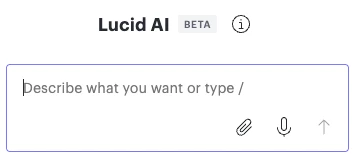
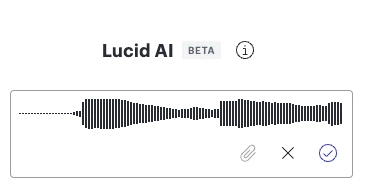
Thank you for your response in this thread! I wanted to share an exciting update that the Voice to Text feature is live for all customers now! You can use this Voice to Text feature to create diagrams in Lucid.

Here are a few instructions on how this feature works:

You will now find a new microphone icon within the Lucid AI panel. However, you will have to click the Voice icon in the chat box to initiate the experience. Once you click the voice icon, Lucid AI will transcribe your dictations and enter it into the prompt box. Please see screenshots below showing what this looks like in Lucid.

Let me know if you have any additional questions and I’m happy to help!


Forum|alt.badge.img

Hi ​@alison cheney,

Thank you for that info, but unfortunately that doesn't address my needs.  First, my organization blocks Lucid AI, and second, I use dictation to help me make changes inside existing Lucid documents, not create docs with AI. 

Because Lucid doesn't work with system-level or third-party dictation tools, I dictate into a text editor, then copy and paste the transcribed text into Lucid.  This is slow and very cumbersome.


alison cheney
Forum|alt.badge.img+8
  • Lucid community team
  • March 12, 2026

Hi ​@Mike Laufer,

I sincerely apologize for any confusion here and I understand how important this feature would be to supporting your workflow. Currently, Lucid does not have a native Dictation or Voice to Text feature outside of the Lucid AI panel, but we’re very interested in your feedback and committed to continually improving our products.


Have you tried either of the following workarounds?

  • If you are able to use professional software like Dragon, you can use the Dictation box setting. It’s designed specifically for apps like Lucid. This will allow you to speak into a floating box that then puts the text directly into the shape once you're done.

  • Some users have found success with third-party accessibility extensions like LipSurf (a Chrome extension). It is built specifically for full voice control of web apps and has custom engines to help bridge the gap with canvas based tools like Lucid.

We would love to hear more details about your use case or what you’d like to see in this experience. This will also allow other users with similar requests to discover and upvote it, then add details of their own. Finally, for more information on how Lucid manages feedback via this community, take a look at this post:

Thank you for using Lucid and for providing feedback in our community!


Forum|alt.badge.img

Adding to this — the feature you presented isn’t solving the underlying need. Having to dictate in a separate tool and then copy and paste into the document is a very painful workaround.

Many other virtual collaboration tools allow dictation directly into existing documents. What’s being proposed here adds additional cognitive and physical load for the user, requiring them to navigate between multiple tools.

Given the original ask was to reduce cognitive and physical effort to make the tool more accessible, this approach unfortunately does the opposite.


Forum|alt.badge.img

Hi ​@alison cheney,

Thank you for suggesting the workarounds.  Dragon is Windows only and I'm on MacOS.  LipSurf might be an option, but it's currently blocked by my organization. I'll request to see if it can be unblocked.

The MacOS is known for its accessibility features.  It's unfortunate that some applications (both SaaS and desktop apps) don't make use of what's built into the OS.  Making use of the OS capabilities would be the best solution so users only have to learn one method to operate their systems and all their apps.

Using a computer with one hand is both cumbersome and tiring.  My productivity was surge if I could use one hand to move and click objects in Lucid, click into an object and dictate the text I want, and then move on to the next object.


alison cheney
Forum|alt.badge.img+8
  • Lucid community team
  • March 17, 2026

Hi ​@Mike Laufer and ​@jess rudolph,

Thank you for providing these details about what you would like to see for this feature. This is the perfect level of detail to share, and it helps our product team better understand your workflows and specific use cases as they consider future updates.

We encourage anyone else who’s interested in this to upvote this post and share any additional details about your use case or what you’d like to see in this experience. For more information about how we manage feedback in this community, please take a look at this post: