Idea

Set a custom default size of org chart employee boxes in Lucid

Related products:Lucidchart
  • April 17, 2025
  • 5 replies
  • 43 views

Forum|alt.badge.img+1

I cannot set default size for an org chart block. I select an existing block, select Set as Default and create more blocks and the size is the standard size.

April 18, 2025

Hi ​@gedkins , 

Thanks for posting in the Lucid Community! Unfortunately, setting a default style only affects the visual aspects of your org chart shapes—such as text style, color, and borders—and does not include the ability to set a default size. 

I suggest considering one of the following alternatives to adjust the size of your org chart shapes:

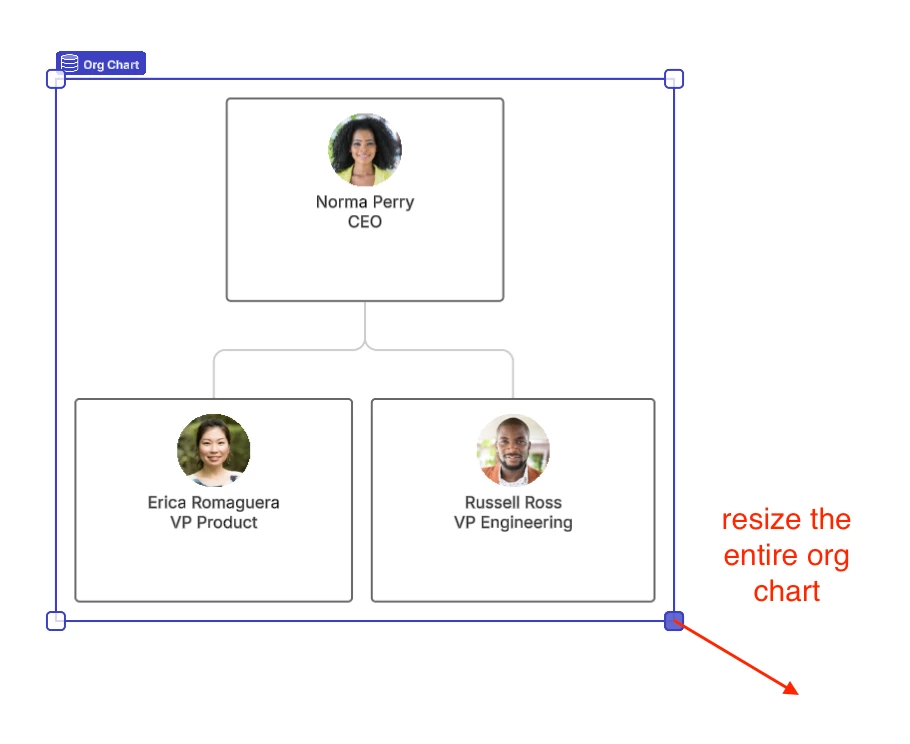
  1. Select the entire org chart by hovering over your org chart and clicking on the dashed line outlining it. You can click and drag out the corners of the org chart to resize it all at once. 


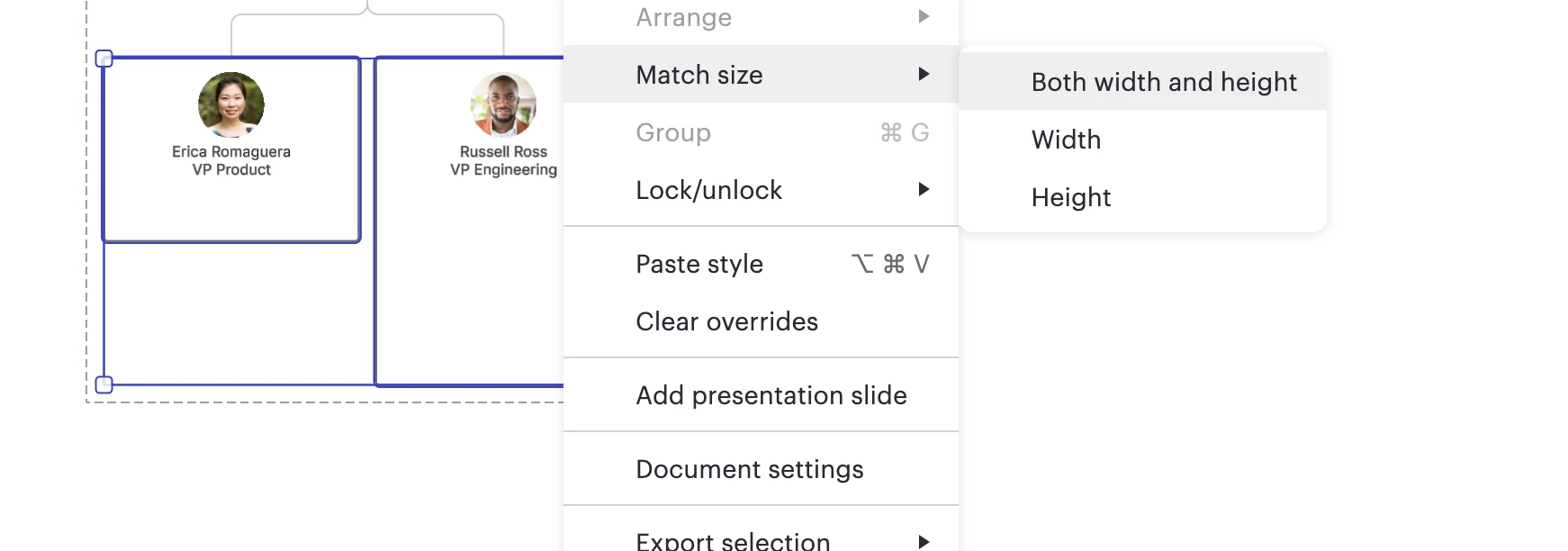
  2. To make your org chart shapes match the size of an existing shape, select all the shapes you want to resize—ensuring the shape with the desired size is selected last—then right-click and choose 'Match Size' > 'Both Width and Height.'


Please let me know if you have any additional questions!

Comments

Forum|alt.badge.img+8
  • Lucid support team
  • April 18, 2025

Hi ​@gedkins , 

Thanks for posting in the Lucid Community! Unfortunately, setting a default style only affects the visual aspects of your org chart shapes—such as text style, color, and borders—and does not include the ability to set a default size. 

I suggest considering one of the following alternatives to adjust the size of your org chart shapes:

  1. Select the entire org chart by hovering over your org chart and clicking on the dashed line outlining it. You can click and drag out the corners of the org chart to resize it all at once. 


  2. To make your org chart shapes match the size of an existing shape, select all the shapes you want to resize—ensuring the shape with the desired size is selected last—then right-click and choose 'Match Size' > 'Both Width and Height.'


Please let me know if you have any additional questions!


Forum|alt.badge.img+1
  • Author
  • April 19, 2025

Ok, thanks. Would like to see setting a default block size so that font size and block make sense when printing file on large format plotter. Would all blocks to be say 2 inches by 3.5 inches with 18 or 20 point font, Then the plot will be readable. Dragging entire charts corner to get specific size is not good approach. 


Forum|alt.badge.img+8
  • Lucid support team
  • April 21, 2025

Hi ​@gedkins , 

Thanks for your response! Unfortunately, setting all your org chart shapes to a default size is not currently supported Lucid. However, you can set a default font size by right clicking on the shape with your desired font size and then click ‘Set default style.’ 

Please let me know if you have any additional questions! 


Forum|alt.badge.img
  • January 9, 2026

It would really be helpful if you could allow the user to set blocks to a default size that works for their purpose. I use Lucid Chart for building family trees and the current default size for blocks is not large enough to capture everything I need within each block. Having to resize every block is cumbersome and time consuming. I’ve seen where you suggest changing the font size, but my old eyes can’t easily read 8-pt. font. Thank you!


Ambar D
Forum|alt.badge.img+10
  • Lucid community team
  • January 9, 2026

Hi ​@tjday1995, thanks for detailing your feedback here! I can certainly see your use case here. 

Unfortunately, this isn’t currently supported in Lucid, but we’re very interested in your feedback and committed to continually improving our products. I’ve converted this post to an idea so that it’s visible to others within the Product Feedback section of the community - from here, they can upvote it and add details of their own.

Finally, for more information on how Lucid manages feedback via this community, take a look at this post: