Idea

Navigate between multiple Lucid boards on the same page tab

Related products:Lucid Suite
  • December 9, 2025
  • 4 replies
  • 67 views

Forum|alt.badge.img+1

Navigate quickly while in a lucidchart, at present to switch between different documents needs coming out of charts or clone tabs

Comments

Ambar D
Forum|alt.badge.img+10
  • Lucid community team
  • December 12, 2025

Hi ​@pbanga, thanks for posting in the Lucid Community!

To clarify, are you hoping to open multiple Lucid documents within the same tab? Are you hoping to navigate through multiple Lucid documents from within the editor?

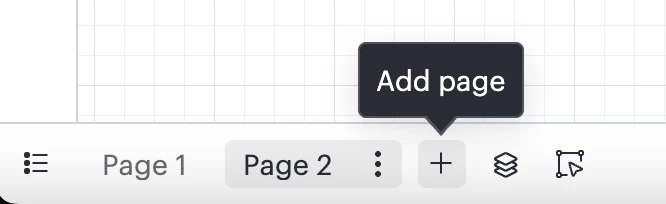
If you’d like to have multiple charts or pages within the same document, you can add a page at the bottom of a Lucidchart document as shown below. 

Alternatively, you can use breakout boards as a workaround to add multiple boards to the same document. 

If I’m misunderstanding your question, please let me know and I’d be happy to help further! 


Forum|alt.badge.img+1
  • Author
  • December 12, 2025

Hi Amber,


I have tried breakout board. It becomes complex and non navigable very fast. My requirement is to have multiple lucid documents that I maintain under folders and want to switch among them, without the need to move out of the current page. Like a standard folder navigation in any standard software 


Ambar D
Forum|alt.badge.img+10
  • Lucid community team
  • December 15, 2025

Hi ​@pbanga, thank you for those details. I certainly see how this would be useful, thank you for letting me know what you’d like to see here!

Unfortunately, this isn’t currently supported in Lucid, but we’re very interested in your feedback and committed to continually improving our products. If you’re willing to share, we’d love to hear more details about your use case or what you’d like to see in this experience within this thread.

I’ve also converted this post to an idea so that it’s visible to others within the Product Feedback section of the community - from here, they can upvote it and add details of their own.

Finally, for more information on how Lucid manages feedback via this community, take a look at this post:


Forum|alt.badge.img+1
  • Author
  • December 16, 2025

Sure, I can be approached for more details or feedback on this topic.