Idea

Move reports lower on grid but keep same supervisor in an Org chart

Related products:Lucidchart
  • January 10, 2019
  • 2 replies
  • 167 views

Angela Easter

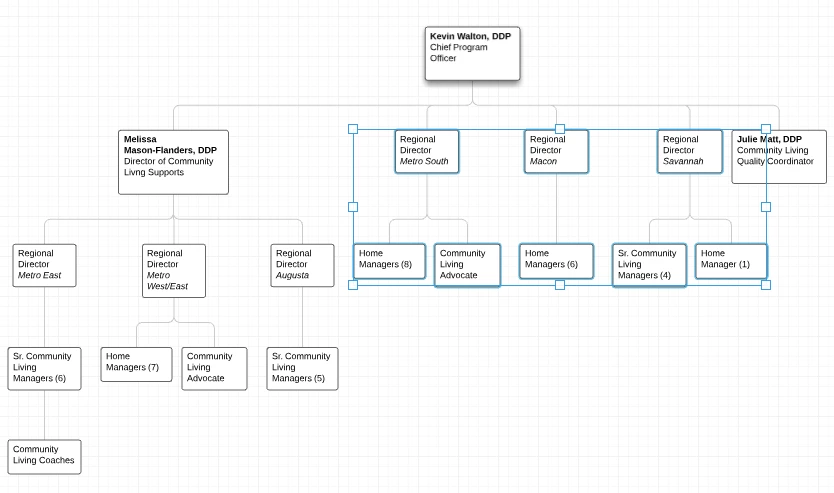
I can't find this info anywhere in existing Help articles. On an Org Chart I have one supervisor who oversees two different levels of staff: senior managers and middle managers. One senior manager also supervises middle managers. So on the chart it looks like one group of middle managers is at the same level as the senior manager. What I need to do is move them down lower on the grid but keep them attached to the same supervisor. I've tried selecting them and dragging them but it doesn't work. Help! See image - the blue selected positions are the ones that need to move down to be in line with similar positions on the left.
January 11, 2019

Hi Angela

Thanks for posting in the community! I'm sorry you're having trouble with this. If I'm understanding what you described correctly the section of middle managers does not have a senior manager to report to in the organization and so they visually appear to be on the same level as the senior managers due to the layout of the org chart.

Although there isn't currently a way to independently adjust the spacing between two individuals in an org chart as a workaround you could place new org chart shapes above the middle managers and change their line color to white and remove the fields within. At this point it will appear like you have a blank space in your line from the "hidden" org chart shape. You can then disable line connections in your page settings and drag a line out to fill the blank space. If you'd like to be able to independently adjust spacing between org chart shapes in the future please submit an idea in our Product Feedback section. Our team uses this section to categorize like requests from users and present them to our Product team for consideration. I hope this helps! 

Comments

  • January 11, 2019

Hi Angela

Thanks for posting in the community! I'm sorry you're having trouble with this. If I'm understanding what you described correctly the section of middle managers does not have a senior manager to report to in the organization and so they visually appear to be on the same level as the senior managers due to the layout of the org chart.

Although there isn't currently a way to independently adjust the spacing between two individuals in an org chart as a workaround you could place new org chart shapes above the middle managers and change their line color to white and remove the fields within. At this point it will appear like you have a blank space in your line from the "hidden" org chart shape. You can then disable line connections in your page settings and drag a line out to fill the blank space. If you'd like to be able to independently adjust spacing between org chart shapes in the future please submit an idea in our Product Feedback section. Our team uses this section to categorize like requests from users and present them to our Product team for consideration. I hope this helps! 


Micah
Forum|alt.badge.img+20
  • Lucid community team
  • March 7, 2024
Idea merged into:

All the votes from this idea have been transferred.

