

Idea

Is there a way to hide weekends from timelines?

Related products:Lucidspark
  • February 3, 2025
  • 4 replies
  • 117 views

Jacob J

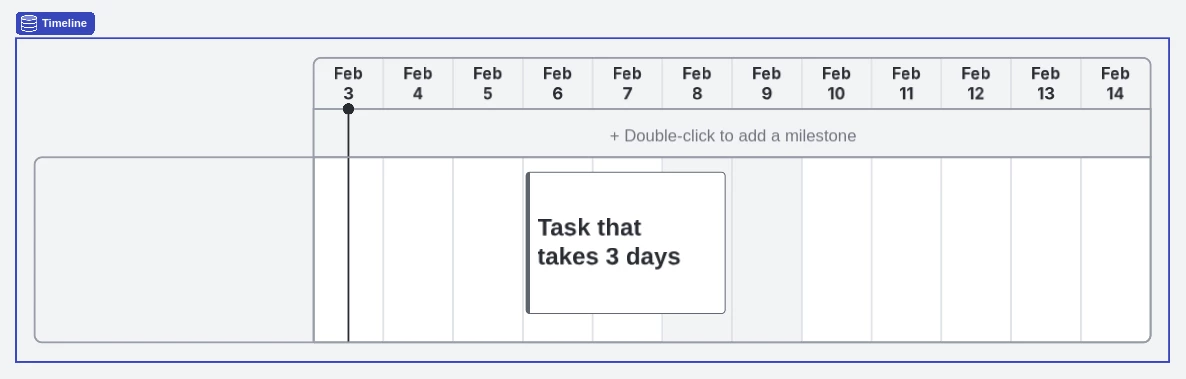
If I have a timeline, can I hide weekends so that multi-day tasks are correctly spread across only business days?


For example, in the screenshot, I’d like the task to occupy Feb 6, Feb 7, and Feb 10. I’d like the weekend to not be visible at all. I can manually expand the task to cover Feb 6-10, but then if I move it to a weekday-only span, I need to remember to resize it. 
 

Comments

Grieser
Lucid Legend Level 3
Forum|alt.badge.img+4
  • Lucid Legend Level 3
  • 19 replies
  • February 3, 2025

Hi Jacob,

I played around with the timeline in Lucid Spark and wasn’t able to get it to do what you want.  I tried to cut/delete the column, but it doesn’t do anything.  Also grouping two timelines together didn’t work either.  When adding a card to a timeline, it only allows you to enter one date range as well. So ultimately the best solution would be to drag it over the weekend or create a second task on the Monday with the same task number/ID/Title. 


I see two possible product enhancement requests to the Lucid dev team that would work here:

  1. On the ‘Flag’ button, add an additional option to hide weekends.  Currently you can ‘remove highlight’ but that isn’t sufficient. 
  2. When you double click to add a card, allow cards to have multiple dates that do not overlap. Using Jacob’s example, I could set the date of the card to 2/6 - 2/7; then in an additional date field, I could set the date to 2/10-2/10. While this solution would “work” for Jacob, it would not be ideal.  That being said, it would be very useful on a timeline when tracking a dependency that happens in the middle of the card to represent no work being done on it.  For example, my Card to create private domain may include submitting a ticket to infrastructure, waiting for them to execute on my ticket, then finishing my card once they’ve provisioned it.

I see a lot of potential in the timeline but it’s pretty limiting in its use cases at the moment. 


Zuzia S
Forum|alt.badge.img+8
  • Lucid support team
  • 384 replies
  • February 4, 2025

Hi ​@Jacob J thanks for your post and thank you ​@Grieser for your response and feedback!

Indeed, unfortunately this isn’t currently supported in Lucid, but we’re committed to continually improving our products. If you’re willing to share, we’d love to hear more details about your use case or what you’d like to see in this experience within this thread. I’ve also converted this post to an idea so that it’s visible to others within the Product Feedback section of the community - from here, they can upvote it and add details of their own.

Finally, for more information on how Lucid manages feedback via this community, take a look at this post.

Cheers!


Forum|alt.badge.img+1
  • 3 replies
  • November 5, 2025

This one would be greatly appreciated.  Highlighting weekends doesn’t really fit the same use case as being able to turn off weekends. The option above via the lag / Options option of the chart would be a good way to get user interaction with this option

We are linking Gantt charts to Jira.  When using week long spans, losing almost 30% of space to unused weekend days is highly taxing on available screen space and is a negative impact on the usability of the chart


Zuzia S
Forum|alt.badge.img+8
  • Lucid support team
  • 384 replies
  • November 5, 2025

@Sean Hannan thank you for additional feedback here! We encourage anyone else who’s interested in this to upvote this post and share any additional details about your use case or what you’d like to see in this experience.