Idea

Is it possible to lock the position of a set of Smart Containers in Lucidchart?

Related products:Lucidchart
  • March 21, 2024
  • 3 replies
  • 38 views

Forum|alt.badge.img+1

I am running a chunk of workshops that requires users to move content from a number of smart containers to a number of others, but am having some trouble with the user experience:


Some users are moving the entire set of smart containers around the board by mistake (by accidentally dragging it rather than the content/shapes), which is then making it difficult for multiple users to use at once.


I can lock the entire set but then users cannot move the content/shapes between the smart containers at all and I am able to lock the individual smart containers in place so users can move the content/shapes between the boxes - but neither of these solve my problem……….


Is there a way I can lock just the position of the set of smart containers?

March 26, 2024

Hi @James2750, thank you for following up with that detail. Unfortunately, this isn’t currently supported in Lucid, but we’re very interested in your feedback and committed to continually improving our products. If you’re willing to share, we’d love to hear more details about your use case or what you’d like to see in this experience within this thread.

I’ve also converted this post to an idea so that it’s visible to others within the Product Feedback section of the community - from here, they can upvote it and add details of their own.

Finally, for more information on how Lucid manages feedback via this community, take a look at this post:

We appreciate your willingness to provide your requests and feedback in the Lucid Community!

Comments

Leianne C
Forum|alt.badge.img+15
  • Lucid support team
  • March 22, 2024

Hi @James2750, thank you for posting in the community!

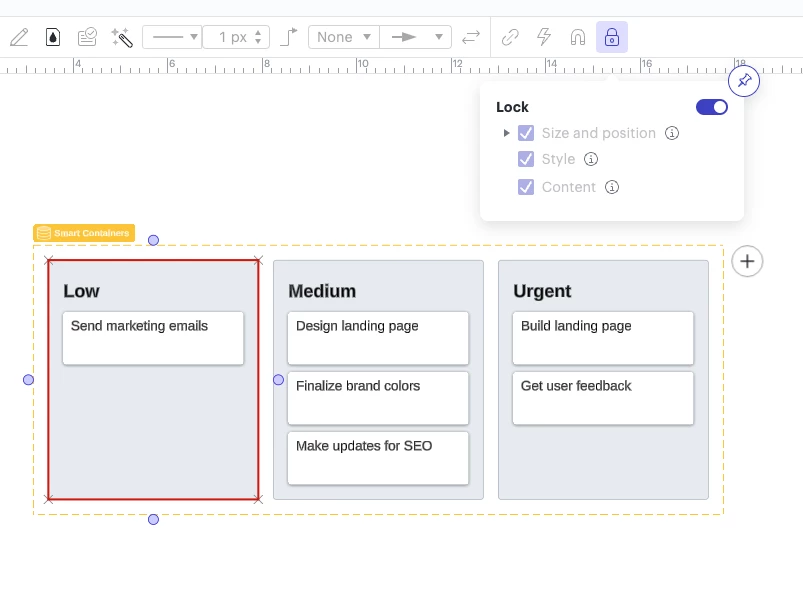
It is possible to select the individual containers and lock them in position such as the ‘Low’ container in my example below. This would still allow the individual tasks to still be moved around. 

Could you please confirm if this is what you are looking for, or are you are hoping to lock the yellow container ‘frame’ shown in the screenshot above in place so that the grey containers can still be moved around within that frame? 

If not, could you please share a screenshot to help me better understand the issue? Thank you in advance! 


Forum|alt.badge.img+1
  • Author
  • March 25, 2024

Hi there,


Yes I’m trying to lock the entire yellow container frame to stop one user moving it for all workshop participants, but when I can only lock in it such a way the content inside it cannot be moved - which then removes the ability to complete the activity in my workshop.


Leianne C
Forum|alt.badge.img+15
  • Lucid support team
  • March 26, 2024

Hi @James2750, thank you for following up with that detail. Unfortunately, this isn’t currently supported in Lucid, but we’re very interested in your feedback and committed to continually improving our products. If you’re willing to share, we’d love to hear more details about your use case or what you’d like to see in this experience within this thread.

I’ve also converted this post to an idea so that it’s visible to others within the Product Feedback section of the community - from here, they can upvote it and add details of their own.

Finally, for more information on how Lucid manages feedback via this community, take a look at this post:

We appreciate your willingness to provide your requests and feedback in the Lucid Community!