Howard S
December 12, 2023
Delivered

How do I turn off "show author" as a default for new sticky notes?

Related products:LucidchartLucidspark
  • December 12, 2023
  • 15 replies
  • 4642 views

Recently I created a new board and now anytime I create a sticky note it’s defaulting to show author and I have to click on them to un-check this option. Is there a way to turn this off as a default setting.  I was out of the office for two weeks so this seems like a recent behavior change. 
Pinned Reply By Gordon

Hi,

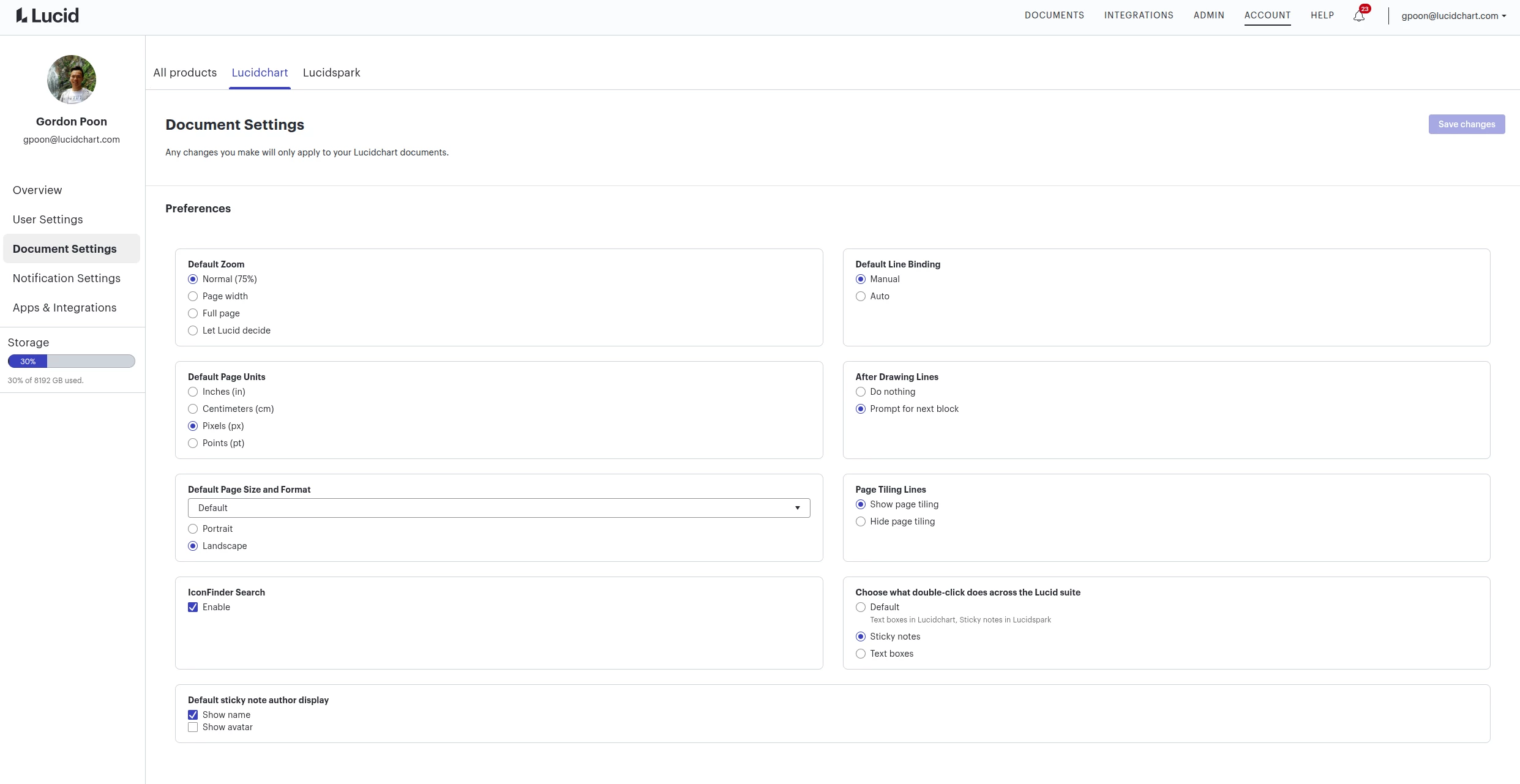
We recently introduced the option to show author avatar and/or name. With that, we also made a user document setting where you can turn on/off these show options for all new documents. It is under account settings > document settings > Lucidchart > Default sticky note author display.

Note that, despite it being under Lucidchart, it will change the default for all products. We are planning to reorganize the document settings in the future, so please expect that the page may look different from the time when this reply is posted.    


Comments

Ambar D
Lucid community team
January 30, 2026
IdeaDelivered
March 12, 2026

Recently I created a new board and now anytime I create a sticky note it’s defaulting to show author and I have to click on them to un-check this option. Is there a way to turn this off as a default setting.  I was out of the office for two weeks so this seems like a recent behavior change. 

I’ve tried the solution and it doesn’t work. No matter what I click off, either on the board settings or in lucidchart, the initials continue to show.

March 12, 2026

Hi Howard, thanks for your post! You’re correct - displaying the author name is a recently released feature in Lucidspark. To disable this for all sticky notes, simply toggle off this setting within the collaboration tools menu:


Toggling this to off for me, still shows the author. I don’t want to use private mode because I want my users to be able to upvote stickies that other people create. This used to work, now it doesn’t.

March 12, 2026

I used to really like this app as I could grant anonymity to the participants. Now, no matter what I try, going to Lucidchart settings, toggling “off” on show authors, nothing works. The initials and names still show which defeats part of the purpose of using Lucidspark for retrospectives.

Zuzia S
Lucid community team
March 17, 2026

@Lorrii-M thank you for chiming into this thread and I am sorry that you are encountering this issue!

Could you try opening your document in a private or incognito window to help us narrow down the potential cause? Could you also try connecting to a different network or disconnecting from your VPN (if applicable)? Sometimes account performance issues can be related to internet security/speed or browser issues. These steps will help us eliminate that possibility. For help with opening an incognito window, please see this community post.

If those don’t resolve the problem, can you please send the following information so I can take a closer look?

  • A detailed description of the steps taken leading up to the issue.
  • Could you please confirm whether the issue occurs in other documents when testing the behaviour with stickies?
  • Could you confirm whether the behaviour persists when trying to hide the authors on a specific sticky note as per these steps?
  • Please provide a screenshot of the associated Javascript Console output after reproducing the issue. You can open your Javascript Console by pressing Ctrl+Shift+J (if your computer is a Windows/Linux) OR Cmd+Opt+J (if your computer is a Mac).
  • Finally, please provide a Technical Support PIN for your account. This PIN is safe to post in this thread because it is only accessible by members of the Lucid support staff. You can find steps for generating a Support PIN in this  Help Center article .


Thanks in advance for your help and patience!