Idea

How do I add tags to Lucid cards when they are in timeline

Related products:Lucidspark
  • February 22, 2024
  • 7 replies
  • 255 views

Forum|alt.badge.img+2

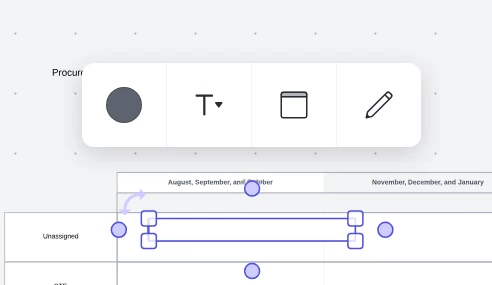
When a Lucid card is outside a timeline , I can add a tag easily , use emojis .. but when I drag that into a timeline in Lucidspark , I see only limited editing capabilities and can not add labels or tags. If I drag car outside of timeline , i can do that again

February 22, 2024

Hey @jag11 -- thanks for posting and thank @Humas1985 for jumping in so quick! This is true for our Lucid Cards when placed on a timeline. If this is something you’d like to be able to do in the future (which I love), 

we’d love to hear more details about your use case or what you’d like to see in this experience within this thread. I’ve also converted this post to an idea so that it’s visible to others within the Product Feedback section of the community - from here, they can upvote it and add details of their own.

Finally, for more information on how Lucid manages feedback via this community, take a look at this post:

Thank so much for the idea and contribution to the Lucid Community! Cheers 😎

Comments

Humas1985
Lucid Legend Level 10
Forum|alt.badge.img+24
  • Lucid Legend Level 10
  • February 22, 2024

Hi - I hope that you are Doing good !!

Would you like to take a closer look in the help link below:
https://help.lucid.co/hc/en-us/articles/14970913626516-Add-a-Tag-to-an-object-in-Lucidspark

Let us know if that does not help you

Happy to help further !!

Hope this helps

Thank you very much and have a fantastic day!
Warm regards


Forum|alt.badge.img+2
  • Author
  • February 22, 2024

Hi

This article does not help. Adding a tag to a lucid card is easy I know that but when I create a timeline and drag the card into the timeline , I cant do that anymore. The edit options are reduced to editing of Lucid card attributes like Estimate , Assignee .. but the advanced edit menu for lables , and emojis just does not show . Please look at screenshot


Regards

Jag


Phillip W
Forum|alt.badge.img+16
  • Lucid support team
  • February 22, 2024

Hey @jag11 -- thanks for posting and thank @Humas1985 for jumping in so quick! This is true for our Lucid Cards when placed on a timeline. If this is something you’d like to be able to do in the future (which I love), 

we’d love to hear more details about your use case or what you’d like to see in this experience within this thread. I’ve also converted this post to an idea so that it’s visible to others within the Product Feedback section of the community - from here, they can upvote it and add details of their own.

Finally, for more information on how Lucid manages feedback via this community, take a look at this post:

Thank so much for the idea and contribution to the Lucid Community! Cheers 😎


Steve S103
Forum|alt.badge.img+1

We also have this issue.  

If any tag already exists on the card, then you can click that tag, and a new “add tag” icon appears below it so you can add a new tag -- but if there is no existing tag then this method is unavailable.

This gap is causing annoyance to our PMs


Phillip W
Forum|alt.badge.img+16
  • Lucid support team
  • April 10, 2024

Hey @Steve S103 -- thanks for posting on this thread! I hear you; would you mind upvoting this request to help surface it to our Dev team?

Thanks again for posting!


Forum|alt.badge.img

This is also causing problems in our planning. Would be good to align on the feature-set when a card is inside or outside of a timeline. Also when I move a card into a timeline it’s also minimized, so that one cannot see the description.


Micah
Forum|alt.badge.img+20
  • Lucid community team
  • June 20, 2024

Thanks for this context, @e4258853c4bea!