Idea

Feature Request: Drag and Drop - Sortable tables (incl. content)

  • October 31, 2023
  • 4 replies
  • 29 views

Thomas P101

Dear Lucid - team

I would like to request a feature which we extensivly use in i.e. Miro with customers.
In i.e. Miro it is possible to create a table and put all sort of content into the cells in a row (sticky notes grafix +++ ).

Then you can easily sort the rows including all content by dragging the rows up and down.

That is a great feature used all over our company with internal and external stakeholders:
Clarifying topics epics whatever in a workshop and priorizing afterwards by simple dragging the rows incl all content 🤩

In Lucid I do not see any solution to that which does not involve copying/pasting / rearranging......


I'd be super-happy to find that feature and I bet I am not the only one.


Best regards

Thomas

Comments

Leah W
Forum|alt.badge.img+9
  • Lucid support team
  • October 31, 2023

Hi Thomas

Thanks for sharing your insights on how we can improve Lucid! We greatly appreciate your feedback

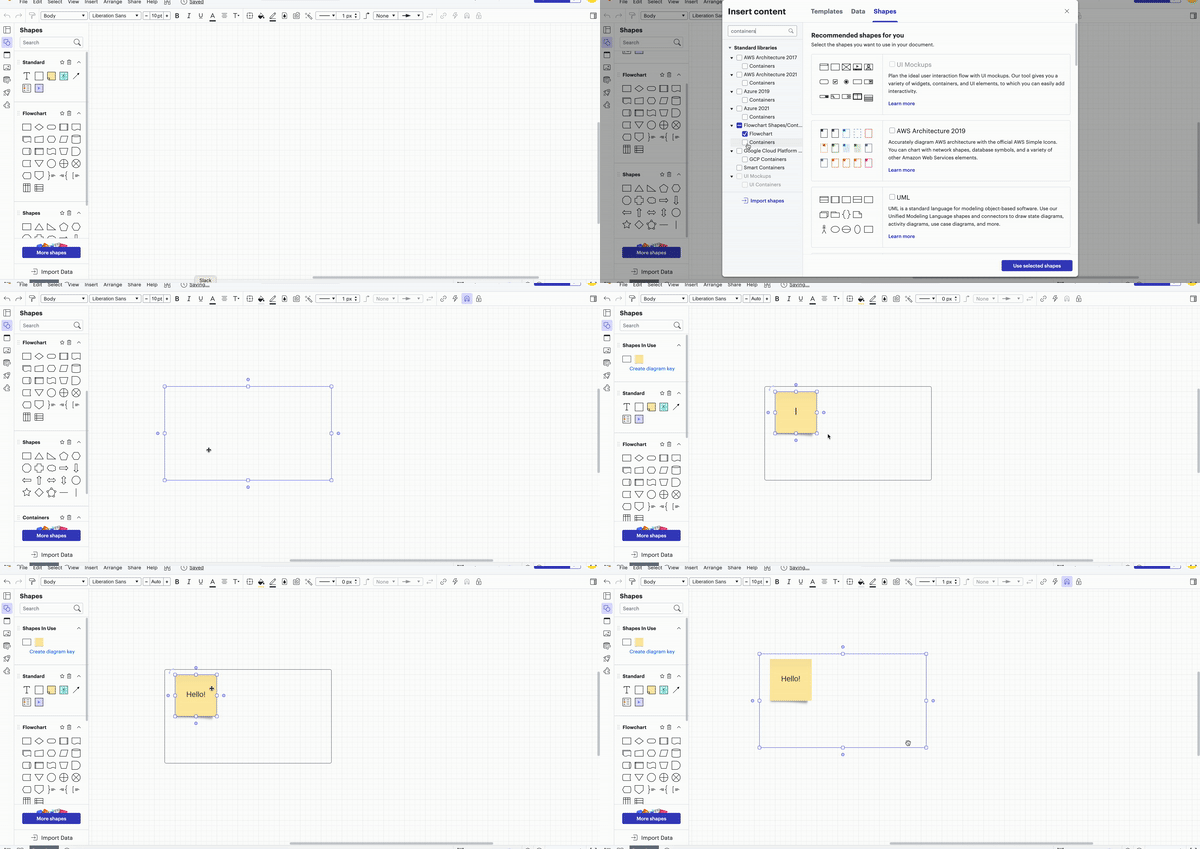
While there is currently no automatic method for achieving this you can utilize containers in Lucidchart to create a table and arrange content. What's special about containers is that they automatically magnetize all content placed within them. This means that when you move the container the content inside it will move as well. To find containers follow these steps or view the gif below for more information:

  1. Select 'More shapes' on the toolbar.
  2. Type 'containers' in the search bar.
  3. Choose the containers from the 'Flowchart Shapes/Containers' tab.

Shown below is an example of what you can create using containers.


I hope this helps and please feel free to comment with any further feedback or clarifying details about this feature below.


Forum|alt.badge.img
  • March 1, 2024

I would like to agree with Thomas in how great it would be to have this feature. For years I have wanted to be able to work well with graphics in tables, but excel, illustrator and whatever else I tried did not manage to combine them well. Then I started working with Miro and it was capable of this, which I loved. However, my current company is using Lucid, so again I’m stuck without this feature.

Containers, while very useful, do not allow for this seeing as you want control in both rows and columns.


Addie
Forum|alt.badge.img+23
  • March 4, 2024

Thanks for your post! We’re very interested in your feedback and committed to continually improving our products. If you’re willing to share, we’d love to hear more details about your use case or what you’d like to see in this experience within this thread. I’ve also converted this post to an idea so that it’s visible to others within the Product Feedback section of the community - from here, they can upvote it and add details of their own.

Finally, for more information on how Lucid manages feedback via this community, take a look at this post:


Abby S
Forum|alt.badge.img+11
  • Lucid community team
  • April 12, 2024

Hi! Abby here from Lucid. I thought you, and others who might come across this feature request in the future, might be interested in Lucid’s Agile Trusted User Group. This group is made up of passionate, experienced users who regularly use agile methodologies in their work. As part of this group, you’ll have the opportunity to connect directly with Lucid’s product team and share insights about your workflows, pain points, and needs, shaping the future of Lucid’s agile tools. 🎉 You can learn more and apply here. Thanks!