Idea

Export comments

Related products:Lucidchart
  • November 19, 2024
  • 3 replies
  • 102 views

Forum|alt.badge.img

Is there a way to export comments exclusively from a tab? I have quite a lot in the entire document. Curious to know if we can export any of them selectively.

June 22, 2026

Jumping in this thread to provide one other workaround option, with a new update to comments. 

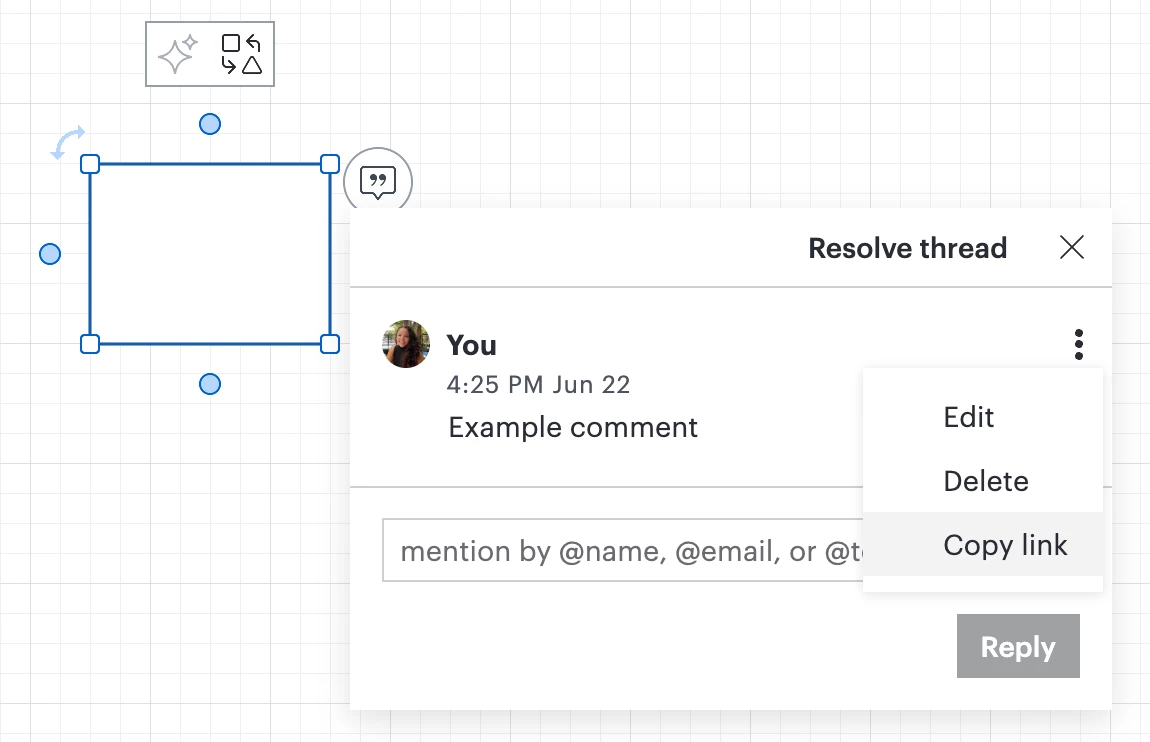
You can now copy a link to your comment from the tri-dot menu shown next to your comment, as shown below! 

This might help if you have a specific comment that you’d like to share with others, or to link to from another source. Clicking the link will automatically send you to the open comment. To learn more, check out this resource.

Comments

Kelsey Gaag
Forum|alt.badge.img+16
  • Lucidite
  • November 21, 2024

Hi ​@panapil

Thank you for your post! There is currently not functionality to export only comments from a tab. However, you can export your shape data as a CSV, and this will include any comments on the document. To do this please follow the directions in this article.

We encourage anyone else who’s interested in this to upvote this post and share any additional details about your use case or what you’d like to see in this experience. For more information about how we manage feedback in this community, please take a look at this post.


Forum|alt.badge.img

Is there a way to export comments exclusively from a tab? I have quite a lot in the entire document. Curious to know if we can export any of them selectively.

you can export your shape data as a CSV, and this will include any comments on the document. To do this please follow the directions in this article.


Ambar D
Forum|alt.badge.img+12
  • Lucid community team
  • June 22, 2026

Jumping in this thread to provide one other workaround option, with a new update to comments. 

You can now copy a link to your comment from the tri-dot menu shown next to your comment, as shown below! 

This might help if you have a specific comment that you’d like to share with others, or to link to from another source. Clicking the link will automatically send you to the open comment. To learn more, check out this resource.