Idea

Expand Lucid AI capacity and limits for complex diagram generation

  • June 1, 2026
  • 5 replies
  • 99 views

john.a.lopez
Forum|alt.badge.img+12

i have been using Lucid AI to create simple class diagrams from CSV structured data. said data is structured as:
Index,SourceSystem,Direction,Data,TargetSystem
ID01,FI,Inbound,SomeKindaDATA,BRIDGE
ID02,FI,Inbound,OtherKindaDATA,PATE …

The result would be:
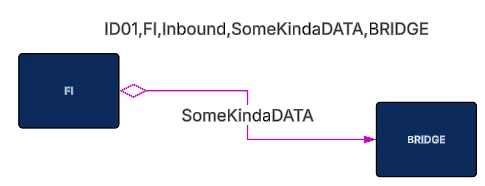
 

the above data source has 293 rows, pasted into the canvas as a CSV data source

it is processing 10 rows at a time. The prompt is as follows:

you are an expert in infrastructure diagramming using simple class diagramming techniques
you will be creating a systems diagram with relationships
it will be structure like a mind map with XXXX in the middle, and outlying systems as leaf nodes
you will use the following CSV data source table on the lucid canvas pasted into the lucidchart document
has the following column meanings:
Index - unique relationship id
SourceSystem - is a system
Direction - is the direction of the relationship:
- Inbound = TargetSystem is from end, and SourceSystem is the to end of the relationship
- Outbound = SourceSystem is from end, and TargetSystem is the to of end the relationship
Data - is the transactional data on the relationship sent from between TargetSystem and SourceSystem
TargetSystem - is a system
create a basic system model using boxes for systems and lines for relationships
colorize each system based on:
- SourceSystem = DARK GREEN line
- TargetSystem = DARK BLUE line
use a small diamond arrowhead for the FROM end of the relationship
use a closed arrowhead for the TO end of the relationship
Make the layout to be export friendly to reduce crossing lines
Make all lines where the FROM system is the SourceSystem color MAGENTA
Make all lines where the FROM system is the TargetSystem color GREEN

each iteration is initated:
>draw all systems and interconnecting relationships from RelationshipID equals ID01 through ID10
this worked until ID40 then it began to error
QQ: are there any recommendations to get this to work?

Thanks

Comments

john.a.lopez
Forum|alt.badge.img+12

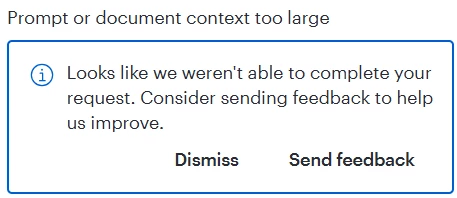
error being recieved is:


Leianne C
Forum|alt.badge.img+15
  • Lucid support team
  • June 3, 2026

Hi ​@john.a.lopez, thank you for posting in the community! There is a size limit for Lucid AI which includes factors such as document size, content size and conversation length. In this case, we recommend clearing the conversation and pasting your initial prompt again to help the AI agent continue without hitting that error. You can do this by starting a new conversations via the "New Chat" pencil icon in the chat panel (without having to refresh the page). 

Could you please give this step a try and let me know if the issue persists, or if you have any questions? Thanks!


john.a.lopez
Forum|alt.badge.img+12

@leianne - thanks for the reply. I had tried that, several new chats. seemed like there was ‘residue’ (memory leak or something), that impacted later attempts. I found that i had to break up the data set into 20-30 records, create a new document, then run the same prompt there. it is slow and tedious but at least it is not failing. i do note that all parameters of the prompt are not necessarily run monolithically, and that i have to follow up with “fix line colors” and “fix arrowheads” and “increase vertical spacing and re-anchor all connectors”, etc. Also it will repetitively ask about creating lines (not yet done) from data set record index X to Y, typically 3-4 records. once it finishes that, it asks for the next 3-4.

I had hoped that i could assign a job, come back in awhile and find it done. Such is not the case.

is there a way to increase factors such as document size, content size and conversation length?

can i update:
Temperature: 0.15
Top_k: 50
Top_P: 0.1
Max Tokens: 1000000
 

Thanks


Leianne C
Forum|alt.badge.img+15
  • Lucid support team
  • June 11, 2026

Hi ​@john.a.lopez, thank you for giving that a try and sharing a detailed breakdown. I completely get the frustration and have shared your feedback with our development team. 

I’ll update you here as soon as I hear back from them!


Leianne C
Forum|alt.badge.img+15
  • Lucid support team
  • June 12, 2026

Hi ​@john.a.lopez, thanks for your patience! I’ve heard back from our development team and they recommended try to do the generation all together in a new document and not on a large one. If your document is quite large, moving the process to a new document for the context savings would help. 

That said, we are continuously looking for ways to improve our products and your input is the most effective way to achieve that goal. I have shared your feedback with our development team and can confirm that expanding these limits is something that’s on their radar. If you’re willing to share, we’d love to hear more details about your use case or what you’d like to see in this experience within this thread.

I’ve also converted this post to an idea so that it’s visible to others within the Product Feedback section of the community - from here, they can upvote it and add details of their own.

Finally, for more information on how Lucid manages feedback via this community, take a look at this post:

Thank you for taking the time to share your feedback in the community. Please let us know if you have any questions!