Idea

Displaying Sprint Name on JIRA Cards in LucidSpark

Related products:Lucidspark
  • October 9, 2024
  • 3 replies
  • 57 views

Forum|alt.badge.img+1

I'm using the Cards for JIRA Integration in LucidSpark to create detailed story maps for our platform development, and I love how the JIRA cards in LucidSpark currently display key information such as the issue type icon, JIRA key, title, priority level, status, assignee, and more. 

However, I have a quick question: Is there a way to include the Sprint name on the JIRA cards displayed in LucidSpark?

Any insights or tips would be greatly appreciated!

Comments

Humas1985
Lucid Legend Level 10
Forum|alt.badge.img+24
  • Lucid Legend Level 10
  • October 9, 2024

Hi @JanH 

By default, the Sprint field is not displayed on the front of Lucid Cards for JIRA in Lucidspark. Still, other essential information, including issue type, status, summary, priority, assignee, and story points, remains visible.

To learn more about this – make use of the below help articles.

https://youtu.be/C0CczSfVyIk

Lucid Jira integration - Show Description/Summary Jira Card | Community

Supported system fields for Jira integrations in Lucidspark | Community

Supported custom fields for Jira integrations in Lucidspark | Community

Hope this helps - Happy to help further!!
Thank you very much and have a great one!
Warm regards


Leianne C
Forum|alt.badge.img+15
  • Lucid support team
  • October 11, 2024

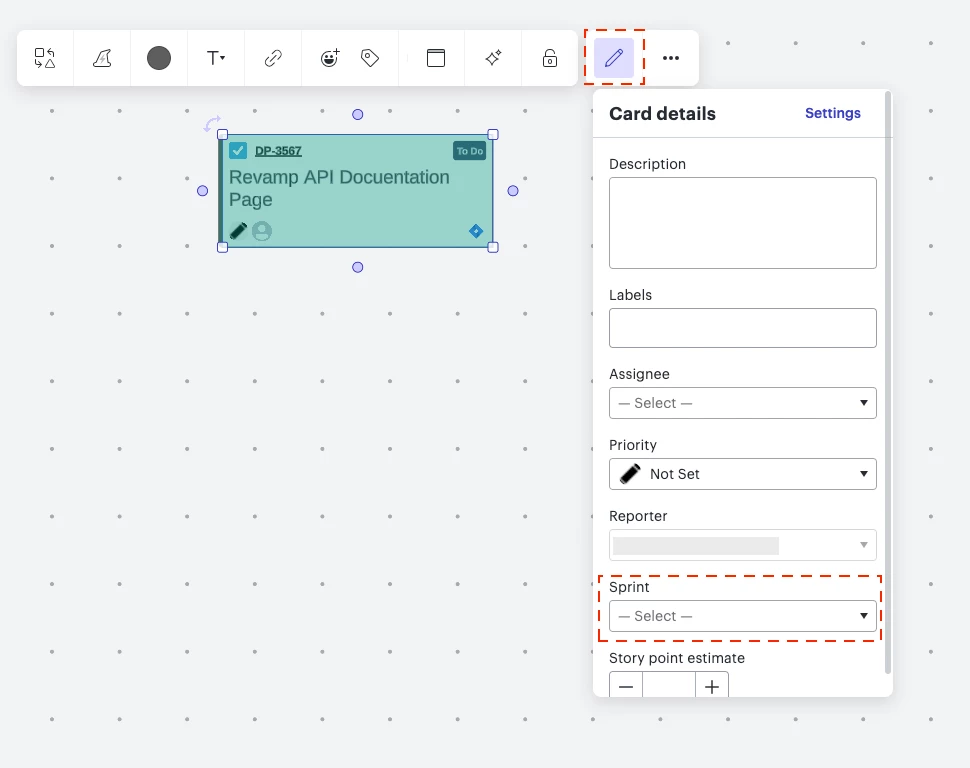
Hi @JanH, thank you for posting! Just to add on to the information @Humas1985 shared, it’s not possible to display the sprint name on the card however this information is available in the card details section: 


However, we’re very interested in your feedback and committed to continually improving our products. If you’re willing to share, we’d love to hear more details about your use case or what you’d like to see in this experience within this thread. I’ve also converted this post to an idea so that it’s visible to others within the Product Feedback section of the community - from here, they can upvote it and add details of their own.

Finally, for more information on how Lucid manages feedback via this community, take a look at this post:

Thank you for sharing your feedback in the community! Please let us know if you have any questions. 


Forum|alt.badge.img+1
  • Author
  • October 14, 2024

Hi @Leianne C 

thanks for the follow-up! I hadn’t seen the card details option yet—very useful, thanks for sharing!

It would be really helpful for us to see the Sprint name on the card to quickly identify what’s in the current sprint and what’s been selected for the next sprint and what is still in our backlog (no sprint).

We also use a "Ready for Sprint" placeholder sprint in our JIRA backlog for refined PBIs, so having the sprint name visible would give us a quick way to identify the status/progress.