

Idea

Dedicated table of contents feature for Lucidchart

Related products:Lucidchart
  • January 9, 2024
  • 10 replies
  • 184 views

Forum|alt.badge.img+12

Hi, 


I’m looking for assistance/guidance for two questions - 

  1. Is there a way to create a ToC in lucidchart when multiple pages are created? If not, is the workaround just creating links to each individual page?
  2. When writing process maps, is there a quick way to change/move the lines? I’ve created multiple process maps where portions have been removed and then I have to manually move each of the steps and lines after which can be time consuming.  
July 14, 2025

Hi ​@jonvalzjon, thank you for adding to this thread with your feedback and for upvoting this post! I certainly understand why this is important and appreciate the time you took to tell us what you’re hoping to see!

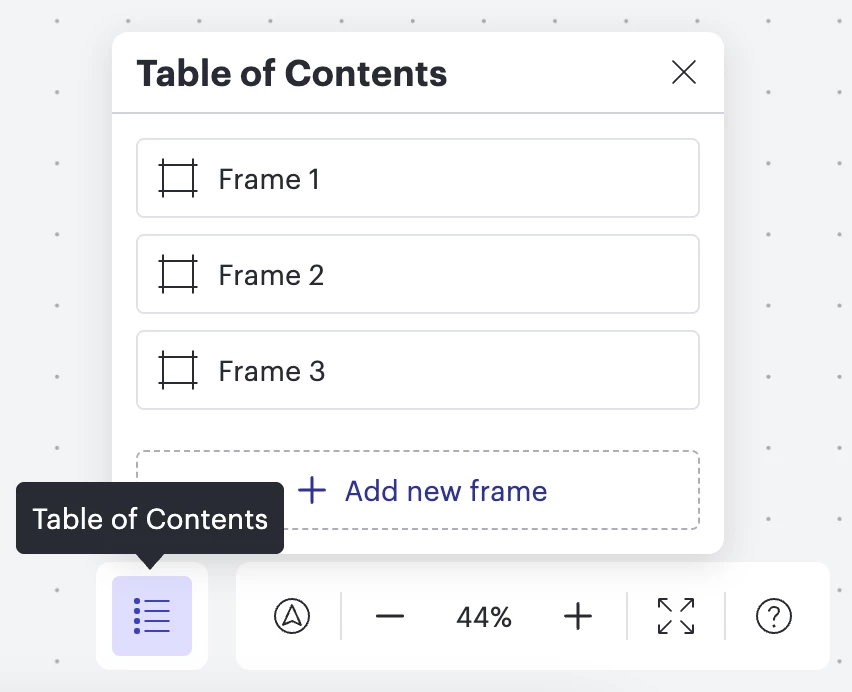
A quick clarification for other users who may come across this post- a table of contents is currently supported in Lucidspark in the bottom right hand corner of the canvas as shown below. To learn more I'd suggest this article. Unfortunately, this isn’t currently supported in Lucidchart.

For anyone else who is interested in seeing a table of contents supported in Lucidchart, I suggest upvoting this post. Your feedback is incredibly important to us, so we’d love to hear details on what you’d like to see in this thread. 

Comments

Addie
Forum|alt.badge.img+23
  • January 10, 2024

Hi @rvassilatos, thanks for your post! Unfortunately, an automatically generated table of contents isn’t currently supported in Lucid, though you can use the page tabs, or generate links to each page as you mentioned in your post. However, we’re very interested in your feedback and committed to continually improving our products. If you’re willing to share, we’d love to hear more details about your use case or what you’d like to see in this experience within this thread. I’ve also converted this post to an idea so that it’s visible to others within the Product Feedback section of the community - from here, they can upvote it and add details of their own.

Finally, for more information on how Lucid manages feedback via this community, take a look at this post:

To answer your second question, did you manually add these lines to your process map? If so, because they were added individually, they must also be individually edited or removed. If you created a diagram from a CSV import, please review this help center article to learn how to format your CSV to update your lines and re-import. 


Forum|alt.badge.img
  • February 23, 2024

I’d love to see this feature as well.


Micah
Forum|alt.badge.img+20
  • Lucid community team
  • February 26, 2024

Thanks, Amy! We’d love to hear any additional details about your use case or what you’d like to see in this experience, if you’re willing to share.


Forum|alt.badge.img+1
  • March 24, 2024

I would also love this feature.

A single document will have many diagrams in it for what I do. I manually create visual “maps” to the document on the first page.

what shape I want to use for my TOC depends on the diagram so,

worst case, I’d like to be able to autogenerate a new page that has boxes with links to all the other oages


best case, I’d be able to pick the shape used for those boxes, so if I am doing a UML activity diagram I can pick the right shape for a sub diagram link.


Micah
Forum|alt.badge.img+20
  • Lucid community team
  • March 26, 2024

This is great detail, @wittij, thank you so much!


Forum|alt.badge.img+3

I’d also like to add that I have many pages in my Lucidchart, and I have manually created a table of contents that link out to each page, but it is a pain to update all of the pages and links when a new page is added.


jonvalzjon
Forum|alt.badge.img

This seems like a fairly simple feature. Some example stories:

1. As a Lucidchart user, I want the ability to automatically generate a Table of Contents which lists the sheets in my document.
2. As a Lucidchart user, I want the ability to automatically generate a Table of Contents which lists the frames in my whiteboard.
3. As a Lucidchart user, I want the ability to automatically generate a Table of Contents which lists the frames in my whiteboard.

Let’s talk more about number 1.
It would be very helpful to eliminate friction for users. To assess value, you should get a report containing of all user-created pages, their document and count how many are titled “Table of Contents”, “TOC”, or equivalent. 

Each of those pages represents 10-20 minutes of manual creation of table, linking of tabs, and formatting.

If you extend the analysis to consider maintenance, I bet you add at least another 50% (15-30 min) of total user time.

tl;dr: It’s very annoying and this feature should be easy to prove value. Hopefully this is a compelling quick win compared to other prioriteis.


Ambar D
Forum|alt.badge.img+10
  • Lucid community team
  • July 14, 2025

Hi ​@jonvalzjon, thank you for adding to this thread with your feedback and for upvoting this post! I certainly understand why this is important and appreciate the time you took to tell us what you’re hoping to see!

A quick clarification for other users who may come across this post- a table of contents is currently supported in Lucidspark in the bottom right hand corner of the canvas as shown below. To learn more I'd suggest this article. Unfortunately, this isn’t currently supported in Lucidchart.

For anyone else who is interested in seeing a table of contents supported in Lucidchart, I suggest upvoting this post. Your feedback is incredibly important to us, so we’d love to hear details on what you’d like to see in this thread. 


john.a.lopez
Forum|alt.badge.img+11

the desired TOC would be a table, with attributes directly from the pages:
 

TOC

Where some attributes in the table come from default page metadata:
 

and others from page related metadata:
 

{{=page.'description'}}


A TOC table could be built with formular references such as:
{{=page(22).'description'}}


where the page is not the current one, but one referenced in the parenthesis …

while the above nomenclature does not result in an error it also does not work in referencing another page:


Ambar D
Forum|alt.badge.img+10
  • Lucid community team
  • December 30, 2025

Thank you ​@john.a.lopez for adding to this thread with your detailed feedback and these screenshots showing what you’d like to see here.