Idea

Custom data for automation potential in shapes

Related products:Lucidchart
  • February 27, 2026
  • 3 replies
  • 18 views

Forum|alt.badge.img+1

Hi all,

I am looking for ideas or best practice on how to introduce ‘Automation Potential’ custom data to my activity shapes. Idea is that users could update maps with indicators that might suggest that task could be automated.

Use case

  • Users can easily  update the shapes using a number of custom data fields
  • Ideally some fields would be customisable (drop down ideally, else radio button)
  • I an add some conditional formatting to highlight which shapes on a diagram are ‘Automation = Yes or Partial’
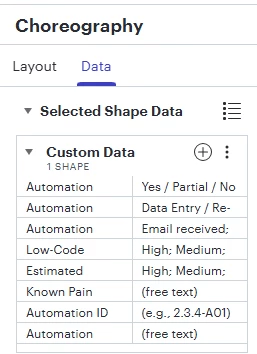
  • Some example fields below - probably too many in practice, but am playing with ideas
  •  

Challenges

  • I have 500+ processes already mapped, none of which have any custom data on the activity shapes - can I retrofit to these 500 maps somehow?
  • Can I make the fields drop down or similar?
  • Can users with read only access complete these fields?
  • I maintain a hierarchy in a excel spreadsheet of all 500 maps - ideally this would link and update with the custom fields (stretch target) i.e. so I can see the opportunities centrally, rather than having to look at single maps
  • Alternatively, could I export a list of all maps including the custom data to a spreadsheet?

If anyone in the community has something similar or al alternative idea I am all ears

Comments

alison cheney
Forum|alt.badge.img+4
  • Lucid community team
  • March 3, 2026

Hi ​@PeteMcClean,

Thank you for posting in the Lucid Community!

I have broken down your request to include what is currently possible and what is not currently supported in Lucid.

Here is a breakdown of what is currently ready for you to use in Lucid:

  1. You can add "Automation Potential" as a custom data field. By selecting all shapes on a canvas, you can add this field to every shape at once via the Contextual Panel.
  2. Conditional formatting is the perfect tool for your “Yes/Partial” indicators. You can set rules so that shapes change color or display icons automatically when the data field matches your criteria.
  3. You can export your shape data into a CSV file.
  4. If you are on an Enterprise Account, you can use data linking in Lucidchart to create powerful, data-driven visualizations by importing datasets from Google Sheets, Excel spreadsheets, and CSVs. You can also refresh or replace your datasets as you continue to make changes and need your diagram to reflect the most up-to-date information. If you are not on an Enterprise Account, you can import your data to create diagrams. If you make updates to your dataset, you can import the updated dataset and a new diagram will be created to reflect those changes.

Here is a breakdown of a few features you mentioned that are not currently supported in Lucid:

  1. There isn't a "one-click" way to inject data into 500 separate files simultaneously. However, you can speed this up by creating a Custom Shape Library with these fields already attached for future diagrams.

  2. Currently, data fields in Lucidchart are text-entry. There isn't a native "dropdown" or "radio button" selection menu within the data panel yet.

  3. Users must have Edit permissions to modify data fields. "View only" users cannot input data into shapes.

  4. Lucid's data linking is document-specific. Aggregating data from 500 separate files into one "Master sheet" automatically would likely require a custom solution using the Lucid API.

Although some of the features you mentioned aren't currently supported in Lucid, we’re very interested in your feedback and committed to continually improving our products. If you’re willing to share, we’d love to hear more details about your use case or what you’d like to see in this experience within this thread. I’ve also converted this post to an idea so that it’s visible to others within the Product Feedback section of the community - from here, they can upvote it and add details of their own. 

Finally, for more information on how Lucid manages feedback via this community, take a look at this post:


Forum|alt.badge.img+1
  • Author
  • March 3, 2026

Thanks ​@alison cheney. I shall review and digest. Much appreciated


alison cheney
Forum|alt.badge.img+4
  • Lucid community team
  • March 4, 2026

Hi ​@PeteMcClean,

It's my pleasure! Please don't hesitate to let me know if there is anything else I can do for you. Have a great rest of your day.