
Idea

Collapsing Parent Node Issue

  • April 11, 2024
  • 5 replies
  • 47 views

Forum|alt.badge.img+1

Hello, I have the below tree-branch structure with 2 parent cells, 4 child cells, and 1 grandchild cell. 
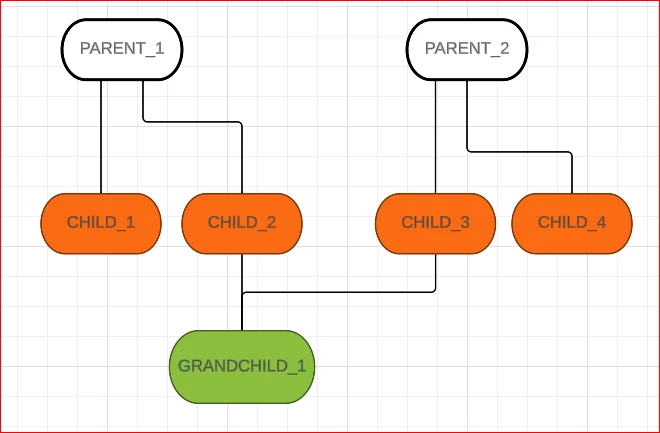

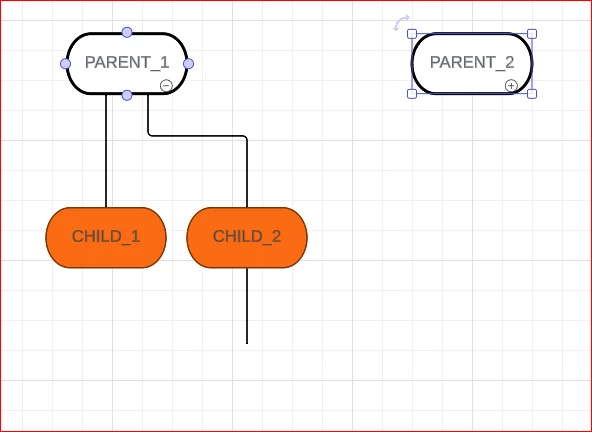
My problem occurs when I click on “PARENT_2” and collapse it, as it makes “GRANDCHILD_1” collapse as well (per below image).

I do not wish for “GRANDCHILD_1” to collapse, as it should still be visible within the “PARENT_1” tree-branch. 

Is there any workaround for this? 


Comments

Kelsey Gaag
Forum|alt.badge.img+16
  • Lucidite
  • April 12, 2024

Hi @Maxwell J , 

Thank you for posting in the Lucid Community! Did you use layers to create your collapsable chart? 


Forum|alt.badge.img+1
  • Author
  • April 12, 2024

Hi @knield , I did not use layers to create the collapsible chart. Would that help?

My understanding is that using layers would mean I’d have to create two “GRANDCHILD_1” nodes (one node on the PARENT_1 path and one node on the PARENT_2 path)?? 


Kelsey Gaag
Forum|alt.badge.img+16
  • Lucidite
  • April 12, 2024

Hi @Maxwell J,

Thank you for the reply! Yes, that is an option for creating your chart. I recommend following the directions in this Community Post about how to use layers to make a collapsable chart, if you’d like to use this method. This method will allow you to fully customize the flow of your diagram.

Alternatively, if you used a template, I’d be happy to take a look at the template to see if there is a solution in the template. If this is the case, can you provide a screenshot of the template you used? 


Forum|alt.badge.img+1
  • Author
  • April 12, 2024

Thank you @knield - I took a look at the documentation you sent, but I don’t think it would work for what I’m building. I’m using the “mind map” nodes to create a treebranch that can collapse / expand, as my data set is too large to use the layers + action keys combination.


Kelsey Gaag
Forum|alt.badge.img+16
  • Lucidite
  • April 12, 2024

@Maxwell J

Thank you for the reply! Unfortunately the functionality you are looking for currently does not exist within Mind Map. When the nodes from the Mind Map are collapsed, they collapse every attached node. 

However, we’re very interested in your feedback and committed to continually improving our products. If you’re willing to share, we’d love to hear more details about your use case or what you’d like to see in this experience within this thread. I’ve also converted this post to an idea so that it’s visible to others within the Product Feedback section of the community - from here, they can upvote it and add details of their own.

Finally, for more information on how Lucid manages feedback via this community, take a look at this post:

