May 6, 2025
Solved

Accessing a local extension in Lucidchart UI

  • May 6, 2025
  • 16 replies
  • 317 views

I’m running a local extension as instructed in https://github.com/lucidsoftware/sample-lucid-extensions/tree/main/asana, and want to access it in Lucidchart UI. I have turned on Developer > Load Local Extension; and the code seems to run fine
```

$ node bin/dataconnectors/debug-server.js 
Routing /?kind=action (Import, Patch, HardRefresh)
Listening on port 3001

```
But where do I find the extension in the Lucidspart UI so I can actually use it? I searched everywhere I can think of, and can’t find it :(

Best answer by Michael B

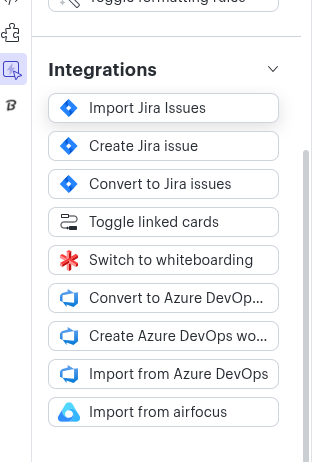
I have confirmed that Asana (and most Card Integrations) are Lucidspark only. The reason for the confusion is that you can build a Cards based integration that will show up in Lucidchart under the “quick tools” section (picture below). Additionally, if you have Enterprise and access to “Universal Canvas”, cards place on the Canvas in Lucidspark will continue to function when switching to Lucidchart. However, the Asana for Lucid Cards integration has not been updated to show in the “quick tools” menu.


I apologize for the confusion and am working now to update the marketplace listing to be accurate.


Comments

Michael B
Lucid product team
May 6, 2025

Hello Dagon, thank you for your question.


I am pulling the open-source Asana extension code myself and running it to ensure that my answer is correct. I’ll be in touch soon.

Michael B
Lucid product team
May 6, 2025

I have a few findings that might be affecting you. To your original question, when running correctly you should be able to find “Asana” at the bottom of “More Tools”.  In the below picture, I expect it will show where you see “Smartsheet” above “Search Marketplace”. Once you have selected it, it will appear in the list to the left. Notice I have two Asana. One is the Marketplace installed version and the other is me running it locally.


However, I fear you are affected by a bug I found while loading the extension. You should have two processes running; the extension and the dataconnector, You posted the dataconnecor process (with corrected path as the documentation is wrong), and one for the extension itself.  When I attempted to run the extension, I got the following error: 

mbowers@mbowers:~/github/sample-lucid-extensions/asana$ npx lucid-package test-editor-extension asana

Listening at http://localhost:9900/extension.js
Listening at http://localhost:9901/shapeLibraries

Error running Lucid Suite Extension CLI Error: manifest.json: Data connector "callbackEvents" must be a record from strings to strings

After some research I found the cause of the error and am working on a solution. In the meantime, you can fix this issue by adding “callbackEvents” to your manifest.json  data-connector:


    "dataConnectors": [
{
"name": "asana",
"oauthProviderName": "asana",
"callbackBaseUrl": "http://localhost:3001/?kind=action",
"dataActions": {
"Import": "",
"Patch": "",
"HardRefresh": ""
},
"callbackEvents": {}
}
]

With that change, the error should go away, both processes will run, and you’ll see the Asana icon become available.  I look forward to hearing if this resolves the issue and am working on both a fix to the error and updating the inaccuracies in the Asana extension README


Michael B
Lucid product team
May 6, 2025

..You may encounter more issues like below. I am researching them now:


ERROR in /home/mbowers/github/sample-lucid-extensions/asana/editorextensions/asana/src/asanacardintegration.ts
28:13-33
[tsl] ERROR in /home/mbowers/github/sample-lucid-extensions/asana/editorextensions/asana/src/asanacardintegration.ts(28,14)
TS2415: Class 'AsanaCardIntegration' incorrectly extends base class 'LucidCardIntegration'.
Property 'userSearchCallback' is private in type 'AsanaCardIntegration' but not in type 'LucidCardIntegration'.


Michael B
Lucid product team
May 7, 2025

Turns out I had a local version of node running that was conflicting with the extension node. You should not see errors like the ones I did.

DagonAuthor
May 7, 2025

Thanks for the prompt reply and the help!
The screenshot you show looks like Lucidspark, I am looking to find the extension in Lucidchart UI.

Here’s what I see in the Lucidchart UI - where do I find the integration?

Also, is Team subscription enough to be able to see it? I’d have thought so, since the Developer extension is available in the Lucidchart UI and the Developer functionality is promised in the feature matrix when choosing my tier, but I see eg the Marketplace Asana→Lucidspark extension says it needs Enterprise.

Michael B
Lucid product team
May 7, 2025

Glad to hear that I over-complicated a simple question. I have confirmed that I also do not see Asana in the Lucidchart UI and am working with our internal teams to understand why.


The Asana Cards Integration is Enterprise only if installed from the marketplace. Running the open source extension should only requires access to the Developer Portal, which Teams have.

Michael B
Michael BAnswer
Lucid product team
May 7, 2025

I have confirmed that Asana (and most Card Integrations) are Lucidspark only. The reason for the confusion is that you can build a Cards based integration that will show up in Lucidchart under the “quick tools” section (picture below). Additionally, if you have Enterprise and access to “Universal Canvas”, cards place on the Canvas in Lucidspark will continue to function when switching to Lucidchart. However, the Asana for Lucid Cards integration has not been updated to show in the “quick tools” menu.


I apologize for the confusion and am working now to update the marketplace listing to be accurate.


DagonAuthor
May 7, 2025

Thanks a lot! 

Are there any working examples of a data integration code with Lucidchart?

I am looking to build an integration between Linear and Lucidchart, representing issue hierarchies as mind maps with two-way sync, and could really use some example code to get started:)

Michael B
Lucid product team
May 7, 2025

I think the only available example we have with two way sync is https://github.com/lucidsoftware/sample-lucid-extensions/tree/main/todoist


I am a bit nervous, as that is one of our older examples and I haven’t worked with it personally. But, it does contain two-way sync logic and hopefully provide some guidance on getting the basics setup.

DagonAuthor
May 7, 2025

Thanks! That one is also lucidspark however. Are there any examples that show something, anything, in the Lucidchart UI?