May 6, 2025
Solved

Accessing a local extension in Lucidchart UI

  • May 6, 2025
  • 16 replies
  • 317 views

I’m running a local extension as instructed in https://github.com/lucidsoftware/sample-lucid-extensions/tree/main/asana, and want to access it in Lucidchart UI. I have turned on Developer > Load Local Extension; and the code seems to run fine
```

$ node bin/dataconnectors/debug-server.js 
Routing /?kind=action (Import, Patch, HardRefresh)
Listening on port 3001

```
But where do I find the extension in the Lucidspart UI so I can actually use it? I searched everywhere I can think of, and can’t find it :(

Best answer by Michael B

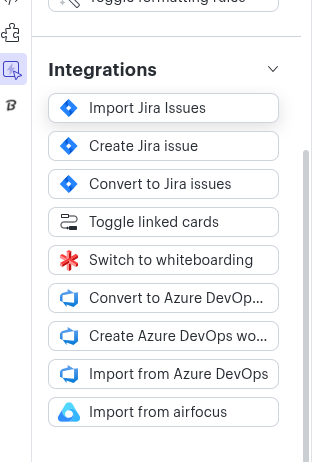
I have confirmed that Asana (and most Card Integrations) are Lucidspark only. The reason for the confusion is that you can build a Cards based integration that will show up in Lucidchart under the “quick tools” section (picture below). Additionally, if you have Enterprise and access to “Universal Canvas”, cards place on the Canvas in Lucidspark will continue to function when switching to Lucidchart. However, the Asana for Lucid Cards integration has not been updated to show in the “quick tools” menu.


I apologize for the confusion and am working now to update the marketplace listing to be accurate.


Comments

Michael B
Lucid product team
May 8, 2025

Ah yes, I still am in the old habit of thinking of “Lucidchart” as the company instead of a distinct product. This example integration https://github.com/lucidsoftware/sample-lucid-extensions/tree/main/data-connector-example works in both Lucidspark and Lucidchart. You can see in the README an example of going to the extension menu to start the import flow.

DagonAuthor
May 9, 2025

Thanks! Followed the instructions at that link precisely; when I run both parts, and open Lucidchart UI, the Extensions > Data Connector Example > Import menu is there, but when I click on it, nothing happens, in particular no OAuth confirmation dialog. How do I debug this?
Thanks again for all your help!

Michael B
Lucid product team
May 9, 2025

Hmm,  do you see anything in the browser console? My guess would be that there is an oauth2 configuration setup error and the request is failing.

A few ideas off the top of my head that I often miss:

  1. Does your oauth2 client have the correct redirect enabled? It should be: https://extensibility.lucid.app/packages/YOUR_APPLICATION_ID_FROM_THE_URL/oauthProviders/lucid/authorized
  2. Do you have a credentials file with the clientId and secret next to your manifest.json?


DagonAuthor
May 12, 2025

Hmm, after a reboot and restart of everything, it works like a charm! And I’m not even on Windows :)
Thanks a lot for all your help, now will go ahead and try to build the integration I want.

Michael B
Lucid product team
May 12, 2025

Fanastic! Good luck on your build; hopefully it goes smoothly from here.

DagonAuthor
December 15, 2025

Sorry for disappearing! In the end I just did Lovable/Claude Code and built what I wanted as a standalone app, check it out at visualproject.ai - more flexibility and less cost ;)