
Introducing the C4 shape library!
We’re excited to announce that Lucidchart now has an official C4 shape library.
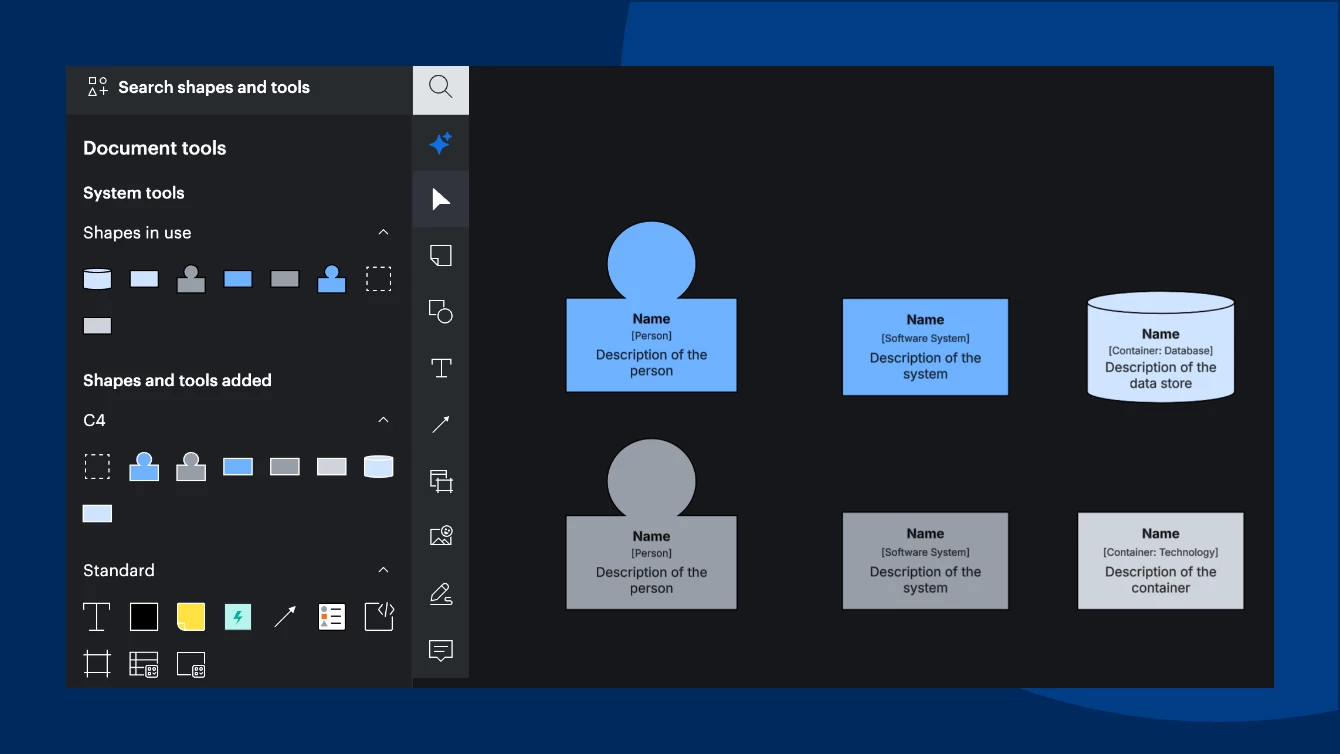
What is it? This shape library includes the core C4 shapes: Person, Software System, Container, Database, Component, and a boundary box. Each shape has spots for a name, type, and description, with color functionality to help distinguish or group shapes by system. Before, you had to start from a C4 template or restyle generic shapes by hand. Now you can drag C4 shapes into any document.
How to turn it on: Click the search icon in the upper-left corner, select Shapes, then Browse all shapes (or press M). Check C4 and click Use selected shapes. In the classic editor, click More shapes at the bottom of the Shape menu.
💡 Quick notes:
- The library covers the Context, Container, and Component levels. For code-level diagrams, use the UML shapes.
- Person and Software System come in internal and external versions. For other shapes, change the color manually.
Ready to try it?
- 👉 Check it out in Lucidchart
- 📚 You can also learn more about our C4 template or Shape libraries in Lucidchart
Tell us about your experience and what you'd like to see next in the comments below.
Tags: #C4, #ShapeLibraries, #SoftwareArchitecture, #ProductUpdate
 Your privacy choices


