Carlos L101
January 25, 2023

How can we Delete / Hide the John Doe's in a Shared Team Folder

  • January 25, 2023
  • 8 replies
  • 88 views

Hi

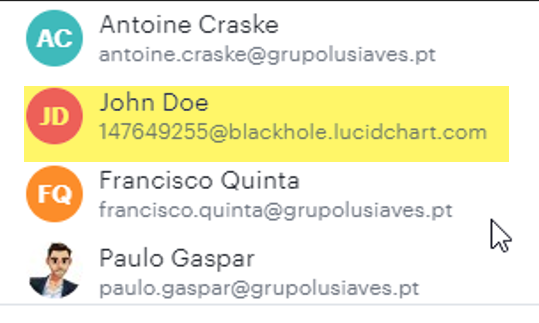
For deleted accounts the shared folder maintain this type of records of John doe

By the time passes we have many John Does in this view how can we clean it ?
    Comments

    Addie
    January 25, 2023

    Hi Carlos 

    Thank you for posting in the Lucid Community! As part of our internal process we permanently delete the personal data of deleted users and their emails are updated to the John Doe format. For more information on this please review our Privacy and Security article from the Lucid Help Center.

    A deleted account showing up as shared on a file or folder is not intended behavior and this has been reported to our development team. As a workaround you can remove this user from the list of collaborators on those documents/folders. I'll keep this thread updated with any developments. 
     
    Apologies for the inconvenience -- let me know if you have any additional questions or concerns.

    Addie
    Carlos L101
    January 26, 2023

    Thanks for the feedback.

    In term of that workaround I see these users in manage colaborators but its wrong because appear 28 users
    and I checked that are 20real users and 8 john doe's
    I Can't delete any john doe's

    Addie
    January 26, 2023

    Hi Carlos

    Thanks for your response! After taking a look at this you're right - it looks like this bug also affects the ability to remove deleted accounts labeled "John Doe" from team folders. My apologies for the inconvenience here. I've reported this to our development team and will keep you posted in this thread with any updates!

    Addie
    Carlos L101
    February 14, 2023

    Hi

    Any update on this issue?

    Addie
    February 14, 2023

    Hi Carlos 

    Thanks for following up - I don't have any updates but I will post in this thread once there is news on this bug. Our development team has to rigorously prioritize what to work on based on the extent and criticality of the issue. Because of this it is not likely that this issue will be resolved quickly. I apologize for any disruption this may cause - please let me know if you have any additional questions!

    Addie
    Addie
    March 31, 2023

    Hi Carlos 

    Good news! It looks like this bug has been resolved. Please let us know if you have any additional questions! 

    Addie
    Carlos L101
    March 31, 2023

    Thanks a lot!

    Keep up the good work

    Addie
    April 3, 2023

    Hi Carlos 

    No problem! Thanks for you patience as we worked to resolve the issue 🤝

    Addie