

Exciting update to comments on sticky notes! 🙌🏽
Exciting update to comments on sticky notes! 🙌🏽
What’s new?
If you’ve authored a sticky note, you’ll now receive a notification when someone comments on it, even if they haven’t directly mentioned you in the comment @author.
Why did we make this change?
Collaboration moves fast! Important feedback can easily get lost if a teammate forgets to tag you. Now with this new notification, you’re always looped into the conversation surrounding your own ideas and contribution. No need for manual check-ins!
How do notifications work?
The author that is displayed on the sticky note will receive the notification.
Even if your sticky note is copy/pasted by another user, if you’re shown as the author the sticky note, you’ll receive the notification.
Let’s take a look at this with an example! ⤵️
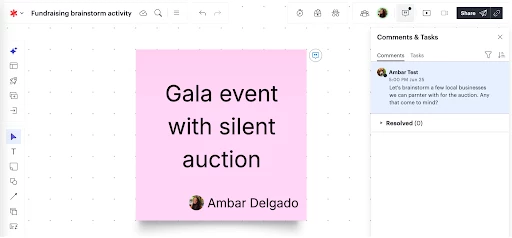
Let’s say you’re on a marketing team brainstorming fundraising events. You have an idea for a gala event with a silent auction, which you add to a sticky note.
A few days later, you’ve moved on to other projects and your mind is on other urgent tasks. You open Lucid to see a notification in the top-right hand corner of your home page, and click View comment to open the document.
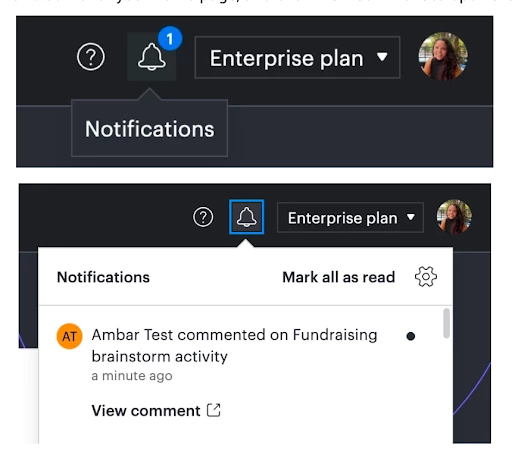
You can also see from within your document that a new comment has been added. Someone liked your idea and wants to collaborate! You jump into the thread and start discussing next steps.
No follow-ups, no pings, no ‘just checking in’- just smooth collaboration.
Can I turn off this notification?
Yes, you can disable these notifications from within your user or document settings. Read this article to learn more about notification settings in Lucid!
Interested in learning more?
Check out the Add comments and assign tasks to collaborators article from the Lucid Help Center.
Let us know what you think in the comments below!
 Your privacy choices


