
A Deeper Look: IP Allowlisting for Lucid’s Public REST API
A Deeper Look: IP Allowlisting for Lucid’s Public REST API
We’re excited to introduce a new security control to help admins manage where requests to Lucid’s public REST API can originate: Public REST API IP allowlisting. This opt-in control extends the pre-existing IP allowlist control to API access, and is available to customers with Enterprise Shield.
What is it?
Public REST API IP allowlisting lets admins restrict API access to approved IP addresses or ranges. For example, your corporate VPN or the outbound IP addresses of servers running your organization’s automations.
This control offers protection against “token replay attacks”, where an attacker steals an OAuth token and tries to use it to access user data. With IP allowlisting enabled, API requests will require both a valid authentication method and an originating IP that matches against the configured allowlist.
How does it work?
When this control is enabled, Lucid checks the originating IP address against the allowlist configured for the account associated with the credential. If the address is outside the approved ranges, Lucid rejects the request with a 403 FORBIDDEN response indicating that the IP address is not allowed. Existing permissions still apply: an allowed IP address does not give a credential additional scopes, grants, or access to documents.
Note: This control only applies to direct requests, and requests from third-party integrations. First-party integrations (integrations published by Lucid Software in our integrations marketplace) are exempted from this restriction. Our MCP also is exempted from this restriction, and has its own dedicated IP allowlist control (described here).
How admins configure it
In the admin panel:
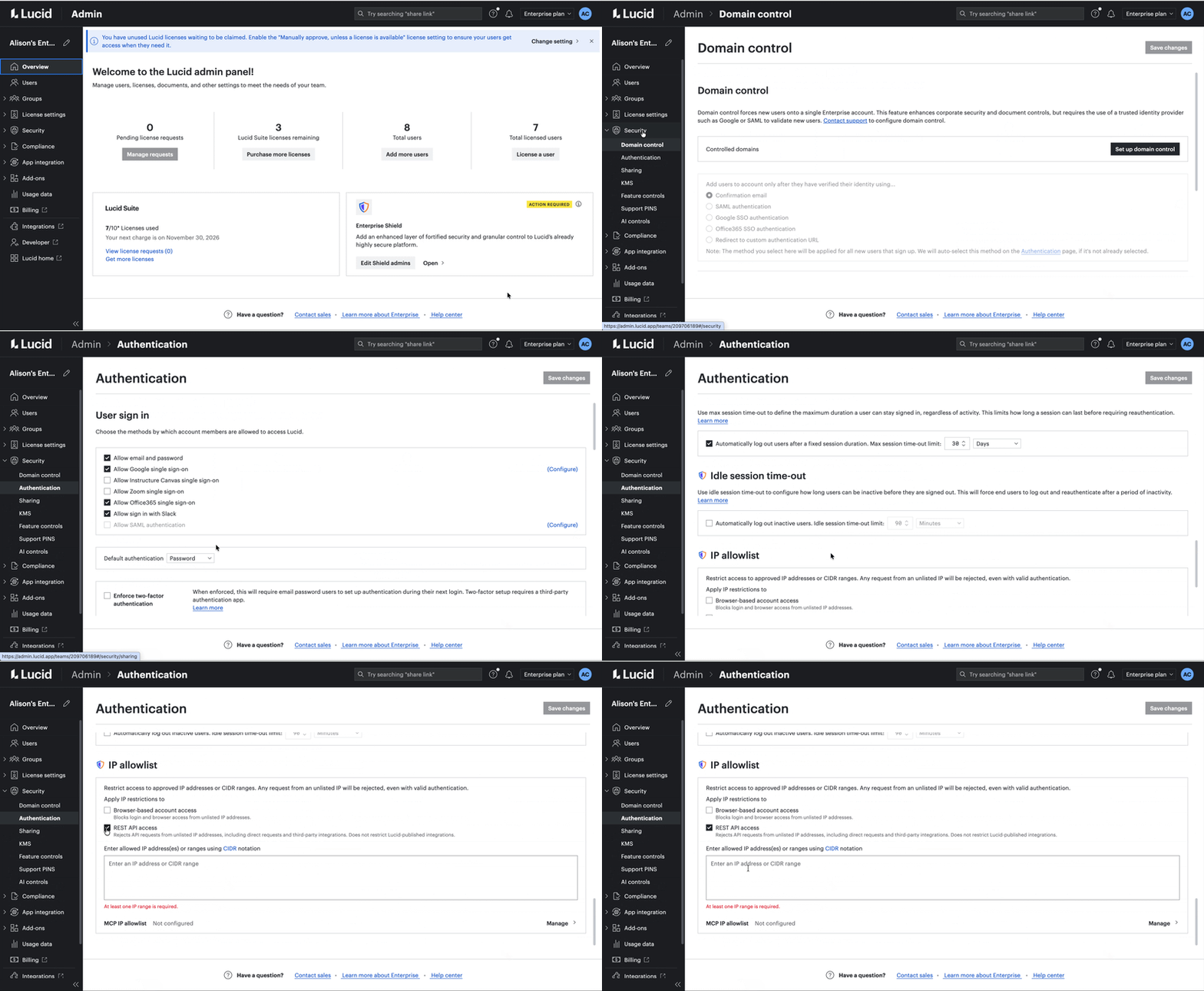
- Open Security -> Authentication and find the IP allowlist section.
- Select the “REST API access” checkbox
- Enter the approved IP ranges, separated by new lines, using CIDR notation.
- Note: the saved allowlist is shared with the user login control. See more details below.
- Save your changes.
We recommend testing your integrations and automations after saving.
Which IP addresses belong on the list?
The address Lucid sees depends on where the request is made. It may differ from the address of a user's personal machine. Requests may come from any of the following (not an exhaustive list), and may require you to provide additional ranges to cover the originating IP:
- Scripts running on employee machines
- Automations running on cloud infrastructure
- Third-party integrations: Requests may originate from the integration provider’s servers. You may need to add the provider’s published outbound IP ranges.
How this interacts with login IP allowlisting
Browser login and REST API access have separate enable settings but share the same IP allowlist.
You can restrict browser login, REST API access, or both. When both settings are enabled, changes to the shared list affect both types of access.
How this interacts with MCP IP allowlisting
Lucid’s MCP IP allowlist is a separate control with a separately maintained list. Enabling REST API IP allowlisting does not enable MCP IP allowlisting, and changes to one list do not affect the other.
Considerations and limitations
- Address maintenance: Your infrastructure and integration providers may change their outbound IP addresses. In these cases, the allowlist will need to be updated to avoid access interruptions.
- Shared infrastructure: An approved IP range may be used by multiple customers of a cloud provider. IP allowlisting does not establish that a request came from your organization’s specific device.
- Token-replay attacks remain possible from approved networks: A stolen credential can still be used from a compromised device within an approved range. Continue to employ secure sanitization practices for credentials.
 Your privacy choices


