I took a look into your account and can confirm that MCP access is currently disabled. Admins and the Account Owner on your Enterprise account can control whether or not users have access to MCP features.
I’d recommend reaching out to your Account Owner or an Account Admin to see if they would be willing the enable MCP access for the account. You can locate them via your account settings page. Please navigate to Account Settings > Plans & Billing > Contact List. Check out this Community Post for more detailed instructions.
Here’s how to adjust these settings within the Admin Panel:
In your Lucid account, open the Admin panel.
Click Security in the left-side menu.
Select Feature controls.
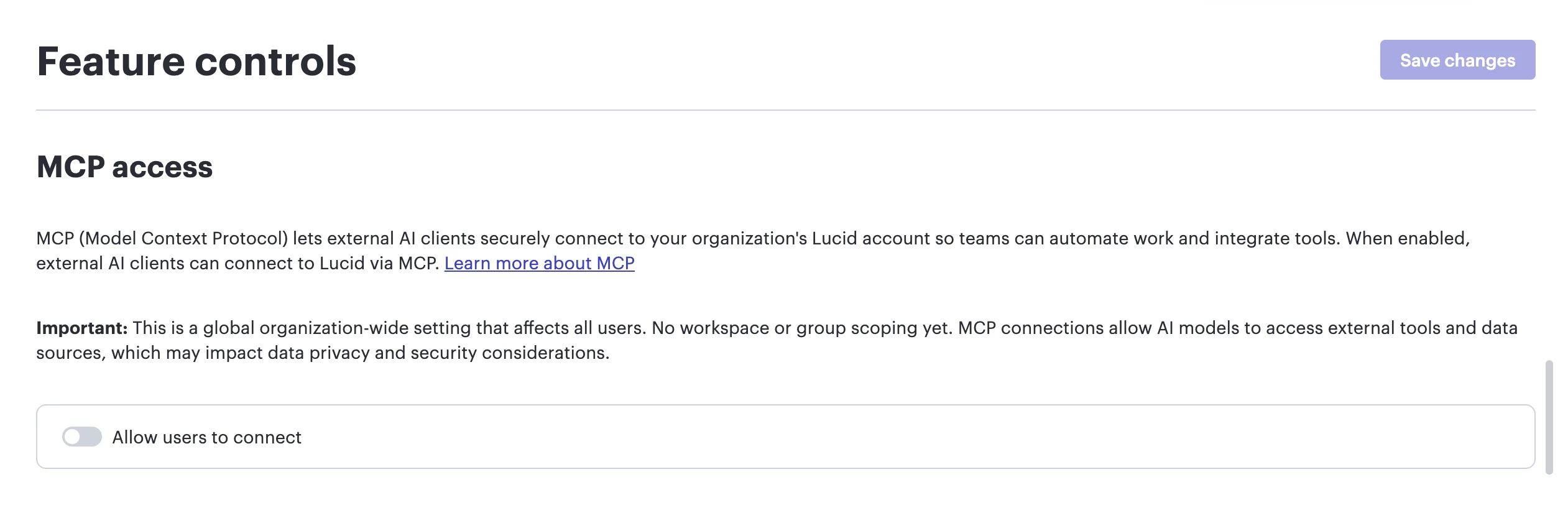
Under MCP access, use the toggle next to Allow users to connect.
Click Save changes in the upper-right corner.
I appreciate your help and understanding. Please let me know if you have any additional questions.
I took a look into your account and can confirm that MCP access is currently disabled. Admins and the Account Owner on your Enterprise account can control whether or not users have access to MCP features.
I’d recommend reaching out to your Account Owner or an Account Admin to see if they would be willing the enable MCP access for the account. You can locate them via your account settings page. Please navigate to Account Settings > Plans & Billing > Contact List. Check out this Community Post for more detailed instructions.
Here’s how to adjust these settings within the Admin Panel:
In your Lucid account, open the Admin panel.
Click Security in the left-side menu.
Select Feature controls.
Under MCP access, use the toggle next to Allow users to connect.
Click Save changes in the upper-right corner.
I appreciate your help and understanding. Please let me know if you have any additional questions.
A Lucid or airfocus account is required to interact with the Community, and your participation is subject to the
Supplemental Lucid Community Terms.
You may not participate in the Community if you are under 18. You will be redirected to the Lucid or airfocus app to log in.
A Lucid or airfocus account is required to interact with the Community, and your participation is subject to the
Supplemental Lucid Community Terms.
You may not participate in the Community if you are under 18. You will be redirected to the Lucid or airfocus app to log in.

 Your privacy choices


