Solved

Lucid Org Chart Printing Error

  • March 30, 2026
  • 3 replies
  • 13 views

Forum|alt.badge.img+1

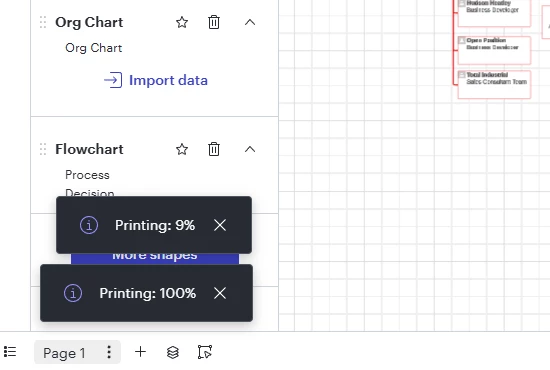
I am experiencing an issue when attempting to print my organizational chart from Lucid.  It gets stuck during the print loading process.  I have reset cookies and site permissions and am still experiencing the same issue.

Please see the snapshot below.  It remains stuck on that screen.  I have tried multiple browsers and restarted my computer with no success.


Best answer by aishakhan

Hi ​@nancrum,


Thanks for posting in the Lucid Community!

Just to make sure that we are on the same page, please review our Export or print a Lucid document article from the Lucidchart Help Center. Let me know if you have any questions about how downloading/exporting your document should work.

 Once you have reviewed this article, here are some specific things to check when exporting your document:

  •  Try the export in a Chrome Incognito browsing session. This often improves performance by clearing your cache and cookies and disabling your extensions.

  • Sometimes issues like this can be related to internet connection speed or network security. Please try the export again on another network, ensuring that you are on a strong, stable connection.

If none of these tips help, would you mind sending me the following details so I can take a closer look at the issue? 

  • A description of the download settings (file type, document pages, cropping, quality, etc.) that you selected for the download.

  • Could you share a temporary Document Support PIN for this document? This PIN is safe to post in this thread because it is only accessible by members of the Lucid support staff. You can find steps for generating a Support PIN in this Lucid Help Center article: Generate a Lucid Support PIN.

 Feel free to let me know if you have any further questions. Thanks for your help and patience!

Comments

Forum|alt.badge.img+4
  • Lucid support team
  • Answer
  • March 31, 2026

Hi ​@nancrum,


Thanks for posting in the Lucid Community!

Just to make sure that we are on the same page, please review our Export or print a Lucid document article from the Lucidchart Help Center. Let me know if you have any questions about how downloading/exporting your document should work.

 Once you have reviewed this article, here are some specific things to check when exporting your document:

  •  Try the export in a Chrome Incognito browsing session. This often improves performance by clearing your cache and cookies and disabling your extensions.

  • Sometimes issues like this can be related to internet connection speed or network security. Please try the export again on another network, ensuring that you are on a strong, stable connection.

If none of these tips help, would you mind sending me the following details so I can take a closer look at the issue? 

  • A description of the download settings (file type, document pages, cropping, quality, etc.) that you selected for the download.

  • Could you share a temporary Document Support PIN for this document? This PIN is safe to post in this thread because it is only accessible by members of the Lucid support staff. You can find steps for generating a Support PIN in this Lucid Help Center article: Generate a Lucid Support PIN.

 Feel free to let me know if you have any further questions. Thanks for your help and patience!

Forum|alt.badge.img+1
  • Author
  • April 1, 2026

Thank you.  I was able to print to pdf in a completely separate Google Profile/Browser, which tells me it’s something tied to my primary G-Chrome browser.


Forum|alt.badge.img+4
  • Lucid support team
  • April 2, 2026

Hi ​@nancrum,

Thanks for following up! Sometimes browser extensions can interfere, so glad to hear that a separate browser resolved this issue. Feel free to follow up here if anything else comes up.