

Admin Resource
License requests: redirecting users to a service desk
When adjusting your license settings in the admin panel, you’ll choose between two options:
- Manage license requests within the Lucid Admin Panel
- Redirect users to a service desk to submit license requests
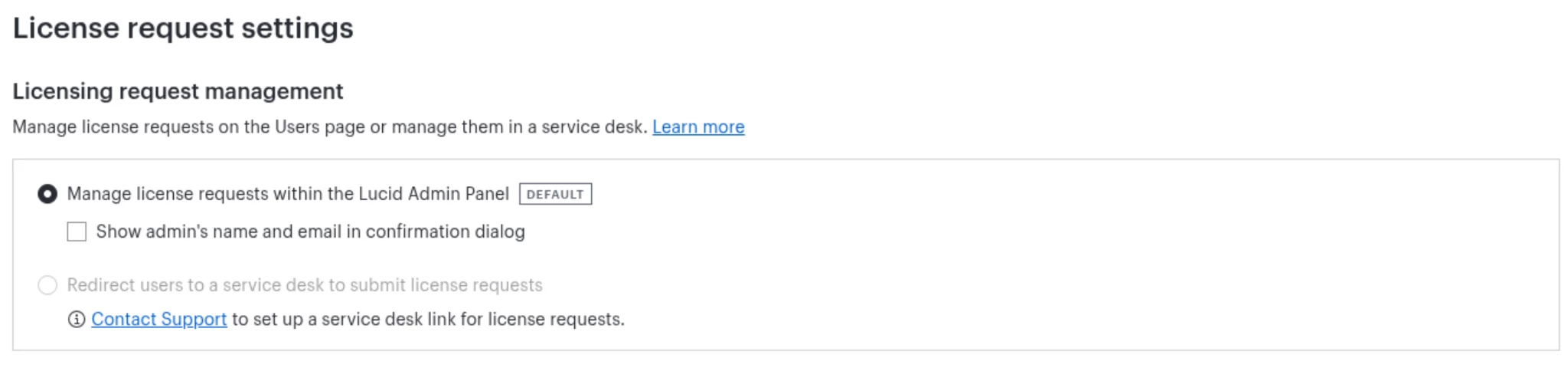
If you’re interested in the service desk option, continue reading to learn more. ⏬
Setting up a service desk for the first time
If you’d like to manage license requests outside of the Lucid Admin Panel, and redirect users to a service desk instead, please navigate to this article to contact support.
Include the following information in your request:
- The URL with the service desk you’d like to use.
If you already have a service desk set-up
If your account already has a service desk set up, there are a few specific items to note:
- The license request button can not be removed.
- Pending license requests appear within Lucid even if licensing is handled in a different system.
- Once a user is granted a license, the pending license request is resolved automatically within Lucid. If a user is denied a license, the change will not be reflected in the admin panel unless you manually deny it there.
To learn more about license settings in the admin panel, check out this article from the Lucid Help Center - Lucid admin panel: License settings.
 Your privacy choices


