
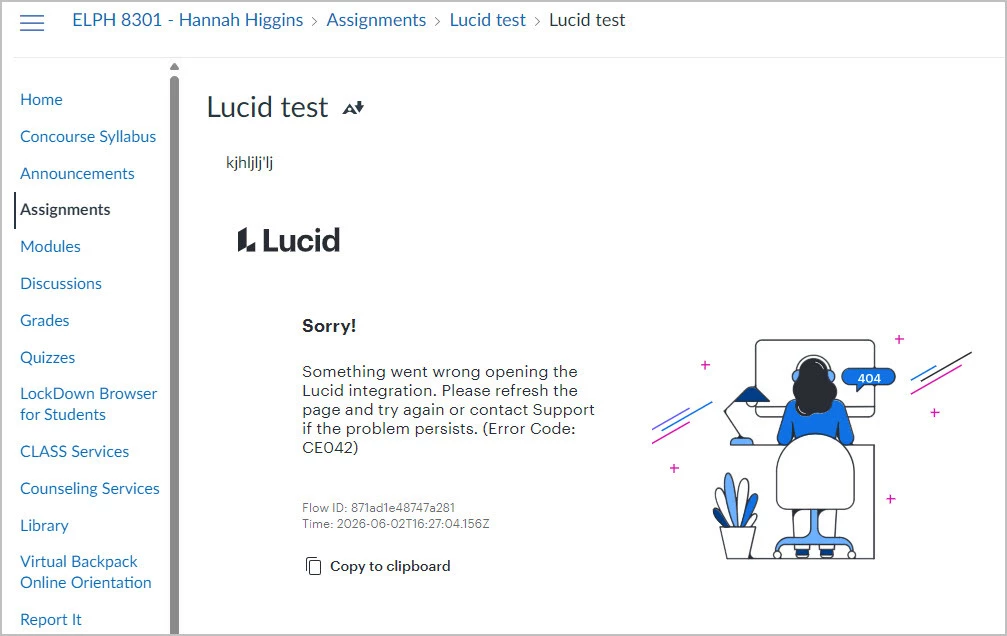
Error Code: CE042 - Something went wrong opening the Lucid integration.

  • June 2, 2026
  • 7 replies
  • 56 views

Forum|alt.badge.img+1

Hello All, 

This error appears after adding Lucid as an assignment submission type in Canvas LMS. What can we do to fix this?
Please let me know if I can provide additional information to assist with this question.

Thanks!

Hannah Marie


Comments

Forum|alt.badge.img+4
  • Lucid support team
  • June 2, 2026

HI ​@HannahMarie,


Thank you for posting in the Lucid Community! As a first step, would you mind enabling 3rd party cookies and then trying again? Please take a look at this article for information on how to do this. If this doesn't solve the problem, could you please try opening a private/incognito window and trying again? 


If the issue persists, can you please send the following information:

  • Could you confirm if the issue persists on an alternate browser?
  • Could you confirm if you are following the steps listed here?
  • Could you send a screenshot of the associated Javascript Console output? You can open your Javascript Console by pressing Ctrl + Shift + J (if your computer is a Windows / Linux) OR Cmd + Opt + J (if your computer is a Mac).


This will help us investigate this further. Thanks!


Forum|alt.badge.img+1

Hello ​@aishakhan,


Thanks for your response, and the issue persists. Following the information you shared, here are the steps I took to troubleshoot so far:

  1. Enabled third-party cookies in Google Chrome browser - got the same error
  2. Opened an incognito window and created an entirely new assignment following the guide you shared - got a different error: CE014-02
  3. Switched to Firefox - did not get an error, but the Lucid app did not load and is displaying a red folder icon

Here is the Javascript as requested. I appreciate your help!


Thanks,

Hannah Marie


Forum|alt.badge.img+1

Hello ​@aishakhan,

Have you had a chance to take a look at the Javascript? Please let me know if you need any additional information.

Thanks!
Hannah Marie


Forum|alt.badge.img+4
  • Lucid support team
  • June 3, 2026

Hi ​@HannahMarie,


Thank you for the details! Can you please provide a screenshot of the CE014-02 error message you see in an incognito window?


Forum|alt.badge.img+1


Forum|alt.badge.img+1

Hi ​@aishakhan,

FYI, I just removed the dates from my test course and now the error is no longer appearing. I will check the actual course within the term to see if the CE042 error is still appearing there. 

Thanks,


Forum|alt.badge.img+1

Hi ​@aishakhan,

We tested again and successfully created the Lucid assignment in Canvas. Would you please provide some information about how dates in Canvas affect Lucid?

Thank you!
Hannah Marie