Solved

Company sharing missing in Slack integration

  • July 29, 2026
  • 2 replies
  • 179 views

We used to be able to share LucidChart’s with our whole organisation, but now only get a list of slack channels without the organisation option available.


Does anyone know why this is and how to resolve it? I have attached screenshots of what we used to see and what we now see.
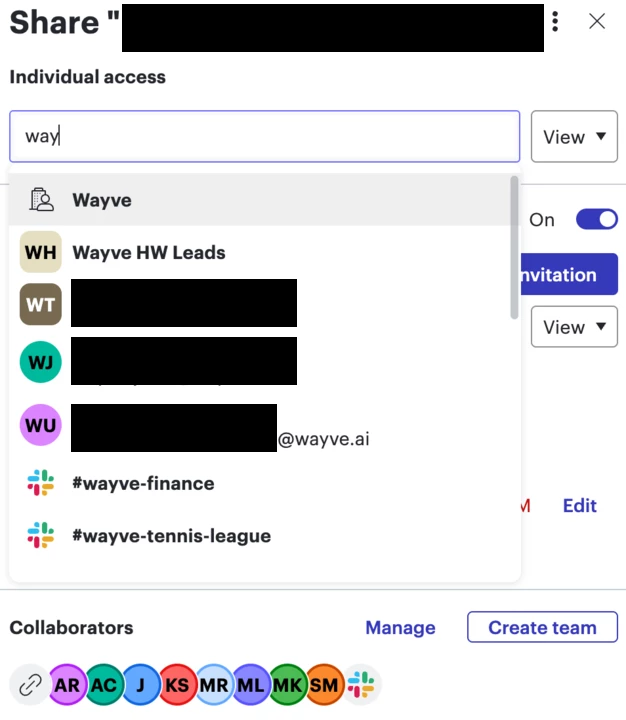
This was before (with the slack integration on) 
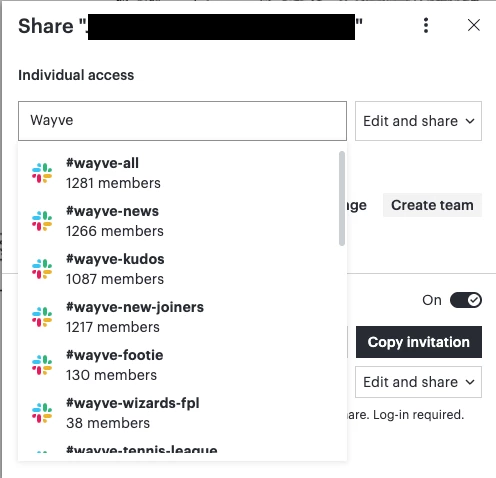
 

This is what we currently see.

Best answer by Humas1985

Hi ​@will.jackson 

Since the Slack integration uses Lucid's existing sharing permissions, if you're still able to share to Slack channels but no longer see the option to share with your entire organization, it's likely that your account or workspace sharing settings have changed.

Kindly check with your Lucid account admin to verify whether organization-wide sharing is still enabled under your account's security and sharing settings

To learn more - What are the sharing permissions for "any logged in user" via shareable link in Lucid? | Community

Hope this helps !!

Comments

Humas1985
Lucid Legend Level 10
Forum|alt.badge.img+24
  • Lucid Legend Level 10
  • Answer
  • July 31, 2026

Hi ​@will.jackson 

Since the Slack integration uses Lucid's existing sharing permissions, if you're still able to share to Slack channels but no longer see the option to share with your entire organization, it's likely that your account or workspace sharing settings have changed.

Kindly check with your Lucid account admin to verify whether organization-wide sharing is still enabled under your account's security and sharing settings

To learn more - What are the sharing permissions for "any logged in user" via shareable link in Lucid? | Community

Hope this helps !!


Zuzia S
Forum|alt.badge.img+10
  • Lucid community team
  • August 5, 2026

Hi ​@will.jackson, thanks for posting in the Community and thank you ​@Humas1985 for chiming in!

@will.jackson could you share a Technical Support PIN for your account? This will help me take a closer look at what’s going on. This PIN is safe to post in this thread because it is only accessible by members of the Lucid support staff. You can find steps for generating a Support PIN in this  Help Center article .

I appreciate your help and patience!