
Visio Stencil not loading after successful importing/uploading shape

  • December 1, 2025
  • 1 reply
  • 17 views

Forum|alt.badge.img+1

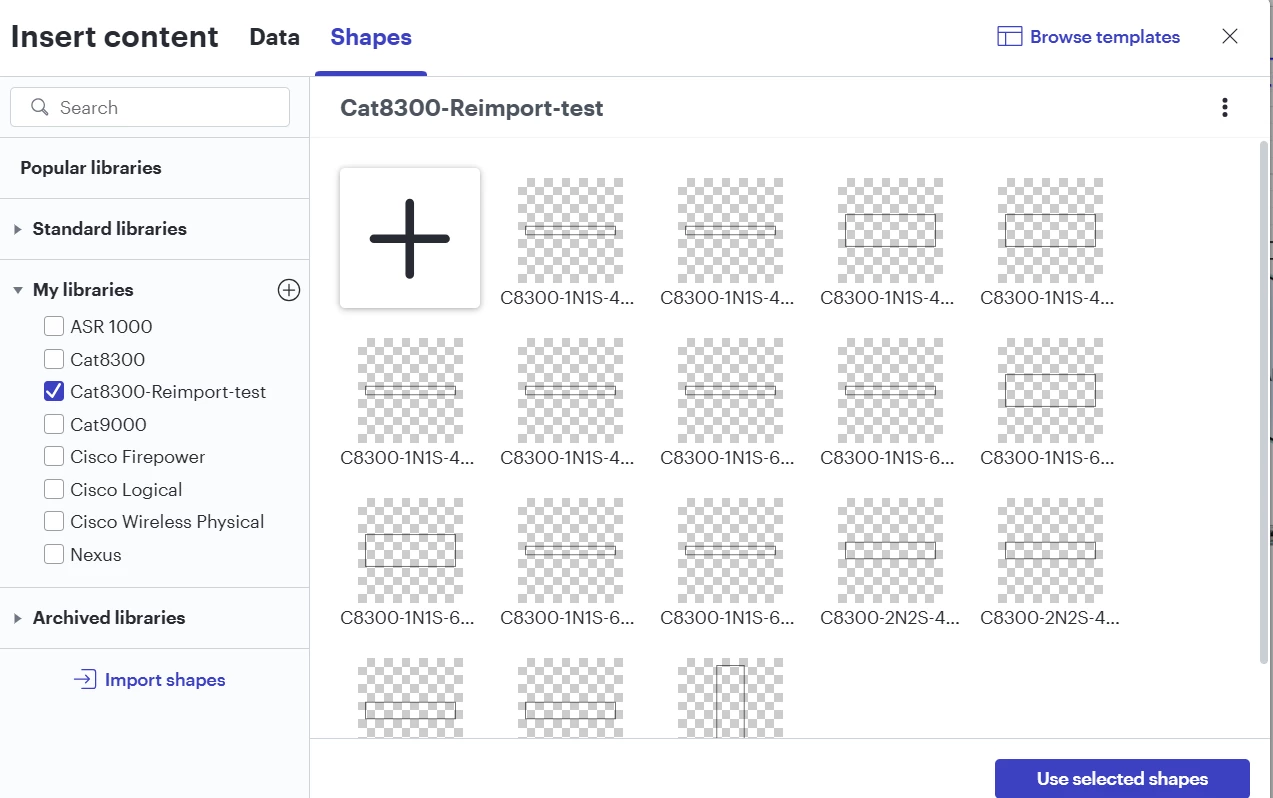
I’m trying to import shape from Cisco Visio Stencil but something on Lucid seems to have changed where the shapes no longer fully load after a successful upload.

The same Cisco Visio stencils that I am still using and know is working no longer works as well when I tried to re-import them as a test. I’ve uploaded vss and vssx files in the past without any issues. I’ve also waited for a while in case they just needed time to upload but to no avail. I’ve also tried uploading using edge, chrome, firefox, and incognito/private but still no luck.

Anyone else having the same issue? 


Example of re-import of a vss file that is not loading the shapes properly:

Confirmed Working vss that I uploaded/imported months ago:


Comments

Ambar D
Forum|alt.badge.img+10
  • Lucid community team
  • December 2, 2025

Hi ​@ipvrey, thanks for posting in the Lucid Community! Sorry you’re having trouble here, but I’m happy to help. 

I can see that shape image previews within your CAT8300-Reimport-Test shape library show up incorrectly. If you select ‘use selected shapes’ and try dragging them onto a board, do they still appear the same or do you see the correct image?

Could you share a temporary Document Support PIN for this document? This will help me take a closer look at what’s going on. This PIN is safe to post in this thread because it is only accessible by members of the Lucid support staff. You can find steps for generating a Support PIN in this Lucid Help Center article: Generate a Lucid Support PIN.

