Hi Bonnie
Thanks for posting in the Lucidchart Community! It sounds like the issue you’re describing is related to the way your page settings are configured. There are two possible causes for this:
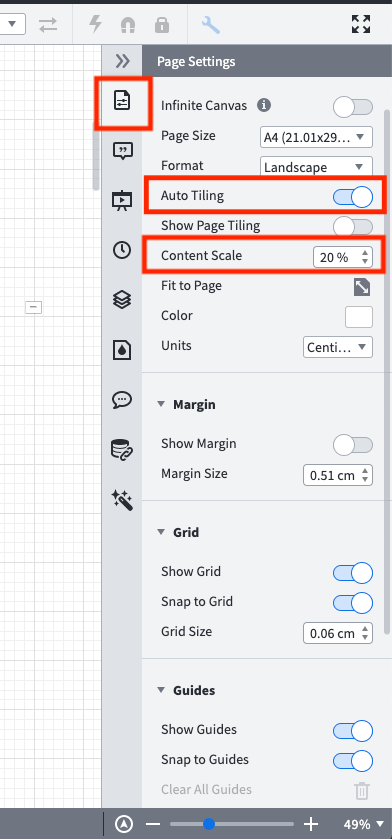
- Auto tiling: Is it possible that your canvas contains a large number of page tiles? This would cause your document to grow dramatically and your shapes to get too small in relation to the page size. It’s easy to add page tiles to the canvas by accident when the "Auto Tiling" is enabled – this makes your canvas to become limitless so that a page tile is automatically created when you add content to the document that exceeds the page boundaries. If that’s the case I’d recommend disabling Auto Tiling. You can do that by clicking on the page settings icon at the top of the right panel > toggling of the Auto Tiling switch. For more information on how to adjust your page settings please read through our Adjust document and board settings from the Lucidchart Help Center.
- Content Scale: Is it possible that your content scale is set to cover a small percentage of your page? For example if you decrease the content scale from 100% to 20% the content on your canvas and any shapes you may add will shrink to cover just a fifth of the original page tile causing the content to get too small in relation to the page size. If that’s what is occurring I’d recommend adjusting the content scale to increase the percent of the canvas that your content is covering.
If none of these options address your issue this is likely a document-specific issue and we’d love to take a closer look. Please submit a ticket by filling out this form with a screenshot of the issue and the URL to the affected document so we can help you out! Thanks!



 Your privacy choices


