leonardo.borgatti.07
November 5, 2023
Solved

The grid is not displayed

  • November 5, 2023
  • 1 reply
  • 38 views

Hi I use Lucidspark from the mobile version and some days ago the background grid disappeared I tried to deactivate and reactivate the grid option and also to uninstall the app but nothing changed does someone know how can I resolve?

    Best answer by Leianne C

    Hi @leonardo.borgatti.07 thank you for posting in the community! I see that you have submitted a support ticket regarding this issue and someone from our team has answered. Please continue to work with our team to troubleshoot the issue. 

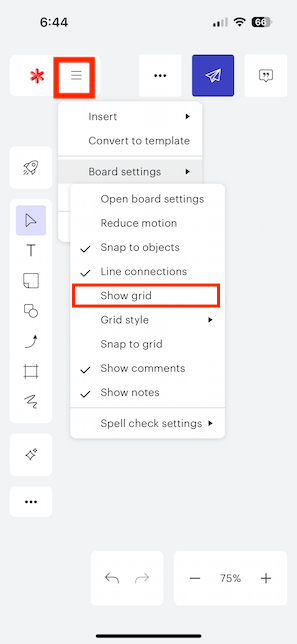
    For anyone with a similar issue you should be enable the grid by pressing the More menu and selecting board settings > show grid. 
    If you are still experiencing issues after trying this step could you please submit a support ticket via this link and include any relevant screenshots of the issue? This will help us take a closer look and troubleshoot further. Thank you! 

    Comments

    Leianne C
    Leianne CAnswer
    Lucid support team
    November 6, 2023

    Hi @leonardo.borgatti.07 thank you for posting in the community! I see that you have submitted a support ticket regarding this issue and someone from our team has answered. Please continue to work with our team to troubleshoot the issue. 

    For anyone with a similar issue you should be enable the grid by pressing the More menu and selecting board settings > show grid. 

    If you are still experiencing issues after trying this step could you please submit a support ticket via this link and include any relevant screenshots of the issue? This will help us take a closer look and troubleshoot further. Thank you!