Question

Right-click menu conflict with browser menu

  • February 10, 2026
  • 4 replies
  • 27 views

Forum|alt.badge.img+1

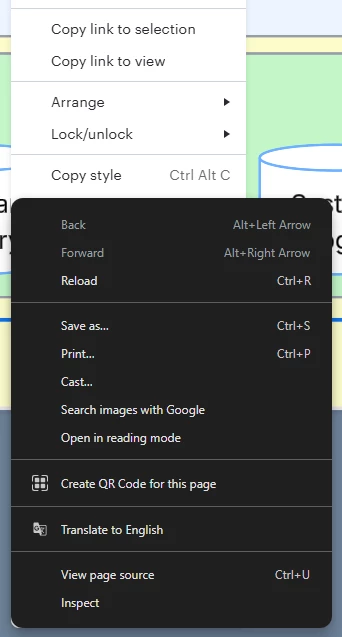
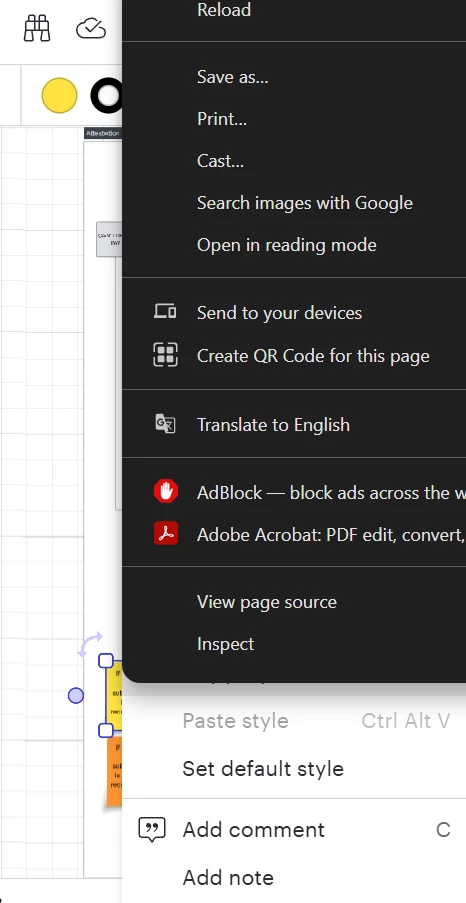
I’ve been using Lucidchart without incident for a few days, but all of a sudden when I right-click on a shape (trying to duplicate it), the Lucidchart menu pops up - but so does the browser’s right-click menu, which covers most of the Lucidchart menu. I have no idea what happened - I was using it perfectly this morning, closed the window to do something else, then this problem just appeared when I opened the page again.

I’ve tried refreshing, logging in and out, deleting cache and cookies, and using an Incognito window; nothing has worked.

Comments

Forum|alt.badge.img+1
  • Author
  • February 10, 2026

Added screenshot for context. This wasn’t happening 2 hours ago and I didn’t change any settings between when it worked properly and when it didn’t. Also, I discovered that if I click on the white, Lucidchart context menu, I can make the black Chrome menu disappear and then access the Lucidchart options freely - but I’d like the Chrome menu to stop coming up.


Forum|alt.badge.img

Came here because of the same issue.  I’ve found that if your mouse has a scroll wheel to zoom in/out, that action will also get the browser menu to drop, without closing the lucid menu options as well.  (quick keys for zooming may do the same?)  Had no issues with the application yesterday while working in the same document.


Troubleshooting:

❌ Tried in Incognito Window: Made no difference.

❌ Disabled Web-GL and refreshed the document: No change.

Browser: Google Chrome - Version 144.0.7559.110 (Official Build) (64-bit)


Forum|alt.badge.img+1
  • Author
  • February 10, 2026

Good to know it’s not just me! I’m on a laptop, so no scroll option for me. And although the workaround I mentioned is possible, it can be very finicky depending on how much/which parts of the Lucidchart menu are covered up.


Forum|alt.badge.img
  • February 10, 2026

I am seeing the same issue as well!  right clicking and then rolling the scroll wheel does seem to make it disappear - but definitely started in the last day or so and very annoying.