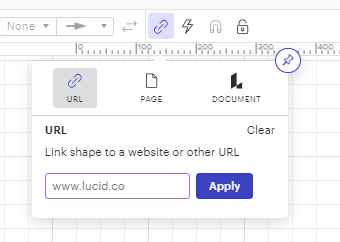
Of course there are multiple ways to use hyperlinks within Lucidchart. In a nutshell, just select the text or shape you'd like to add the link to and then click on the link button in the toolbar at the top of the editor. From there, you can add the URL you want to link to. Alternatively, you can use the ctrl/cmd +K keyboard shortcut to open this menu, or access it by right-clicking and choosing Link.
Of course there are multiple ways to use hyperlinks within Lucidchart. In a nutshell, just select the text or shape you'd like to add the link to and then click on the link button in the toolbar at the top of the editor. From there, you can add the URL you want to link to. Alternatively, you can use the ctrl/cmd +K keyboard shortcut to open this menu, or access it by right-clicking and choosing Link.
A Lucid or airfocus account is required to interact with the Community, and your participation is subject to the
Supplemental Lucid Community Terms.
You may not participate in the Community if you are under 18. You will be redirected to the Lucid or airfocus app to log in.
A Lucid or airfocus account is required to interact with the Community, and your participation is subject to the
Supplemental Lucid Community Terms.
You may not participate in the Community if you are under 18. You will be redirected to the Lucid or airfocus app to log in.


 Your privacy choices


