Answer

Importing referential integrity between tables across schemas in an ERD diagram

  • July 10, 2025
  • 12 replies
  • 61 views

Forum|alt.badge.img+1

Several of our My SQL database designs have referential integrity between tables across schemas. When trying to import an ERD from My SQL it seems that referential integrity between tables across schemas is ignored on import.    Is there a way to make it so that referential integrity Lines will show up in imported diagrams across schemas?

Best answer by Micah

Hi all, good news! A fix for this has been released, so everything should function as normal. Please give it a try, and let me know in this thread if you continue to experience problems. 

Comments

Forum|alt.badge.img+1
  • Author
  • July 10, 2025

Clarifying the above.  The RI lines are only imported when the entry in the TABLE_NAME matches the REFERENCED_TABLE_SCHEMA.  If they don’t match the lines are imported.


Forum|alt.badge.img+1
  • Author
  • July 10, 2025

Correction.  If they don’t match the lines aren’t imported.


Forum|alt.badge.img+1
  • Author
  • July 10, 2025

Please ignore everything I wrote above.  That’s what I get when I try and multitask. So, I am going to start over to be clear.

Several of our My SQL database designs have referential integrity between tables across schemas. When trying to import an ERD from My SQL it seems that referential integrity between tables across schemas is ignored on import.    Meaning The RI lines are only imported when the entry in the TABLE_SCHEMA column matches the entry in the REFERENCED_TABLE_SCHEMA.  If they don’t match the lines are not imported.

I’d be happy to provide example files demonstrating this behavior.


Forum|alt.badge.img+1
  • Author
  • July 14, 2025

Several of our My SQL database designs have referential integrity between tables across schemas. When trying to import an ERD from My SQL that referential integrity between tables across schemas is ignored on import.    Meaning: the RI lines are only imported when the entry in the TABLE_SCHEMA column matches the entry in the REFERENCED_TABLE_SCHEMA.  If they don’t match the lines are not imported.

I’d be happy to provide example files demonstrating this behavior.


Leianne C
Forum|alt.badge.img+15
  • Lucid support team
  • July 16, 2025

 Hi ​@CCourim, thank you for posting in the community and apologies for our delayed reply! I noticed you create another topic for this question which I’ve gone ahead and merged into this same post. 

To help us take a closer look at the issue, would you mind sharing an example screenshot or snippet demonstrating this behaviour? (feel free to censor any important information). Alternatively, please let me know if you’d like me to move our conversation to a private support ticket! 

Thank you for your help and patience. Please let me know if you have any questions!


Forum|alt.badge.img+1
  • Author
  • July 16, 2025

Leianne-


Thank you for your response.  I have created two samples source csv files demonstrating the issue.     Please let me know how you want me to attach the samples so you can reproduce.   

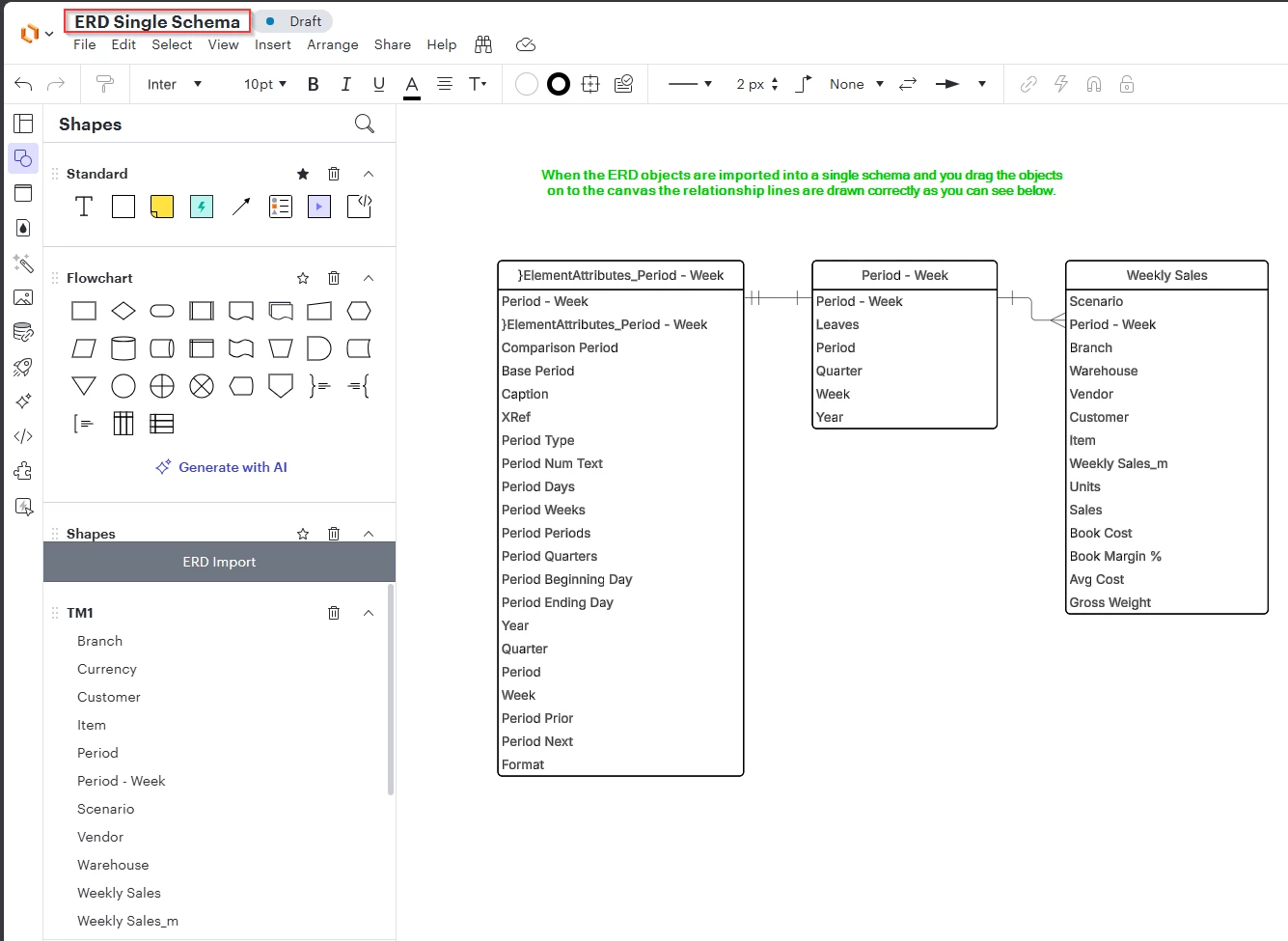
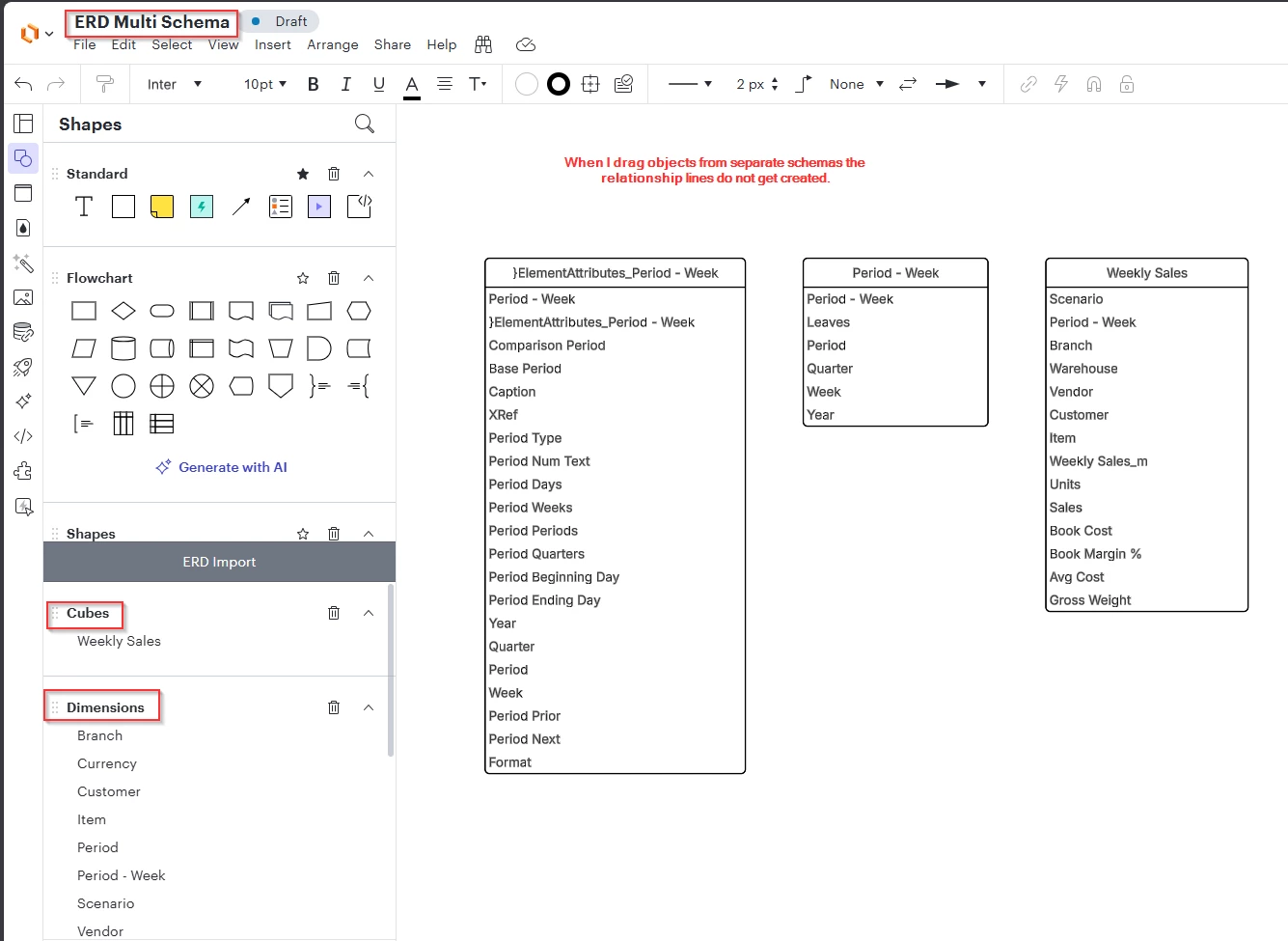
Here are two visuals that demonstrate the issue.


Here's what it looks like when we import from an ERD that has multiple schemas.  Note: The issue is that the relationship lines are not drawn when the tables cross multiple schemas.


Forum|alt.badge.img+1
  • Author
  • July 18, 2025

Any update.  Could I be doing something wrong?


Leianne C
Forum|alt.badge.img+15
  • Lucid support team
  • July 21, 2025

Hi ​@CCourim, thank you for sharing the screenshots and details about the issue you’re seeing. I would love to take a closer look at the samples so I am going to move our conversation over to a private support ticket. Please keep an eye out for an email from Lucid Support.Thanks! 


Forum|alt.badge.img+1
  • Author
  • August 6, 2025

Any update on this issue?


Leianne C
Forum|alt.badge.img+15
  • Lucid support team
  • August 7, 2025

Hi ​@CCourim, thanks for checking in! This issue was reported this to our development team for investigation. I apologize for any disruption this may cause, and I will update this thread with any new information about a fix. Please follow along on this thread for updates, and post any additional questions or concerns below.


Micah
Forum|alt.badge.img+20
  • Lucid community team
  • October 29, 2025

Hi ​@CCourim - good news! A fix is in the works and should be released shortly. I’ll update this thread once it officially is live, but wanted to let you know that it’s imminent! Thanks for your patience. 


Micah
Forum|alt.badge.img+20
  • Lucid community team
  • Answer
  • November 6, 2025

Hi all, good news! A fix for this has been released, so everything should function as normal. Please give it a try, and let me know in this thread if you continue to experience problems.