Simon D101
March 24, 2023
Solved

Importing ERD file from MySQL leads to error "Error:We couldn't parse the output you provided." in Lucidchart

  • March 24, 2023
  • 26 replies
  • 903 views

Hi

I've created an ERD on LucidChart and exported it for MySQL and tried to use this input to re-create in LucidChart the same document with the ERD import from SQL but get an error.
"Error:We couldn't parse the output you provided."
What is wrong with my input?

I'm trying to figure out how should I setup my SQL schema for import from SQL

How can generated data from export not being good for input?

Thank you

Best answer by Micah

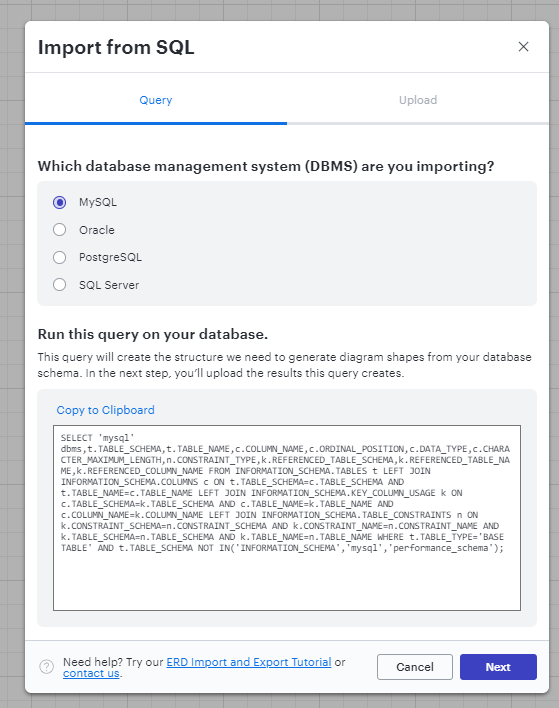
Hi @efredericksen, thanks for this question! Can you confirm what DBMS you’re using and that you’ve selected the corresponding query in this modal?

I see “sqlserver” in your output. If this is correct, I recommend comparing it to the example output file I’ve attached to this comment. Using this as a template will allow you to identify any differences in structure that Lucidchart isn’t able to interpret. 


Comments

Coumba D
Lucid support team
March 27, 2023

Hi Simon

Thanks for posting in the Community!

I am not sure I fully understand. Do you mean that you manually created an ERD in Lucidchart which you then exported for MySQL and then directly re-imported the exported file back into Lucidchart?

Could you provide some more details regarding what you are trying to achieve so I can try and guide you better?

Thanks!

Simon D101
March 28, 2023

Hi Coumba

Yes I'm trying to do exactly what you mentioned.
We can import our DB in format of (MySQL PostgreSQL Oracle SQL Server) I tried with MySQL 
Reference: https://lucidchart.zendesk.com/hc/en-us/articles/207299756-Entity-Relationship-Diagrams#import-database
However it didn't work
I tried with the example given from the SQL "7. Click Copy to Clipboard to copy the query." didn't work either
So at last resort I create manually the ERD "https://lucidchart.zendesk.com/hc/en-us/articles/207299756-Entity-Relationship-Diagrams#manually-create-erd"
and export it as MySQL => https://lucidchart.zendesk.com/hc/en-us/articles/207299756-Entity-Relationship-Diagrams#export-erd
Then I tried to import this file into the import of ERD it doesn't work
How can something generated from export cannot be good format for import?
Could you share a working MySQL file good for import in the ERD?

Thank you

Best regards

Simon

Coumba D
Lucid support team
March 29, 2023

Hi Simon

Thanks for the explanation.

Note that you will need to first run the query reference at step 7 of the Import your database section of our  ERD help article in your DBMS before either pasting the output in plain text or importing the results generated by your DBMS back into Lucidchart.

Basically step 7 is only about copying the query from Lucidchart and the following steps explain what to do with the query:


I hope this helps however if you feel that I am misunderstanding I would recommend filing a support ticket and include the URL to your document so that our team can take a closer look and test if necessary!

Simon D101
March 30, 2023

Hi Coumba

Thank you for highlight the request to DB first missed this part.
I tried it it works thanks
However only the Primary key Foreign Key(constraint key) are into the schema which is not all the data(other columns).
At the end I created it manually from my DB as I couldn't find a solution.

Thank you

Simon

Coumba D
Lucid support team
March 30, 2023

Hi Simon

Glad to read that you've been able to import your file after having ran the query in your DBMS!

If I understand correctly the issue that you are now experiencing not all entities (with the exception of your primary and foreign keys) are rendered onto your ERD.

When you import your file into Lucidchart the software immediately converts the imported query into a list of databases tables and schemas and organizes the list in your shape menu. If some of the entities you expect to see rendered are not available from your shape menu it is likely that they were not clearly referenced in your data file or the file is mis-formatted.

To be able to help with that we would need to take a look at the .csv file or plain text output received from your DBMS after running the query provided by Lucidchart. I will turn this community post into a support request and reach out to you that way to ask for this information as well as a few other ones in order for me to take a look. You'll receive an email from me very shortly!

Naresh R
April 24, 2023

 I would recommend filing a support ticket and include the URL

February 7, 2024

I am having the same issue, but with what seems to be a valid Import File. I attempted to convert the CSV to TSV and Text but still get this error when trying to import. I will post the first few rows of the data. I’m not sure what the issue is as the error doesn’t give specific reason for failure.


#NAMES
dbms    TABLE_CATALOG    TABLE_SCHEMA    TABLE_NAME    COLUMN_NAME    ORDINAL_POSITION    DATA_TYPE    CHARACTER_MAXIMUM_LENGTH    CONSTRAINT_TYPE    TABLE_SCHEMA    TABLE_NAME    COLUMN_NAME
#TYPES
str    str    str    str    str    I    str    I    str    str    str    str
#ROWS    774
sqlserver    Ignition    Report    UserReport    id    1    int        PRIMARY KEY            
sqlserver    Ignition    Report    UserReport    UserID    2    int        FOREIGN KEY    dbo    scada_users    id
sqlserver    Ignition    Report    UserReport    ReportID    3    int                    
sqlserver    Ignition    Report    UserReport    FrequencyID    4    int                    
sqlserver    Ignition    Report    UserReport    DeliveryTimeID    5    int                    
sqlserver    Ignition    LSEM    Attachment    AttachmentId    1    int        PRIMARY KEY            
sqlserver    Ignition    LSEM    Attachment    ObjectId    2    int                    
sqlserver    Ignition    LSEM    Attachment    ObjectType    3    nvarchar    50                
sqlserver    Ignition    LSEM    Attachment    GlobalId    4    nvarchar    50                
sqlserver    Ignition    LSEM    Attachment    FileName    5    nvarchar    256                
sqlserver    Ignition    LSEM    Attachment    FileType    6    nvarchar    10                
sqlserver    Ignition    LSEM    Attachment    FileSize    7    int                    
sqlserver    Ignition    LSEM    Attachment    S3FileName    8    nvarchar    255                
sqlserver    Ignition    LSEM    Attachment    S3ThumbnailName    9    nvarchar    255                
sqlserver    Ignition    LSEM    Attachment    CreatedBy    10    int                    
sqlserver    Ignition    LSEM    Attachment    CreatedOn    11    datetime2                

Micah
MicahAnswer
Lucid community team
February 7, 2024

Hi @efredericksen, thanks for this question! Can you confirm what DBMS you’re using and that you’ve selected the corresponding query in this modal?

I see “sqlserver” in your output. If this is correct, I recommend comparing it to the example output file I’ve attached to this comment. Using this as a template will allow you to identify any differences in structure that Lucidchart isn’t able to interpret. 


February 7, 2024

Hi @Micah , Thank you for the response. We are using MSSQL. We did finally get this to work by tweaking the query a bit to remove some deprecated tables that most likely caused the issue. I love this feature and the export as well and I was showing a colleague this functionality. They were very impressed. 


Thanks again!!

Micah
Lucid community team
February 7, 2024

@efredericksen Thanks for getting back to me, and well done with the workaround! MSSQL isn’t directly supported in our import options, which may have contributed to the parsing error, but our recommendation is to do exactly what you did. Great to hear this was successful and will be useful for you! Please reach out if there’s more we can do to support your work.