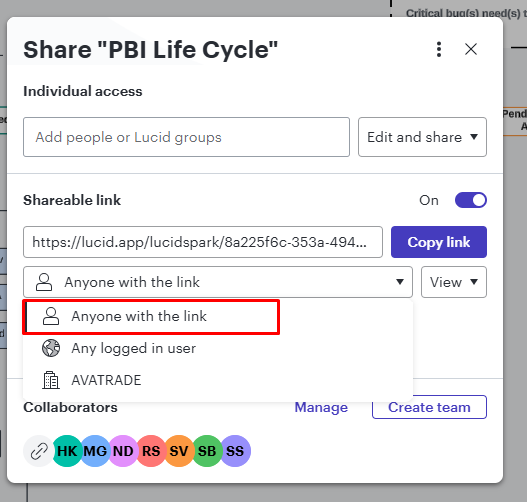
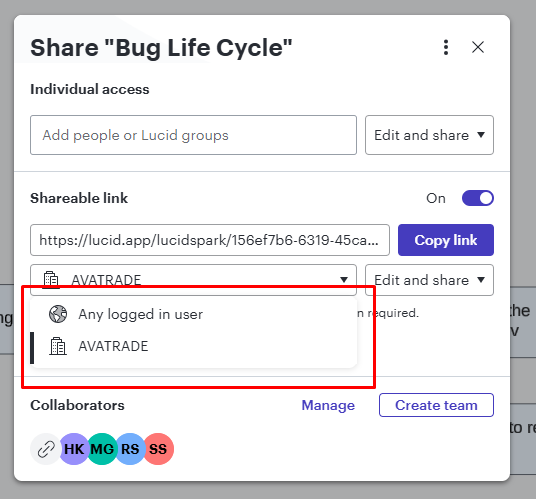
Hi @Netanel Zerbiv, just adding to the suggestions from @Humas1985, could you please confirm if both document 1 and document 2 are both originally created using Lucidspark?
The Guest Collaborator feature is currently only available in Lucidspark boards. If the document ‘But Life Cycle’ was created using Lucidchart, it is expected that the ‘Anyone with the link’ option doesn’t appear in the list (even when editing in Lucidspark).
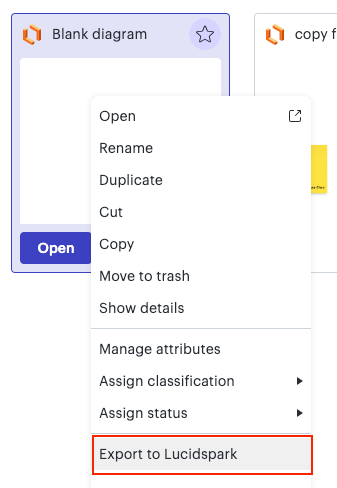
If you’d like to use the guest feature, you will need to convert your Lucidchart document to Lucidspark. You can do so by right-clicking your document and select ‘Export to Lucidspark’. This Import and export within Lucid article has more details about this.
Please note that this creates a new board with the content from your Lucidchart document. This means you will need to re-share it with any collaborators you had in your original document.
I hope this helps! Feel free to let us know if you have any questions :)
Could you please confirm who the owner of the document is, where you're experiencing issues with the sharing option?
The location of a document can impact its sharing options. When a document is stored within a team folder, it automatically gets the folder's permissions
Relocating the document to your personal space increases your control.
Hope this helps - Happy to help further!! Thank you very much and have a great one! Warm regards
Hi @Netanel Zerbiv, just adding to the suggestions from @Humas1985, could you please confirm if both document 1 and document 2 are both originally created using Lucidspark?
The Guest Collaborator feature is currently only available in Lucidspark boards. If the document ‘But Life Cycle’ was created using Lucidchart, it is expected that the ‘Anyone with the link’ option doesn’t appear in the list (even when editing in Lucidspark).
If you’d like to use the guest feature, you will need to convert your Lucidchart document to Lucidspark. You can do so by right-clicking your document and select ‘Export to Lucidspark’. This Import and export within Lucid article has more details about this.
Please note that this creates a new board with the content from your Lucidchart document. This means you will need to re-share it with any collaborators you had in your original document.
I hope this helps! Feel free to let us know if you have any questions :)
A Lucid or airfocus account is required to interact with the Community, and your participation is subject to the
Supplemental Lucid Community Terms.
You may not participate in the Community if you are under 18. You will be redirected to the Lucid or airfocus app to log in.
A Lucid or airfocus account is required to interact with the Community, and your participation is subject to the
Supplemental Lucid Community Terms.
You may not participate in the Community if you are under 18. You will be redirected to the Lucid or airfocus app to log in.


 Your privacy choices


