Answer

How to sum groups using formulas

  • December 3, 2024
  • 2 replies
  • 51 views

Forum|alt.badge.img+2


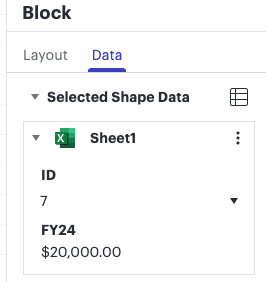
  • I have multiple shapes that I have copy & pasted. (screenshot 1)
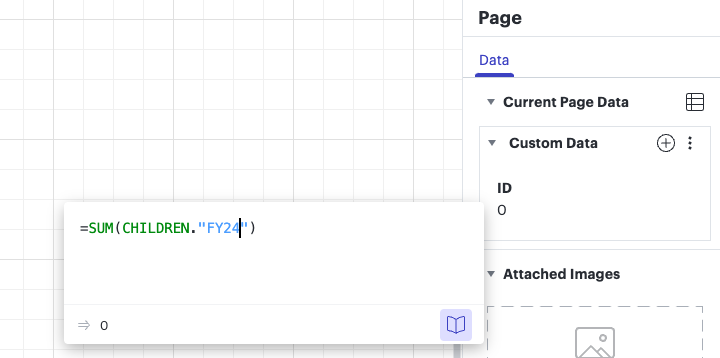
  • I have added a field called FY24 which has numbers from a data import. (screenshot 2)
  • I used the Page>Data to create a field called “FY24” and then used the formula 
    `SUM(CHILDREN.”FY24”). (screenshot 3)
  • No summing is occurring 

I will attach a few screen shots as well.  What am I missing?  Thank you.
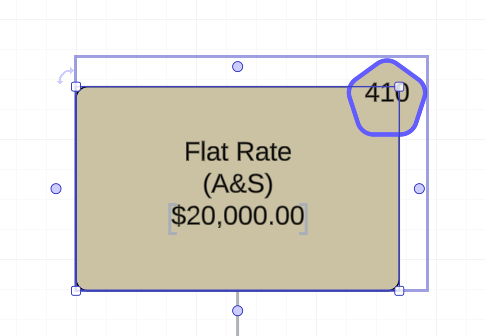
 

Screenshot 1
Screenshot 2
Screenshot 3


Best answer by HEC-User

I figured it out.  Because the containers I am trying to access are actually groups.  I have to reference them with the “DESCENDANTS” function instead of the “CHILDREN” function.

Comments

Forum|alt.badge.img+2
  • Author
  • Answer
  • December 3, 2024

I figured it out.  Because the containers I am trying to access are actually groups.  I have to reference them with the “DESCENDANTS” function instead of the “CHILDREN” function.


Amelia W
Forum|alt.badge.img+9
  • Lucid support team
  • December 3, 2024

Hi ​@HEC-User, thanks for posting in the Lucid Community! I’m glad to hear you were able to answer your question! One helpful resource I would recommend for you or other users working with formulas is our Use formulas in Lucidchart article from the Lucid Help Center. It contains helpful information to help you get started with formulas and has additional resources to reference. Please let me know if you have any further questions!