Answer

How to change line shape in Lucid?

  • August 19, 2019
  • 1 reply
  • 43 views

msraza

Hi i have created a network diagram with many devices connecting to two devices. The issue i am facing is that when i connect multiple devices to two devices the lines doesn't connect straight instead it create like a" bending" line that overlap lines. How do i make straight connector's without bending the line due to overlap?

Please advise


Best answer by Chase V

Hello there

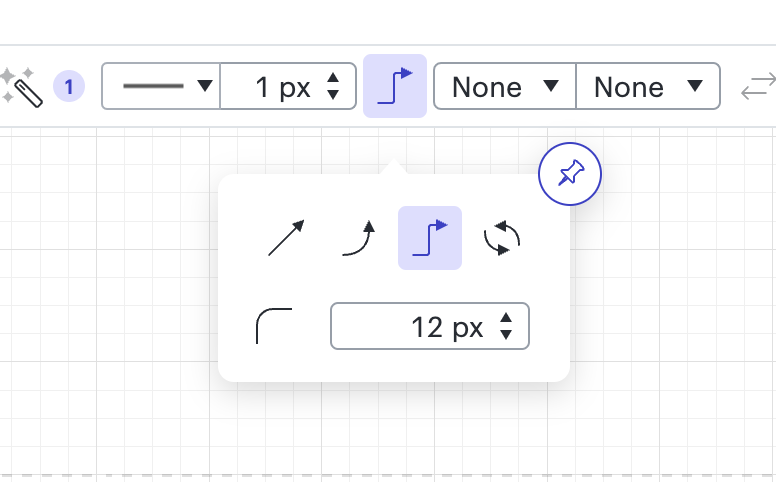
Thanks for posting in the Lucidchart community! To ensure your connecting lines are straight you can use the Line Style tool in the toolbar at the top of the editor.

Here you can select whether you'd like your lines to be straight bent or angled. You can also find some more instructions and information about working with lines here. If you have any other questions let me know!

Comments

Chase V
Forum|alt.badge.img+3
  • Lucid support team
  • Answer
  • August 20, 2019

Hello there

Thanks for posting in the Lucidchart community! To ensure your connecting lines are straight you can use the Line Style tool in the toolbar at the top of the editor.

Here you can select whether you'd like your lines to be straight bent or angled. You can also find some more instructions and information about working with lines here. If you have any other questions let me know!