Answer

How can I rotate shapes and modify text in Lucidchart?

  • August 7, 2023
  • 7 replies
  • 1328 views

Ian W101

Hi I also use Lucidchart to make electrical diagrams.

I would like the ability to flip a symbol vertically and horizontally.  Is this possible?

Question 2.

Is it possible to modify text rather than deleting it and retyping?

Thanks   Ian

Best answer by Coumba D

Hi Ian

Thanks for posting in the Community!

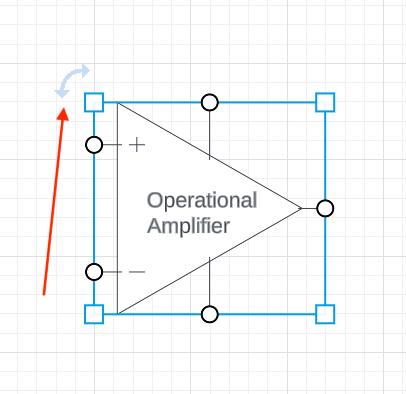
I'm not sure what you mean exactly by "flipping a symbol vertically and horizontally". It is possible to rotate a shape clicking the double-sided arrow located right next to any selected shape you have dragged onto your canvas and dragging it in the desired direction:
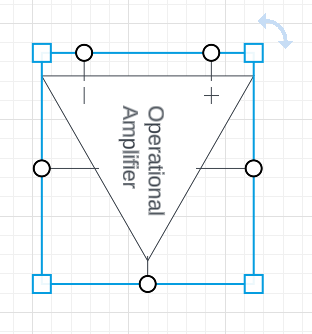
Here I rotated the shape to the right:
 

If you double click the text on your shape the entire content will be selected and will be highlighted in blue:
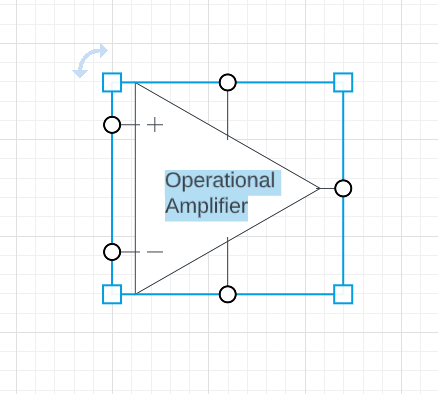
If you hit the delete key then the entirety of the text will be deleted.

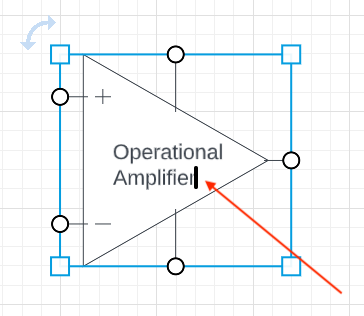
However if you click once more a text cursor will allow you to have a more granular control over what you would like to remove (delete specific letters or chunks of text):
I hope this helps! Let us know if you have any questions!


Comments

Coumba D
Forum|alt.badge.img+7
  • Lucid support team
  • Answer
  • August 9, 2023

Hi Ian

Thanks for posting in the Community!

I'm not sure what you mean exactly by "flipping a symbol vertically and horizontally". It is possible to rotate a shape clicking the double-sided arrow located right next to any selected shape you have dragged onto your canvas and dragging it in the desired direction:

Here I rotated the shape to the right:


If you double click the text on your shape the entire content will be selected and will be highlighted in blue:

If you hit the delete key then the entirety of the text will be deleted.

However if you click once more a text cursor will allow you to have a more granular control over what you would like to remove (delete specific letters or chunks of text):

I hope this helps! Let us know if you have any questions!



Forum|alt.badge.img+1

And what about when there is no double-sided arrow?


Addie
Forum|alt.badge.img+23
  • January 9, 2024

Hi @Super secret user, thanks for posting in the community! Can you share a screenshot image of what you’re referring to? Thanks for your help and patience! 


Forum|alt.badge.img+1


Addie
Forum|alt.badge.img+23
  • January 10, 2024

Hi @Super secret user, thanks for the response and screenshot! Unfortunately, rotating floor plan shapes is not currently a functionality that’s available. You can adjust the shape by using the corner indicators, and if you’d like to upvote this feature request, please do so here:

Our apologies for the inconvenience - let us know if you have any questions!


Forum|alt.badge.img+1

Thanks for the clarification, Addie.  It keeps me from continuing to search for a solution.


I must say, this is a severe oversight in the software.  I cannot adjust my whole facility because this piece of equipment cannot be correctly oriented.  I hope this gets corrected quickly.


Addie
Forum|alt.badge.img+23
  • January 10, 2024

Hi @Super secret user, thanks for the reply - and our apologies! We understand your frustration, as we can see that this would be an extremely useful feature. Please upvote this feature idea I linked above, as the top requests get passed directly to our product team each month. We truly do value your feedback and appreciate you sharing your insight with us.