Answer

Error in publishing diagrams with accented text

  • November 3, 2025
  • 10 replies
  • 92 views

Forum|alt.badge.img+1

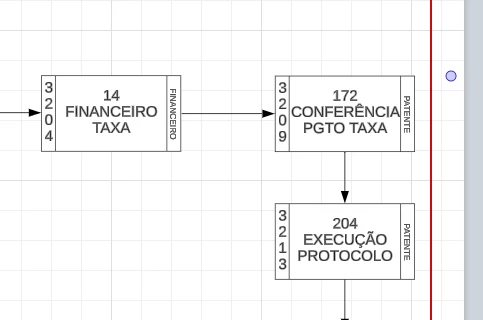
We are experiencing problems with all diagrams published via image link. All text containing accents is being distorted and generating strange characters.

Below is a screenshot of how the diagram appears in the Lucid editing screen:
 

And below is a screenshot of how the publication image is being generated:
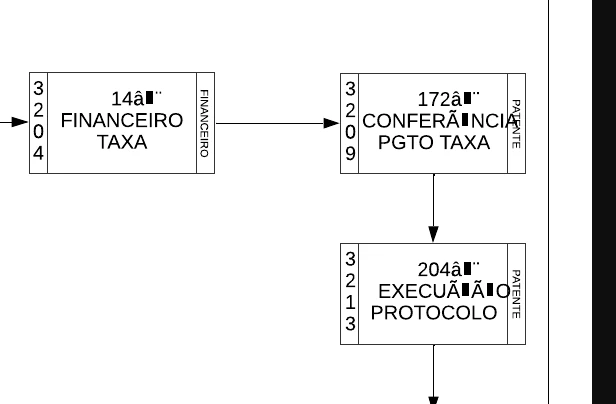


All the diagrams we have with accented text are the same. We recreated the publication using another link and the problem persists.

Documents exported as PDFs also have the same error.

We await your feedback on the problem.

Thank you, Otavio

 

Best answer by Michelle S

Hi ​@Sally ​@otavio.bonvino
I have good news!
Our development team has let me know that the issue should now be resolved. I’m sorry for any inconvenience this may have caused.
If you’re still seeing the issue or have any other questions, feel free to reach out. I’m happy to help! 

Comments

Forum|alt.badge.img+8
  • Lucid support team
  • November 6, 2025

Hi ​@otavio.bonvino

Thanks for posting in the Lucid Community!
Could you share a temporary Document Support PIN for this document? This will help me take a closer look at what’s going on. This PIN is safe to post in this thread because it is only accessible by members of the Lucid support staff. You can find steps for generating a Support PIN in this Lucid Help Center article: Generate a Lucid Support PIN.


Forum|alt.badge.img+1
  • November 6, 2025

We have been experiencing a similar issue over the past few days. When uploading diagrams into Word documents, strange characters and symbols appear.

Please advise.


Forum|alt.badge.img+8
  • Lucid support team
  • November 6, 2025

Hi ​@otavio.bonvino and ​@Sally ,
Thanks for getting back to me with this additional information.
I believe you have identified a bug, and I have reported this to our development team. I apologize for any disruption this may cause, and I will update this thread with any new information about a fix. Please follow along on this thread for updates, and post any additional questions or concerns below. 


Forum|alt.badge.img+1

Hello Michele.


I don´t know if you need this yet, but here is the PIN of on page:


duFHkSYZFk4ZdUZ9J2cQGQRXux33Lk2ecn112918407


You can PUBLISH this in any format (jpg, png, pdf, etc.) and the problem still persists. But if you EXPORT it, the problem doesn't appear.

Talking to my team, apparently this has happened before and was resolved after a while.

If need more informations or another PIN support, just tell me.

Best,
Otavio


Forum|alt.badge.img+8
  • Lucid support team
  • November 10, 2025

Hi ​@otavio.bonvino

Thanks for sending this support PIN and for the additional information! Our development team is looking into the issue. I will let you know as soon as I hear back with any updates. We appreciate you reporting this. 


Forum|alt.badge.img+1
  • November 12, 2025

Hi ​@Michelle S

Could you please give us an update on the progress of the fix for this bug? Additionally,  could you provide an estimated timeline for when it will be resolved? This issue is affecting the workflow of many of our teams. Thank you!


Forum|alt.badge.img+8
  • Lucid support team
  • Answer
  • November 12, 2025

Hi ​@Sally ​@otavio.bonvino
I have good news!
Our development team has let me know that the issue should now be resolved. I’m sorry for any inconvenience this may have caused.
If you’re still seeing the issue or have any other questions, feel free to reach out. I’m happy to help! 


Forum|alt.badge.img+1
  • November 12, 2025

@Michelle S,

Thank you so much! The team confirmed everything is working fine now!👍


Forum|alt.badge.img+1

Hi ​@Michelle S , we confirm that everything is fine now, thank you for help and fix this.


Forum|alt.badge.img+8
  • Lucid support team
  • November 13, 2025

Hi,

I'm happy to hear that this has been resolved for you. Please don't hesitate to let me know if there is anything else I can do for you.


This community is dedicated to supporting your work in Lucid's products. If other product questions arise, or if you'd like to share how you use Lucid, you can create a new topic!