Answer

Drawing a half circle in Lucidchart

  • April 3, 2020
  • 1 reply
  • 977 views

Chuck C

I need to draw a small half circle in Lucidchart and have not found a good way to do that. Using a curved line does not make a symmetrical half circle or most probably I have not found how to do it.


The end result of this is to draw a circuit breaker symbol which is a vertical half circle with a small T on top.

 

Best answer by Maison W

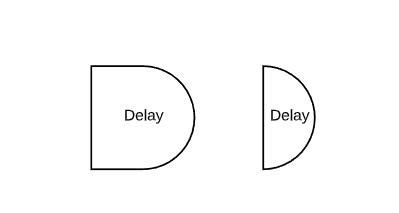
Hi Chuck thanks for posting! What you could try is using one of the "Delay" shape from our basic "Flowchart" library and then shorten the straight edge until it's a half circle (see screenshot) then you can resize as needed. Hope this helps!


Comments

Maison W
Forum|alt.badge.img+7
  • Lucid support team
  • Answer
  • April 3, 2020

Hi Chuck thanks for posting! What you could try is using one of the "Delay" shape from our basic "Flowchart" library and then shorten the straight edge until it's a half circle (see screenshot) then you can resize as needed. Hope this helps!