
Custom formula in evaluating conditional formatting

  • February 9, 2021
  • 2 replies
  • 42 views

David U102

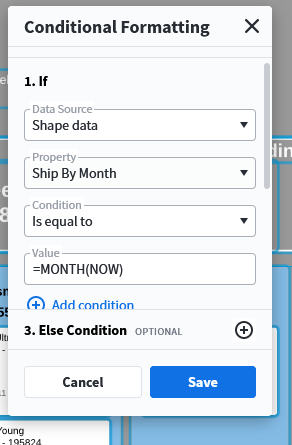
I am attempting to create a conditional formatting that changes the color of a shape based on if it is in the same month as this month. I have discovered the NOW constant to be used in formulas but I can't figure out how to use the formula Month(NOW) in conditional formatting. This image should give an idea of how I think it should work.
Comments

David U102
  • Author
  • February 9, 2021

I figured it out. You have to use a formula as the data source as value is read as a string literal and not interpreted as a formula even if you use curly braces. It might be nice to be able to use curly braces for a formula anywhere in the program. The formula ended up looking like: WEEK(DATE(YEAR(NOW)@"Ship By Month"@"Ship By Day"))=WEEK(NOW)


Nico S
  • Lucid support team
  • February 10, 2021

Hi David

Thanks for posting in the Community we're glad to see you managed to find a solution! This will certainly be valuable to others in the future thanks a lot for coming back to the thread and sharing your answer!