Answer

Can't find trash to restore Lucidchart document

  • December 1, 2020
  • 1 reply
  • 59 views

Robyn A

I upgraded today as when I clicked on 'saved' (the clock) received a message I needed to upgrade to see those changes.  I deleted some documents this morning and accidentally deleted a file I need.  1) I don't see the trash icon mentioned in the other posts and 2) I see changes to other documents when I click on the clock but the deleted docs don't appear to be there.  I will revert to the individual version if upgrading doesn't allow me to see the deleted docs.  Thanks.  By the way LOVE LucidChart :-).  

Best answer by Ashley C

Hi Robyn

Thanks for posting your question. I'm so glad to hear you're loving Lucidchart!

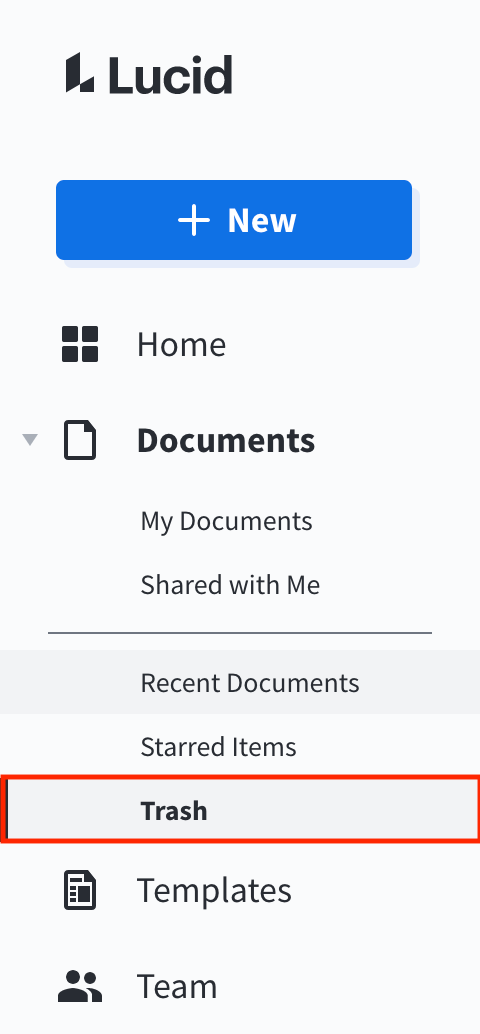
You can find your trash by clicking Documents in the left-hand menu. You'll be able to find and recover any documents you've deleted in the past seven days.

I hope this helps! Please let us know if you continue running into issues. 

Comments

Ashley C
Forum|alt.badge.img+11
  • Lucid support team
  • Answer
  • December 1, 2020

Hi Robyn

Thanks for posting your question. I'm so glad to hear you're loving Lucidchart!

You can find your trash by clicking Documents in the left-hand menu. You'll be able to find and recover any documents you've deleted in the past seven days.

I hope this helps! Please let us know if you continue running into issues.