Solved

Bug: Visio stencil not loading after successful import/upload

  • December 1, 2025
  • 12 replies
  • 105 views

Forum|alt.badge.img+1

I’m trying to import shape from Cisco Visio Stencil but something on Lucid seems to have changed where the shapes no longer fully load after a successful upload.

The same Cisco Visio stencils that I am still using and know is working no longer works as well when I tried to re-import them as a test. I’ve uploaded vss and vssx files in the past without any issues. I’ve also waited for a while in case they just needed time to upload but to no avail. I’ve also tried uploading using edge, chrome, firefox, and incognito/private but still no luck.

Anyone else having the same issue? 


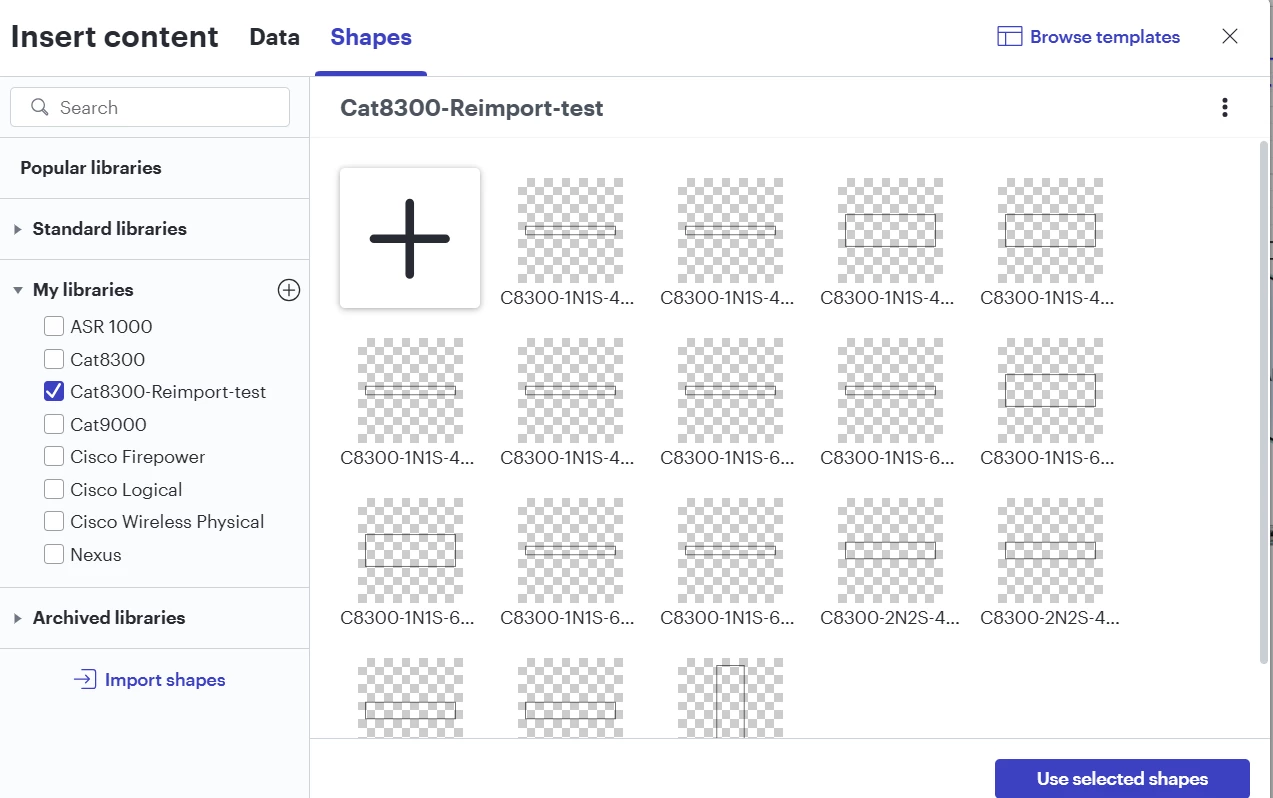
Example of re-import of a vss file that is not loading the shapes properly:

Confirmed Working vss that I uploaded/imported months ago:


Best answer by Ambar D

@ipvrey, ​@Paddy B, ​@lbarile 

Good news! Our development team has let me know that the issue should now be resolved. I’m sorry for any inconvenience this may have caused.

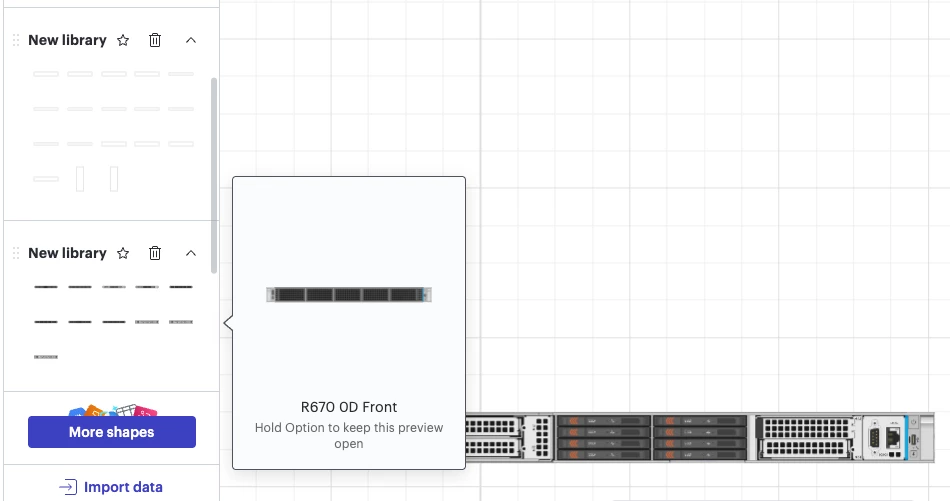
I recommend re-uploading your files into a new custom shape library and trying this again. Testing on my end, you can see my initial test library on top is still missing those icons. Upon re-importing the shape library now with the fix, I can now see the image previews within my new shape library, and they appear correctly when dragged onto the canvas.

If you’re still seeing the issue or have any other questions, please reach out in this thread. I’m happy to help!  

Comments

Ambar D
Forum|alt.badge.img+10
  • Lucid community team
  • December 2, 2025

Hi ​@ipvrey, thanks for posting in the Lucid Community! Sorry you’re having trouble here, but I’m happy to help. 

I can see that shape image previews within your CAT8300-Reimport-Test shape library show up incorrectly. If you select ‘use selected shapes’ and try dragging them onto a board, do they still appear the same or do you see the correct image?

Could you share a temporary Document Support PIN for this document? This will help me take a closer look at what’s going on. This PIN is safe to post in this thread because it is only accessible by members of the Lucid support staff. You can find steps for generating a Support PIN in this Lucid Help Center article: Generate a Lucid Support PIN.


Forum|alt.badge.img+1
  • Author
  • December 4, 2025

Hi ​@Ambar D ,


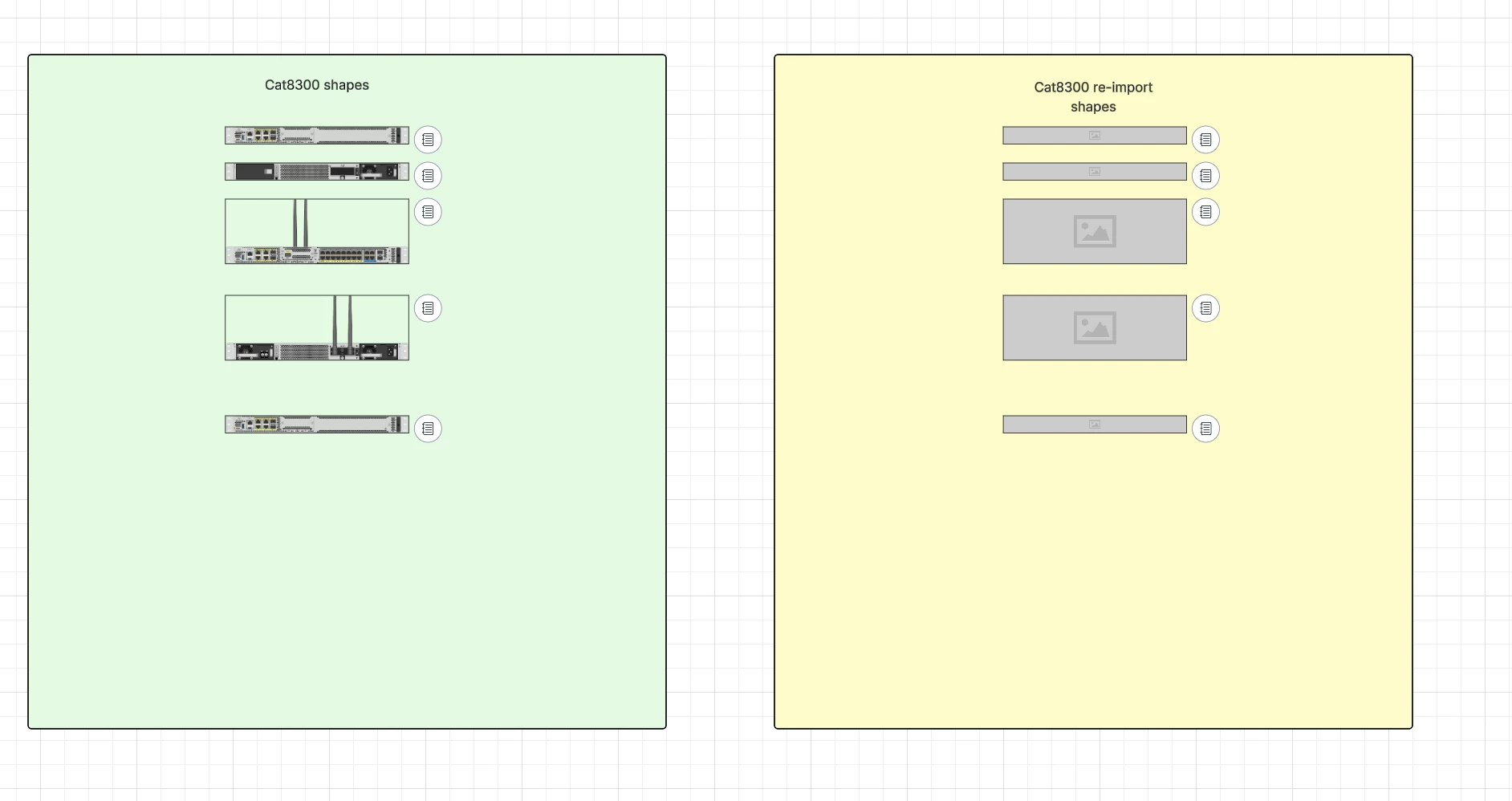
When I drag the non working shapes to the diagram, they show up as an image icon and don’t fully load. Here is a screenshot of a comparison of what they should look like:


Support PIN in duINuHeyTLYyklI0hKgRzAzyxLJFl5n7tO209335840


Forum|alt.badge.img
  • December 6, 2025

Having same problem!


Forum|alt.badge.img
  • December 8, 2025

Having the exact same issue. I have a number of Juniper VSS stencils uploaded fine but uploading a new library now all I’m getting is the outline shape in the preview and then nothing is actually pasted onto the canvas. Almost like the conversion tool is broken but it was working before even a week or so ago.


Ambar D
Forum|alt.badge.img+10
  • Lucid community team
  • December 8, 2025

@ipvrey Thanks for getting back to me with that information! Sorry for the delay here.

@lbarile ​@Paddy B Thank you for adding your reports to this thread as well.

I believe you have identified a bug, and I have reported this to our development team.

I apologize for any disruption this may cause, and I will update this thread with any new information about a fix. Please follow along on this thread for updates, and post any additional questions or concerns below.


Forum|alt.badge.img+1
  • Author
  • December 8, 2025

@Paddy B , thank you for confirming my thoughts exactly. I also reached out to a couple of my ex colleagues who experience the same. I have a product support case opened and they’re currently looking into this. I haven’t received any recent updates though so hopefully they’re still working on it. 


Forum|alt.badge.img+1
  • Author
  • December 8, 2025

@ipvrey Thanks for getting back to me with that information! Sorry for the delay here.

@lbarile ​@Paddy B Thank you for adding your reports to this thread as well.

I believe you have identified a bug, and I have reported this to our development team.

I apologize for any disruption this may cause, and I will update this thread with any new information about a fix. Please follow along on this thread for updates, and post any additional questions or concerns below.

Thank you! Looking to hear back soon


Ambar D
Forum|alt.badge.img+10
  • Lucid community team
  • December 8, 2025

Thank you ​@ipvrey for that additional context here!

I apologize for the disruption this may cause. I’ve added to the report for our developer team, and I’ll update this thread as soon as I hear back about a fix. 

Feel free to post any additional concerns or questions below in the meantime. 


Ambar D
Forum|alt.badge.img+10
  • Lucid community team
  • Answer
  • December 8, 2025

@ipvrey, ​@Paddy B, ​@lbarile 

Good news! Our development team has let me know that the issue should now be resolved. I’m sorry for any inconvenience this may have caused.

I recommend re-uploading your files into a new custom shape library and trying this again. Testing on my end, you can see my initial test library on top is still missing those icons. Upon re-importing the shape library now with the fix, I can now see the image previews within my new shape library, and they appear correctly when dragged onto the canvas.

If you’re still seeing the issue or have any other questions, please reach out in this thread. I’m happy to help!  


Forum|alt.badge.img
  • December 9, 2025

Can confirm this is working as of this morning.


Forum|alt.badge.img+1
  • Author
  • December 9, 2025

@Ambar D , thank you so much! Can confirm this is working now.


Ambar D
Forum|alt.badge.img+10
  • Lucid community team
  • December 9, 2025

Hi ​@Paddy B ​@ipvrey, I’m happy to hear that this has been resolved for you. Please don't hesitate to let me know if there is anything else I can do for you.

This community is dedicated to supporting your work in Lucid's products. If other product questions arise, or if you'd like to share how you use Lucid, you can create a new topic! We’d love to hear from you!