Answer

Ability to remove yourself as a Collaborator from a shared document...

  • May 10, 2023
  • 4 replies
  • 69 views

zander n

We really need to be able to remove ourselves as collaborators from shared documents. It is rediculous how long it is taking to implement such a simple feature. This could even be considered a security risk. 

Please add this ability so that users can manage their own documents.

Best answer by Micah

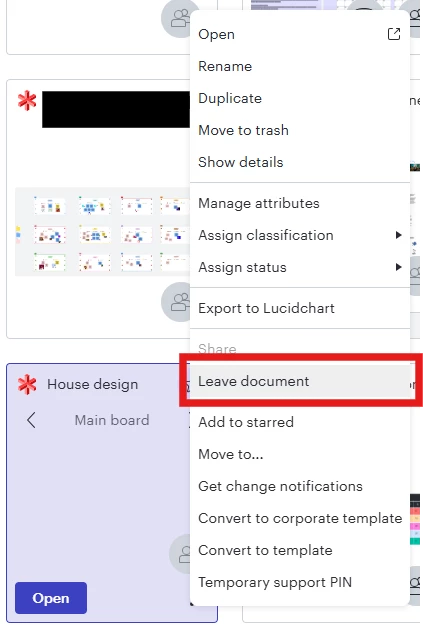
Hi all, good news! This is now officially supported. To remove a document from your Shared with me folder, simply open the More menu and select Leave document. 


Comments

Phillip W
Forum|alt.badge.img+16
  • Lucid support team
  • May 10, 2023

Hi Zander

Thank you for posting in the Lucid Community! The owner of a document has the ability to remove collaborators from a document. This can be done by clicking the Share button from the My Documents menu or from within the document itself:


Depending on the share settings of the documents you can also remove yourself as a collaborator as well. You can then move the documents to the trash and empty the trash to remove them from your account altogether. 

Hope this helps -- please let me know if you have any other questions! 


zander n
  • Author
  • May 10, 2023

I am not the owner of the document and do not have any contact with the owner of the document. There seems to be no ability to remove myself as a collaborator or delete the document in any way.


Phillip W
Forum|alt.badge.img+16
  • Lucid support team
  • May 10, 2023

Hey Zander

Thank you for the reply! This is likely due to the share settings from the documents original owner. You can try to drag the document to the trash -- this may place a copy of the document in your "My Documents" section which you can then move to the trash as well. 

Hope this helps -- please let me know if you have any other questions! 


Micah
Forum|alt.badge.img+20
  • Lucid community team
  • Answer
  • June 25, 2025

Hi all, good news! This is now officially supported. To remove a document from your Shared with me folder, simply open the More menu and select Leave document.