Today I launched a new file in Lucidchart and found that it had updated to the new editor, and one of the first issues I encountered was that I couldn’t locate a custom shape library in the “Search Shapes and Tools” menu. No custom library button/dropdown seems to exist, and searching the exact name of my custom library returns no results.
I then opened an older file which utilised a custom library, and this opened in the new editor with the custom library active and available. I could also search the custom library in the Search Shapes and Tools menu.
For the time-being I have switched back to the old editor which allows me to add the custom shape library as usual.
Hi @cschofield, thank you for posting in the next generation space of the Lucid Community! Thank you for providing this feedback and letting us know about your experience with the new editor.
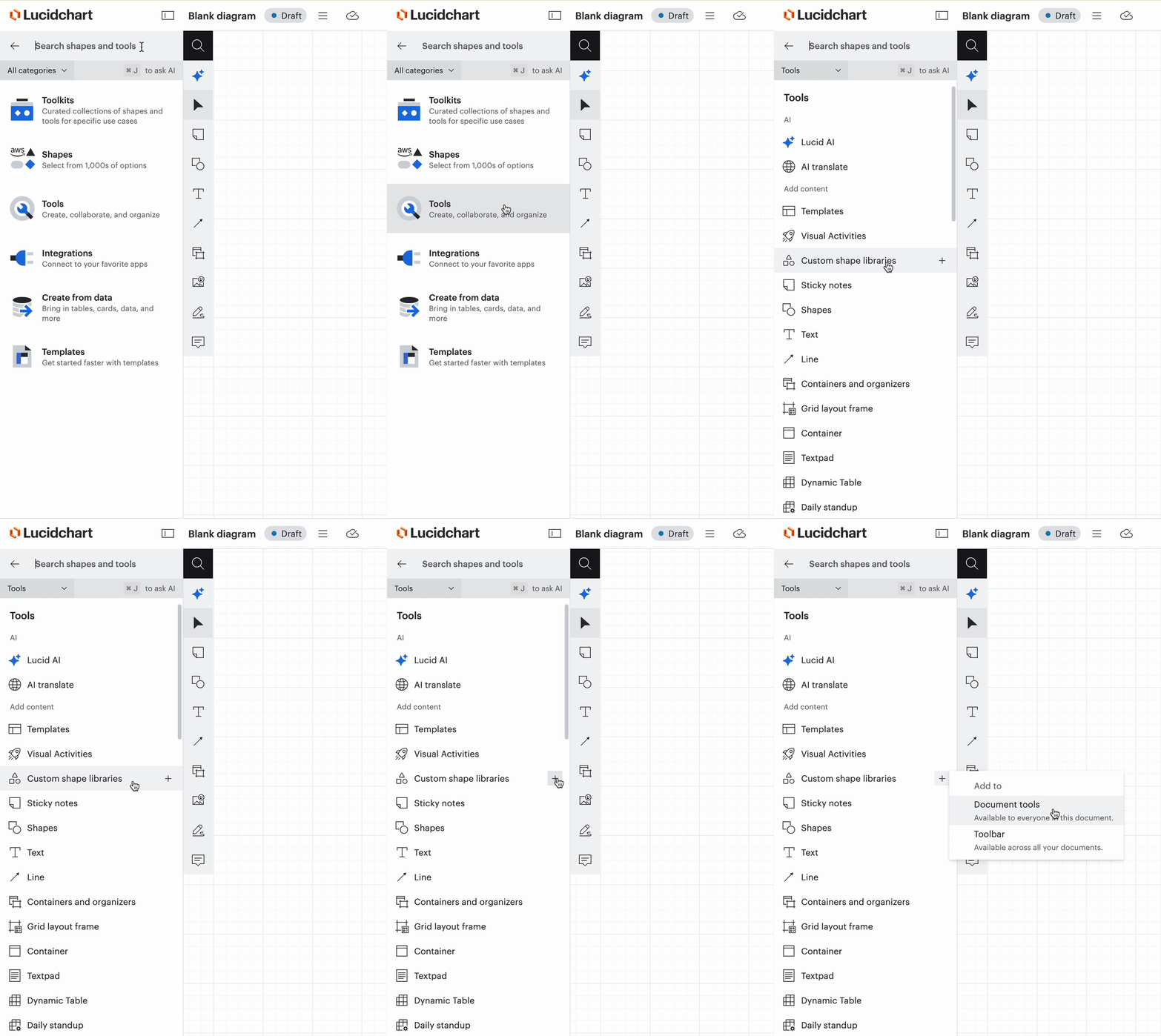
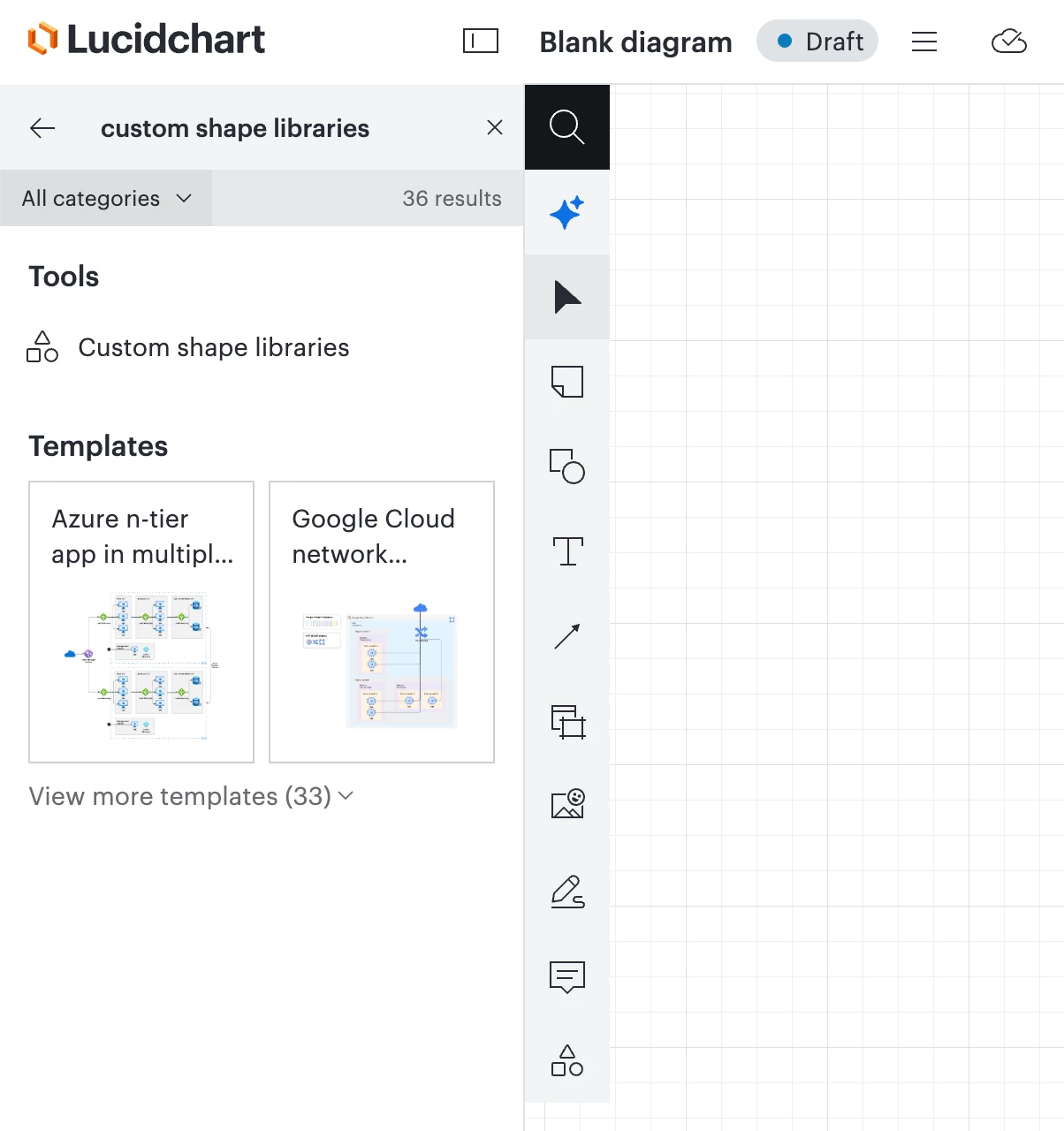
If you’d like to use your custom shape libraries within the new editor, I would suggest first searching for “custom shape libraries”, then you’ll be able to open the specific library you’ve created.
To find the custom shape library in the new Lucidchart editor, you can follow these steps:
Navigate to Search shapes and tools in document tools.
Select Tools. Scroll down and select Custom shape libraries. (or search “custom shape libraries”)
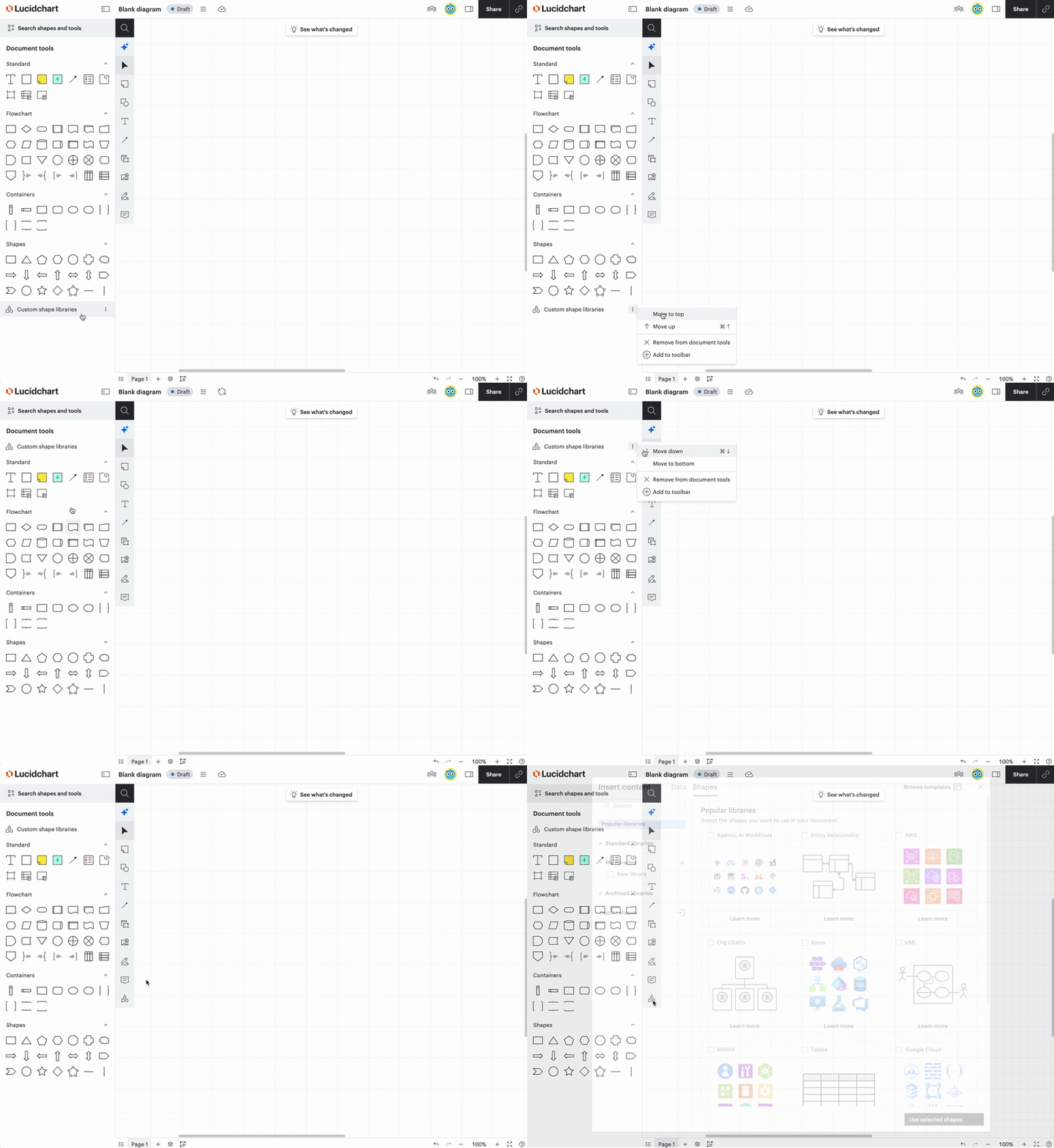
From there, you can open your shape library. You can also customize your document tools, adding the button to access custom shape libraries to your document tools for quicker access.
In the example GIF below, you’ll notice that I added the custom shape libraries button to document tools. I can then move it around my document tools, or add it to the toolbar to quickly open up or manage any custom shape libraries in the future.
Moving custom shape libraries around document tools, adding it to the toolbar
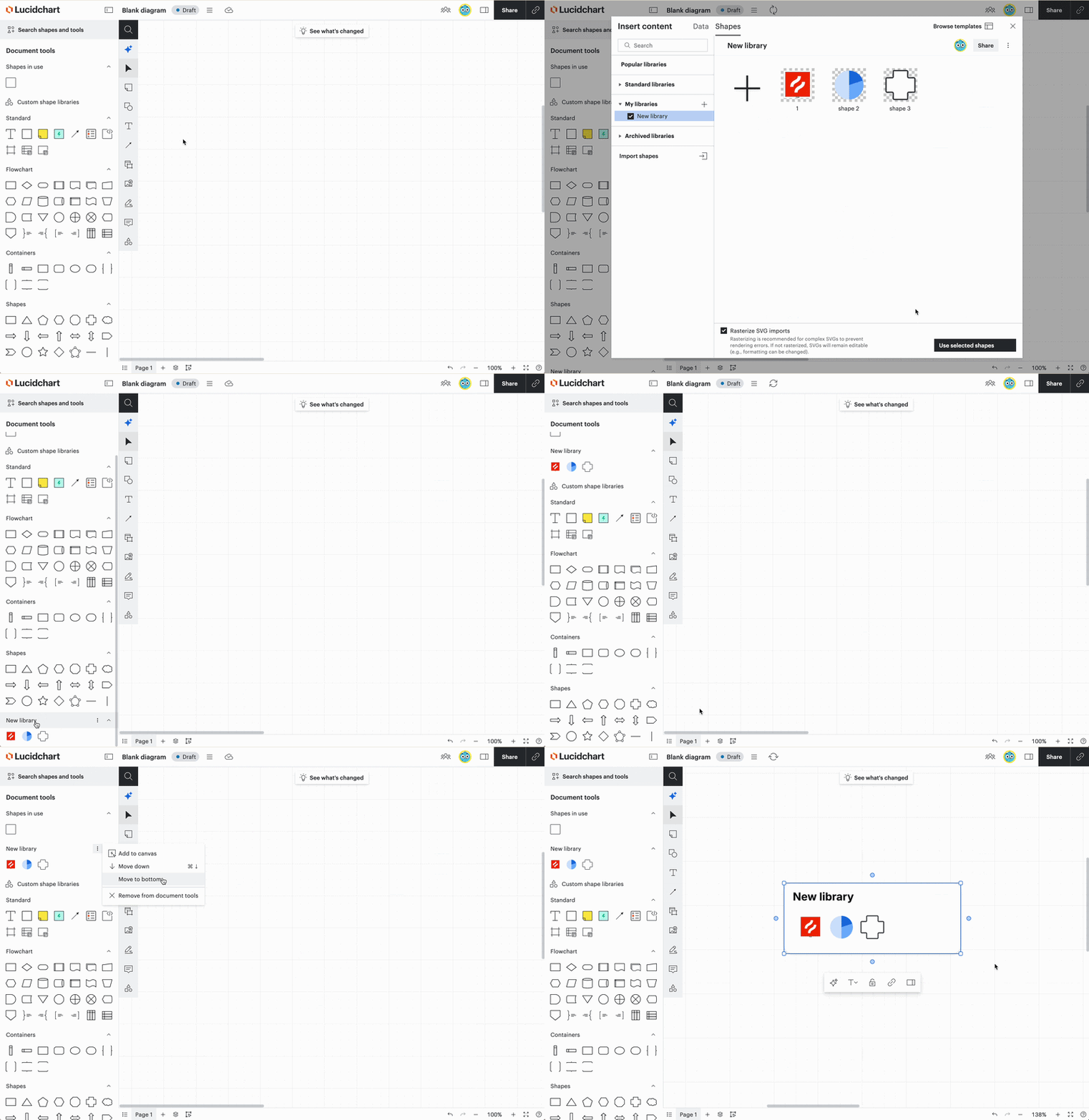
I also wanted to mention that after opening your specific custom library, you can move it around your document tools panel, or add the library to your canvas to have the shapes readily accessible.
Adding your custom library to your document tools and to your canvas
I hope this helps! If you have any further questions, please let me know and I’d be happy to help further. We’d also still love to hear your feedback, so feel free to leave it here in this thread or create a new post within the next generation space.
Thank you again for sharing about your experience!
Hi @cschofield, thank you for posting in the next generation space of the Lucid Community! Thank you for providing this feedback and letting us know about your experience with the new editor.
If you’d like to use your custom shape libraries within the new editor, I would suggest first searching for “custom shape libraries”, then you’ll be able to open the specific library you’ve created.
To find the custom shape library in the new Lucidchart editor, you can follow these steps:
Navigate to Search shapes and tools in document tools.
Select Tools. Scroll down and select Custom shape libraries. (or search “custom shape libraries”)
From there, you can open your shape library. You can also customize your document tools, adding the button to access custom shape libraries to your document tools for quicker access.
In the example GIF below, you’ll notice that I added the custom shape libraries button to document tools. I can then move it around my document tools, or add it to the toolbar to quickly open up or manage any custom shape libraries in the future.
Moving custom shape libraries around document tools, adding it to the toolbar
I also wanted to mention that after opening your specific custom library, you can move it around your document tools panel, or add the library to your canvas to have the shapes readily accessible.
Adding your custom library to your document tools and to your canvas
I hope this helps! If you have any further questions, please let me know and I’d be happy to help further. We’d also still love to hear your feedback, so feel free to leave it here in this thread or create a new post within the next generation space.
Thank you again for sharing about your experience!
Hi @cschofield, thank you for posting in the next generation space of the Lucid Community! Thank you for providing this feedback and letting us know about your experience with the new editor.
If you’d like to use your custom shape libraries within the new editor, I would suggest first searching for “custom shape libraries”, then you’ll be able to open the specific library you’ve created.
To find the custom shape library in the new Lucidchart editor, you can follow these steps:
Navigate to Search shapes and tools in document tools.
Select Tools. Scroll down and select Custom shape libraries. (or search “custom shape libraries”)
From there, you can open your shape library. You can also customize your document tools, adding the button to access custom shape libraries to your document tools for quicker access.
In the example GIF below, you’ll notice that I added the custom shape libraries button to document tools. I can then move it around my document tools, or add it to the toolbar to quickly open up or manage any custom shape libraries in the future.
Moving custom shape libraries around document tools, adding it to the toolbar
I also wanted to mention that after opening your specific custom library, you can move it around your document tools panel, or add the library to your canvas to have the shapes readily accessible.
Adding your custom library to your document tools and to your canvas
I hope this helps! If you have any further questions, please let me know and I’d be happy to help further. We’d also still love to hear your feedback, so feel free to leave it here in this thread or create a new post within the next generation space.
Thank you again for sharing about your experience!
This requires an additional 4-8 mouse clicks to reach the same, extremely used function that was previously 1 mouse click. Something that is a core function and purpose of the website, made more time consuming to access.
Please reconsider the current trend of making the website more time consuming and confusing to navigate. We get paid for document creation and management. We do not get paid per mouse click. When scaled up to hundreds or thousands of documents, that’s hundreds OF thousands of extra mouse clicks.
Hi @User_Name, I certainly understand your feedback. Thank you for sharing just how impactful this is to your daily work.
The feedback in this space of the community is shared with our product teams as they continue to build on the new user interface and research product enhancements. Thank you for being part of this feedback collection process.
Happy to hear that this worked for you @cschofield! Please don’t hesitate to reach back out in this thread if you have any further questions about custom shape libraries.
This community is dedicated to supporting your work in Lucid's products. If other product questions arise, or if you'd like to share how you use Lucid, you can create a new topic!
Is there a way to pin a shape library to automatically display on the left toolbar under the shapes and tools added section? I have one shape library that I use for every document I create or edit. It would be much easier if that could always display rather than the extra clicks required to add/use the shapes via the method discribed.
A Lucid or airfocus account is required to interact with the Community, and your participation is subject to the
Supplemental Lucid Community Terms.
You may not participate in the Community if you are under 18. You will be redirected to the Lucid or airfocus app to log in.
A Lucid or airfocus account is required to interact with the Community, and your participation is subject to the
Supplemental Lucid Community Terms.
You may not participate in the Community if you are under 18. You will be redirected to the Lucid or airfocus app to log in.


 Your privacy choices


