Nov 2, 2026 4:13 PM UTC
Solved

How do you switch off the new editor and return to the classic?

How do you switch off the new editor and return to the previous version? the new one is a mess takes be so many clicks just to do basic things.

Ambar D
Ambar DAnswer
Lucid community team
Nov 2, 2026 9:17 PM UTC

Hi ​@francisuk, thank you for posting in the Lucid Community! I would love to understand more about your experience and share your feedback with our product team working on the new editor. 

Would you mind sharing a bit more about what's challenging in the editor? Are you having trouble locating a specific feature?

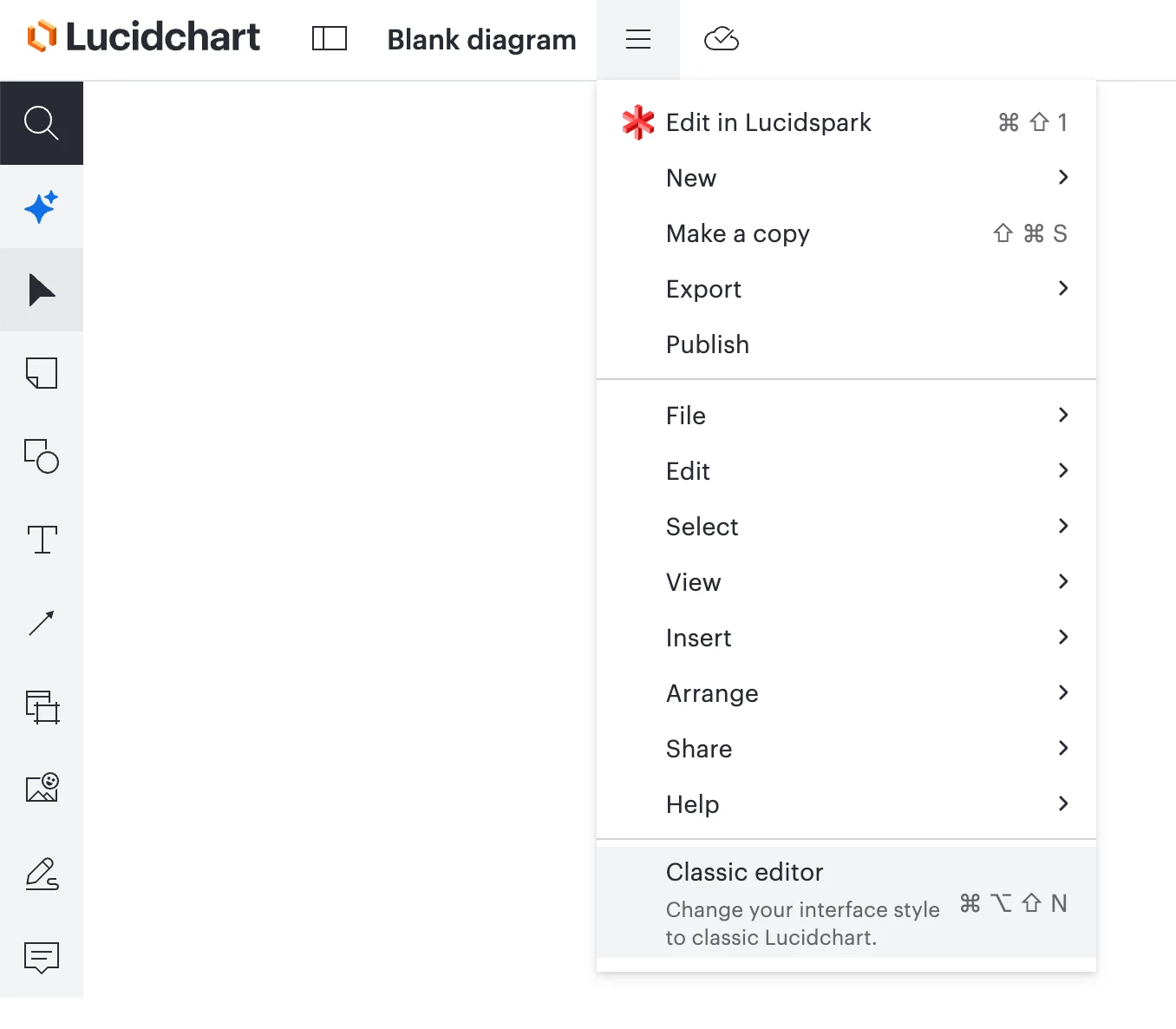
During the roll out phase of the new editor experience, you can switch back to the classic editor from the file menu shown below. 

Comments

Ambar D
Ambar DAnswer
Lucid community team
Nov 2, 2026 9:17 PM UTC

Hi ​@francisuk, thank you for posting in the Lucid Community! I would love to understand more about your experience and share your feedback with our product team working on the new editor. 

Would you mind sharing a bit more about what's challenging in the editor? Are you having trouble locating a specific feature?

During the roll out phase of the new editor experience, you can switch back to the classic editor from the file menu shown below. 

Translate
Nov 4, 2026 5:59 PM UTC

I don’t see the “Classic Editor” option in the menu as shown. I’m not a fan of the new layout either. 

Translate
Ambar D
Lucid community team
Nov 5, 2026 8:52 PM UTC

Hi ​@DrewW, would you mind sharing a screenshot of what you’re seeing on your end? Sorry to hear about your experience with the new editor.

Is there something in particular that’s challenging in the new experience? Are you having trouble locating a specific tool?

If you have any questions, I’d be happy to help here in this thread!

Translate
mzwetsloot
Nov 5, 2026 9:00 AM UTC

I can see the option. But this option only works on the current opened document/drawing. When you open a new document/drawing then the new editor is active again.

I find searching Shapes has become a bit complex in the new editor and missing overview there.

Translate
MorrResearch
Lucid product team
Nov 5, 2026 8:58 PM UTC

Hi ​@mzwetsloot , 

Can you tell me more about what you mean regarding “searching shapes has become a bit more complex in the new editor?” We are actively working on improving the search experience and any feedback you have would be very helpful. 
 

Thanks!

Translate
mzwetsloot
Nov 6, 2026 9:03 AM UTC

​@Ambar D & ​@MorrResearch 

Screenshot from drawing with classic editor where I can reach my shape libraries through the More Shapes + button. Easy to navigate to the specific vendor/general/personal shape libraries.


Then with the new editor, we select the Search shapes and tools button or the binoculars button. If we know exactly what we are looking for then we can type in the search field. If we don’t know then we have to click on the Shapes button. We then get all shapes in a particular order. If we are looking for a specific vendor shapen then either we need to type the vendor (f.i.) in the search field or scroll down the whole list to find the shape. On the bottom the Browse all shapes button seems to bring the classic editor up.


Maybe “more complex” was not the correct wording, but it has become slightly unintuitive for me.


Offering the classic editor is a nice feature but this will probably be removed in a future release? If this is an option which will stay then it would be nic if this can be made a permanent setting.

Translate
MorrResearch
Lucid product team
Nov 6, 2026 4:28 PM UTC

Hi ​@mzwetsloot!

Thank you so much for the detailed feedback! The new search experience is meant to consolidate all of our different searches (e.g., shape search, binoculars, etc.) into one single-source search. With that change, we are working to optimize the experience to make sure that it works well for everyone. Your feedback will absolutely help the team as they refine the design and it very much aligns with some of the things the team is hard at work on. 

I do have a couple more questions, if you have the time. 

  1. Where do you usually go to find the shapes you are looking for (i.e., the “more-shapes” pop-up you show in the image, the shape search bar in the left panel, or somewhere else) in the classic Lucidchart editor?
  2. Do you find that you are usually after one shape or a collection of shapes when you search for shapes?

The team is very eager for any and all feedback regarding the search experience, so feel free to provide as much detail as you would like. That includes feedback outside of the scope of the above questions. 

Thanks!


Translate
mzwetsloot
Nov 9, 2026 10:29 AM UTC

​@MorrResearch The most shapes I use are from my shape library which is still visible on the left bar. Not so clearly seperated from the main shapes as with the classic editor.


In practice I don’t need much other shapes but sometimes for a customer case it might be usefull to use general known shapes from vendor libraries. As I don’t use those regularly I search these with a general term like “router” and then f.i. Cisco router shapes are shown which I then can select. For some searches this maybe works quicker then with the classic editor but for random searches not.

Translate