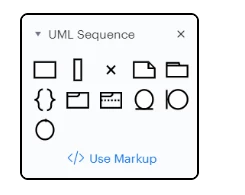
Step 2 of this document shows the library and it has a text link to Use Markup as per this screen shot:
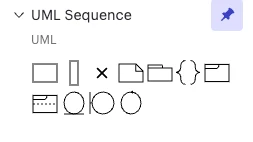
In my environment this link is missing:
Please advise
Best answer by Suman Chatterjee
Hi,
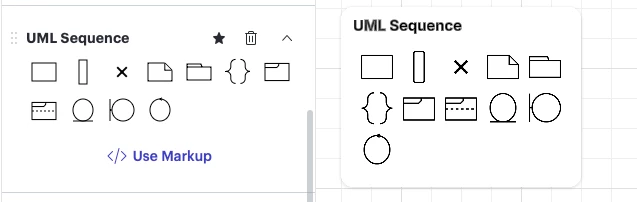
I have used this feature many times before and today also I checked - the option (Use Markup) does 1. appear in my case similar to how it is shown in the document/ link. I can only think of the following:
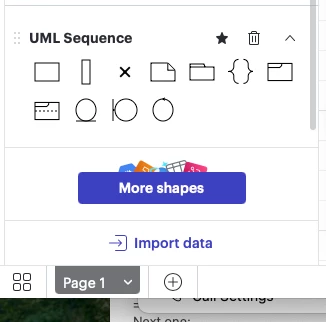
Is UML Sequence at the bottom of your left pane of libraries? Then the link might be hidden if the window has been resized. Try maximizing your window or drag the shape library to higher position.
Did you by any chance drag the UML Sequence library to your main campus ? Something like this ? Then try removing the shape library (trash icon) and then adding it back.
By the way, How did you get the PIN icon on the top right of your image ?
I have used this feature many times before and today also I checked - the option (Use Markup) does 1. appear in my case similar to how it is shown in the document/ link. I can only think of the following:
Is UML Sequence at the bottom of your left pane of libraries? Then the link might be hidden if the window has been resized. Try maximizing your window or drag the shape library to higher position.
Did you by any chance drag the UML Sequence library to your main campus ? Something like this ? Then try removing the shape library (trash icon) and then adding it back.
By the way, How did you get the PIN icon on the top right of your image ?
A Lucid or airfocus account is required to interact with the Community, and your participation is subject to the
Supplemental Lucid Community Terms.
You may not participate in the Community if you are under 18. You will be redirected to the Lucid or airfocus app to log in.
A Lucid or airfocus account is required to interact with the Community, and your participation is subject to the
Supplemental Lucid Community Terms.
You may not participate in the Community if you are under 18. You will be redirected to the Lucid or airfocus app to log in.





 Your privacy choices


