
Ellery Goudy
August 26, 2024
Solved

Force Copy

  • August 26, 2024
  • 27 replies
  • 660 views

Is there a feature to be able to force copy a lucid document? With Jamboard going away I lose the capability to have a copy for each of my students. I know that if I do it in a canvas LTI, it will make a copy but on some assignments, I already have an LTI selected and need to be able to force a copy without going through the external tool feature. If this isn't already a capability, I would strongly suggest it be added. Losing this service would be pretty detrimental.

Best answer by Morgan T

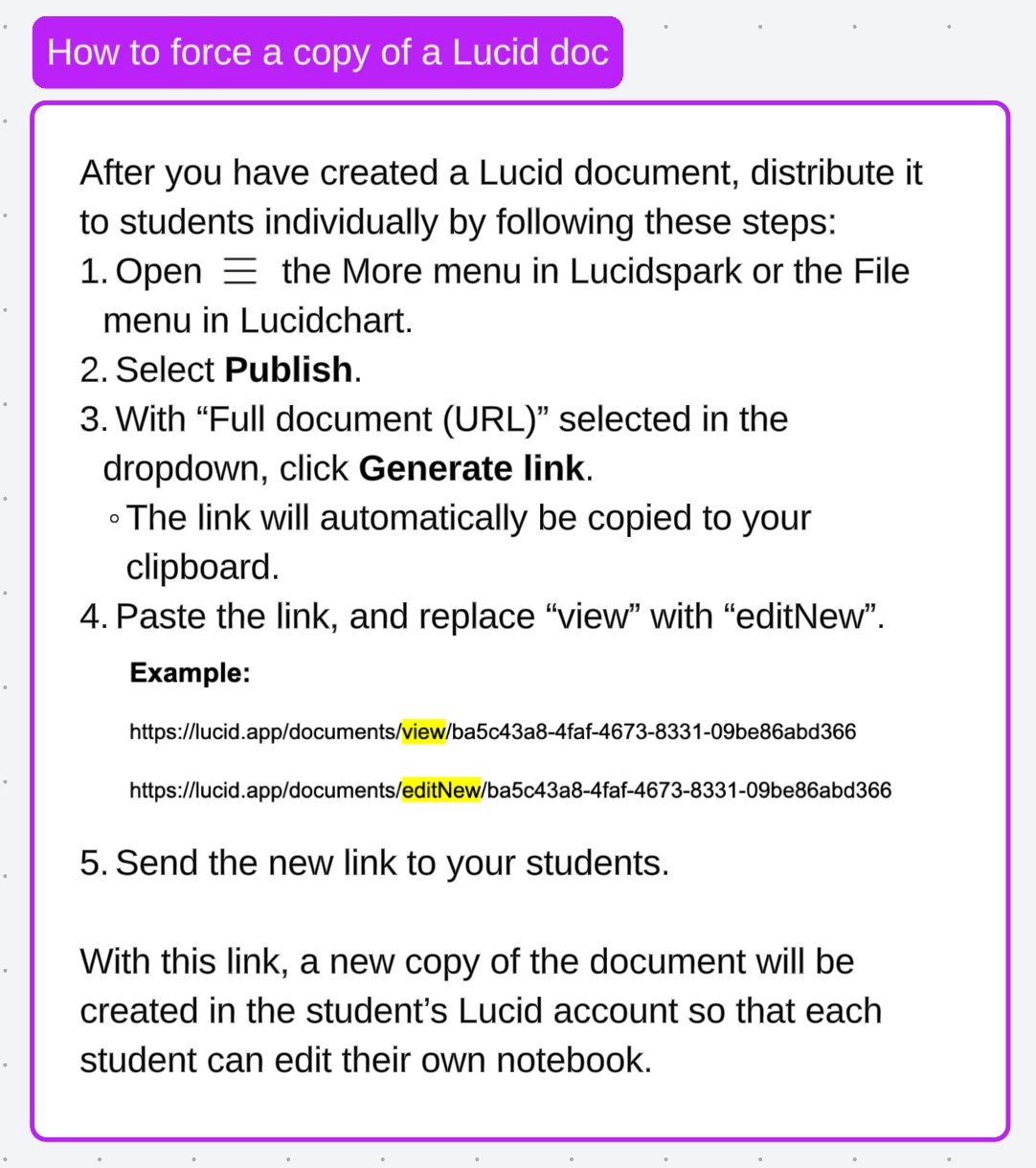
Hi @Ellery Goudy ! Just to reiterate what Kathy has said, check out these steps for creating a link that will force a copy for students! Thank you so much for the excellent troubleshooting steps @Kathy R !


Comments

Morgan T
Lucid support team
August 27, 2024

@Ellery Goudy In addition to Rick’s suggestions, would you mind verifying for me that you first published the document according to the steps I shared above?

Rick P
Lucid product team
August 27, 2024

This is what I get every time I do that process. I’ve been at it for hours now. Feeling defeated!

My interpretation for what this means:

The request was submitted to create a new document! The system attempted to respond, and “something went wrong”. Then the browser session attempted to load the resulting new document. Which doesn’t exist. So the message becomes “Sorry, we couldn’t find the page you’re looking for”.

But that’s not entirely clear as to what failed, or why.

Ellery Goudy
August 27, 2024
  1. Full sharing permissions are on to edit.
  2. These are all documents that I have created
  3. None of the documents are in a folder. All just housed in recent documents.
  4. This account is part of the Core Bundle that is paid for by my district.
  5. Each document I have tried has been published. 

I am truly stumped! I promise I am not a tech newbie. I am our school’s digital coach and just can not figure it out!

Morgan T
Lucid support team
August 27, 2024

@Ellery Goudy I’m sorry if this is redundant, but I just want to double check. When you are editing the link to add “editNew”, are you using the link from the Publish panel as shown below:


Morgan T
Lucid support team
August 27, 2024

If that still doesn’t work, let’s try another method. Can you make a document into a template following the steps here, then follow the steps here to copy a share link?

Ellery Goudy
August 27, 2024

Correct, I am using the publish link. I have tried it with the shareable link as well for good measure and no luck. Here are the steps recommended and the result I get. Screen Recording

Kathy R
Lucid Legend Level 5
August 27, 2024

I can get it to do what you have done too!  It’s not the link that works.  It’s a longer one.  After playing around, I’ve just clicked on the paperclip on the snapshot of the document and used that link.  The ‘edit’ and ‘?’ are in the middle of these links, not the end.  


Ellery Goudy
August 27, 2024

I have tried both ways. Literally no combination of any of the steps will create a force copy. :) 


Morgan T
Lucid support team
August 27, 2024

@Ellery Goudy Would you mind trying the steps you showed in your first video, but capitalize the “N” in “editNew”?

Ellery Goudy
August 27, 2024

HOLD YOUR BREATH! I think I got it to work. Does this look right? https://www.loom.com/share/e4c9993df9414a7b96137bfddceb2a3b?sid=ffd4c26b-67df-4b18-a58a-1969dd4d5461