
Ellery Goudy
August 26, 2024
Solved

Force Copy

  • August 26, 2024
  • 27 replies
  • 660 views

Is there a feature to be able to force copy a lucid document? With Jamboard going away I lose the capability to have a copy for each of my students. I know that if I do it in a canvas LTI, it will make a copy but on some assignments, I already have an LTI selected and need to be able to force a copy without going through the external tool feature. If this isn't already a capability, I would strongly suggest it be added. Losing this service would be pretty detrimental.

Best answer by Morgan T

Hi @Ellery Goudy ! Just to reiterate what Kathy has said, check out these steps for creating a link that will force a copy for students! Thank you so much for the excellent troubleshooting steps @Kathy R !


Comments

Kathy R
Lucid Legend Level 5
August 26, 2024

I keep forgetting how to do this, but it is a thing!  I have used this video for reminding me how to make a forced copy of items for students.  I can then post the link for my students in Canvas without using the External Tool function.

Long story short: Copy the link for the document, then add NEW between the ‘edit’ and ‘?’ in the address line.  See the video below for a better explanation with more important details! :)


Ellery Goudy
August 26, 2024

This is what I get every time I do that process. I’ve been at it for hours now. Feeling defeated!

Kathy R
Lucid Legend Level 5
August 26, 2024

How frustrating!  Maybe it’s blocked at work since it’s on YouTube.  Here’s the written part of the transcript that should help:

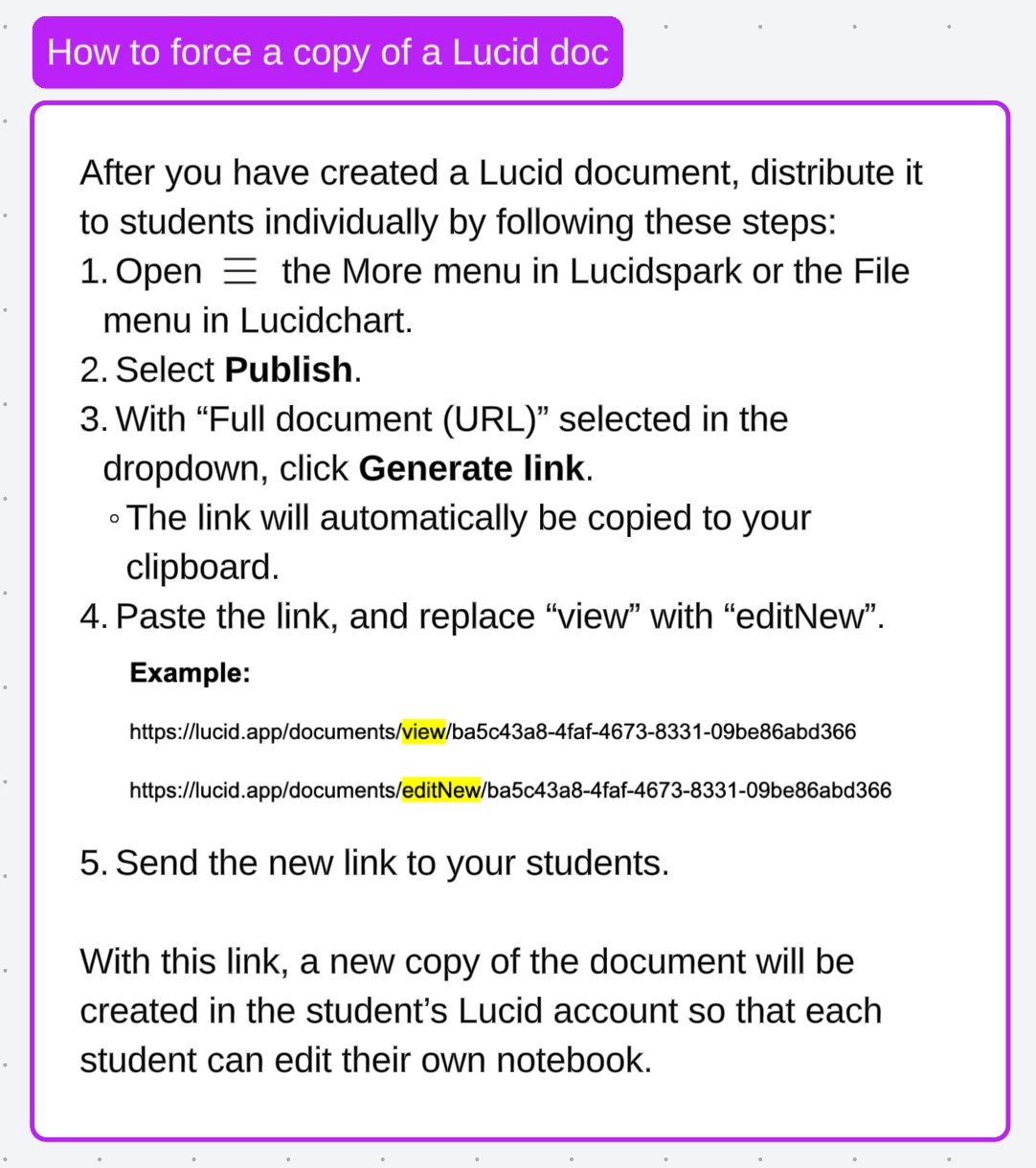
  1. Find the Document you want to share
  2. Go to the top bar and press ‘File’ and ‘Publish’
  3. Click ‘Generate Link’
  4. Paste that link into a web browser (or Word doc… that some times easier for editing the link)
  5. In that link, there’s a phrase like ‘……..edit?…...’
  6. Between the EDIT and the ? character, type ‘New’
  7. Copy this new link and share that with your class.

Here’s an example of where to put the ‘New’ part:

Template:

https://lucid.app/lucidspark/da004bc5-e141-41f7-b083-5e534b5d044f/edit?invitationId=inv_27c10c3f-cf23-4d02-854c-a09c76a6327a


Here’s where you would add ‘New’ (half way thru, I changed the text to yellow between the ‘edit’ and ‘?’

https://lucid.app/lucidspark/da004bc5-e141-41f7-b083-5e534b5d044f/editNew?invitationId=inv_27c10c3f-cf23-4d02-854c-a09c76a6327a


Does that work?

Ellery Goudy
August 26, 2024

Thank you for your help! The video worked fine but that is the error I get on every Lucid document when I use those steps. Templates, nontemples, shared to view, shared to edit, published and nonpublished. I just can’t figure out why!

Kathy R
Lucid Legend Level 5
August 26, 2024

Ok - that’s actually even more frustrating!

I just did some playing around… I can get that screen when I’m just sharing a page.  

But, when I changed it into a template (doesn’t do anything to the document… just makes it a master template).  THEN, I published it and added the New.  That worked!  (I also played with the capital N vs the lower case n… doesn’t seem to matter) ;) 

Does it fix it for you??

Morgan T
Morgan TAnswer
Lucid support team
August 26, 2024

Hi @Ellery Goudy ! Just to reiterate what Kathy has said, check out these steps for creating a link that will force a copy for students! Thank you so much for the excellent troubleshooting steps @Kathy R !


Ellery Goudy
August 27, 2024

Does this only work with Lucidcharts? I have tried it on every single document, all Sparks, and each one of them get that error. Templates or not. I follow the steps to a T! I’ve tried the NEW and EDITNEW ways and none work.

Morgan T
Lucid support team
August 27, 2024

@Ellery Goudy Can you please send a temporary Support PIN for one of thr documents you are trying? This will allow me to take a closer look at the issue you’re experiencing. The Support PIN is only usable by Lucid Support agents, so it is okay to share publicly here. For more information on generating a Support PIN, check out this Help Center article.

Ellery Goudy
August 27, 2024

Here it is! bZ5g94QCqMSc

Rick P
Lucid product team
August 27, 2024

Does this only work with Lucidcharts? I have tried it on every single document, all Sparks, and each one of them get that error. Templates or not. I follow the steps to a T! I’ve tried the NEW and EDITNEW ways and none work.

It should work with Lucidchart and Lucidspark, and with templates.

One thought to check is whether you have the right permissions for the document. For example, is the document one that you created or have full edit permissions on? Or is it one that someone else created, and possibly didn’t share with full permissions to you?

Similarly, if the folder that holds the document is one that you don’t have permissions to create new documents in, that could cause a failure I suspect. Or if you are on a free account, and there’s a limit on how many documents you can create, it might give an error?

Just a few additional ideas for how it could cause a symptom like you’re describing :/